Table of Contents
Google has just updated Gmail, allowing Workspace Enterprise Plus users to use Client-side Encryption to send end-to-end encrypted emails (E2EE) to anyone, including Outlook or their own domain, helping to increase data security.
Gmail End-To-End Encryption Overview
Gmail Client-side Encryption (CSE) users on Google Workspace Enterprise Plus accounts with Assured Controls have some good news: Google announced that they can now send end-to-end encrypted (E2EE) emails to anyone.
Previously, Gmail encrypted data in transit using TLS, but CSE is a much more advanced layer of security. With CSE, the encryption process takes place in the browser, before the data is sent to Google servers. In practice, the entire email content, including images and attachments, is secure, except for the headers and recipient list, which are not encrypted.
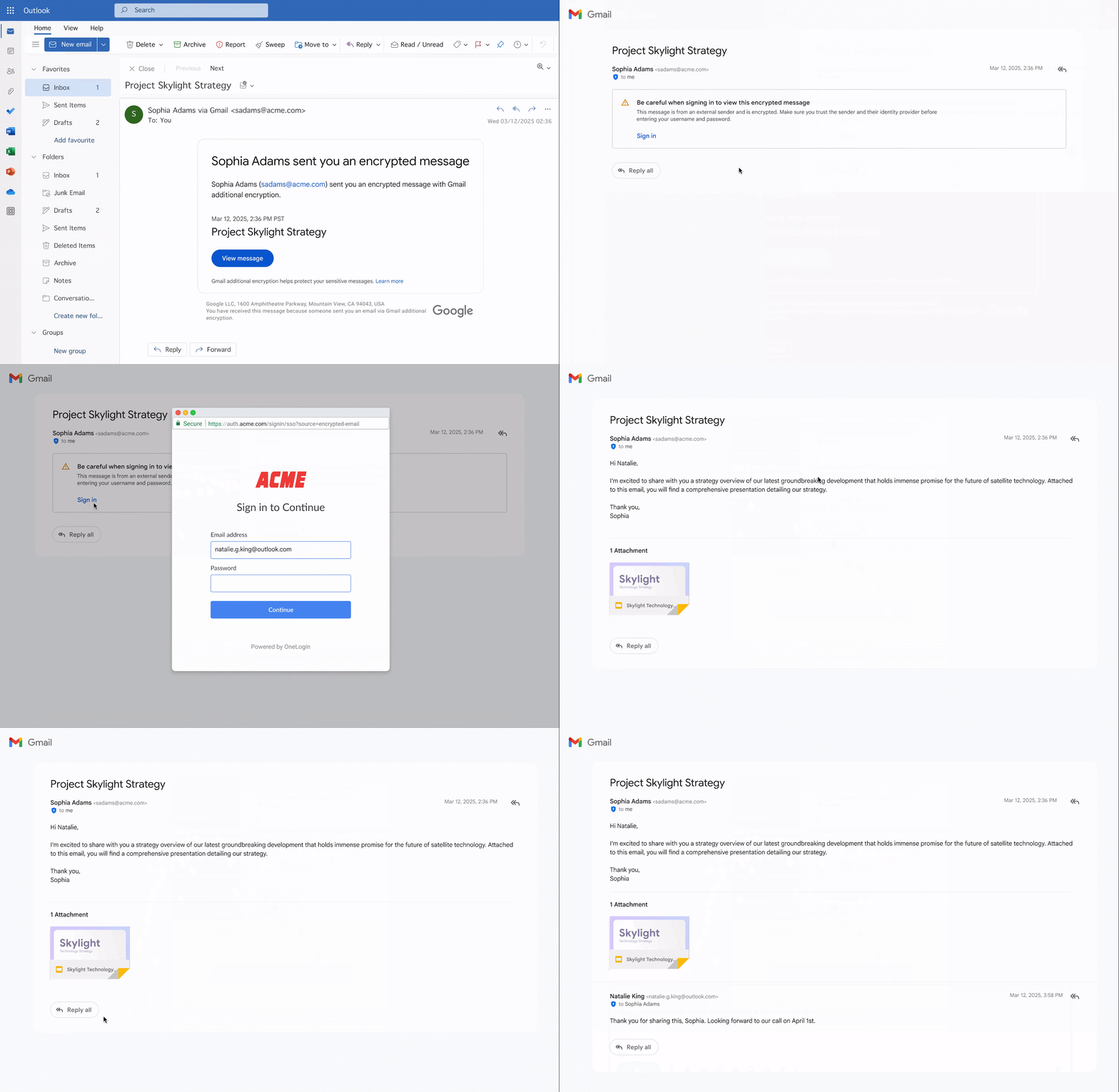
The 'anyone' part of the message means that even if the recipient uses a different email service like Outlook or their own domain, they can still open the message. The new system eliminates the cumbersome process that previously required the manual exchange of S/MIME security certificates between the two parties. Now, the recipient can simply click a link in the notification email, log in via a temporary Google guest account, and securely access the message.
When you receive this type of email, your inbox will only show the message instead of the content. To read the message, click the 'View message' Button, verify your email address with the verification code sent to you, then follow the on-screen instructions to open the message.
The process of sending E2EE emails is also straightforward:
- Click 'Compose' To begin.
- In the compose window, select the 'Message security' Button.
- Enable 'Additional encryption' Option before writing content.
Important: If you turn on encryption after you've already written an email, Gmail will delete the draft and open a new blank page.
For administrators, the ability to send CSE emails externally is disabled by default and needs to be enabled at the OU or Group level before You can use it.
FAQ
What should you know about Gmail allows sending end-to-end encrypted emails (E2EE) to any?
In practical terms, Google has just updated Gmail, allowing Workspace Enterprise Plus users to use Client-side Encryption to send end-to-end encrypted emails (E2EE) to anyone, including Outlook or their own domain, helping to increase data security.
Why does Gmail allows sending end-to-end encrypted emails (E2EE) to any matter?
The article highlights that previously, Gmail encrypted data in transit using TLS, but CSE is a much more advanced layer of security.
What is the main takeaway?
The main takeaway is that the process of sending E2EE emails is also very simple: Click 'Compose' to begin.
Related Articles
 How to Send Encrypted Emails on Gmail3 minutes read
 3 Useful Features Gmail Will Offer for Free to Everyone6 minutes read
 How to Scheduling Sending Emails and Delaying Sending Emails in7 minutes read
 How to Send Emails with Attachments on iPhone5 minutes read
 How to Send Email to Self-Destruct Within 5 Minutes on Gmail5 minutes read
 Discover Useful Gmail Features7 minutes read
Reader Comments 0
Sign in with email or Google to join the discussion.