Table of Contents
Discover why aren't the keys on the keyboard aligned and explore the main causes, risks, practical effects, and recommended actions.
Like many other computer standards, the answer lies largely in historical factors, although there are also minor reasons why this layout persists.
Much of the keyboard's history stems from the typewriter
The main reason the keys on today's keyboards aren't perfectly aligned stems from their ancestor: the typewriter. Because typewriters used their hands to tap on paper to print characters, each key with a letter, number, or symbol needed a way to print. Typewriters achieved this by connecting each key to a typing bar, which ended with a mechanism to tap on the page.
Look at any popular typewriter from that era, and you'll see the typing bars extending from beneath the keys. All of these bars were necessary for typing, but the physical space available for them was very limited.
In the video above, notice how the number keys 6, B, Y, H, 7, and N (for example) are arranged in order. The keys being slightly offset horizontally allows them to fit into the compact shape of the typewriter. If the keys weren't offset, the key bars would touch each other (for example, Q, A, and Z would touch). The easiest solution to this problem is to keep the keys offset, which is why all typewriters are designed this way.
And after about 100 years of using typewriters, people became accustomed to the key layout. Therefore, the general layout remained the same when we switched to computer keyboards. Although the reasons for this layout are no longer suitable for computers, there is also no good reason to change it.
This is very similar to the story behind why we still use the QWERTY keyboard, even though other keyboard layouts are more efficient. It was designed to reduce the frequency of key jamming by separating frequently typed pairs of letters (not to intentionally slow down typing speed, as is often said). Computer keyboards don't have this problem, but we still keep the QWERTY layout because people are used to it.
Other considerations regarding keyboard layout
We've kept this layout the same for a long time
Historical inertia is the primary reason keyboards have their current shape, but there are also a few other potential reasons for this design's persistence.
Some people argue that staggered keys better fit the natural curve of the fingers, providing greater comfort when moving fingers up or down a column (like R, F, and V). This sounds reasonable, although people haven't tried a non-staggered keyboard to test the difference.
Depending on your keyboard, some keys may be aligned – especially newer keyboards that aren't found on typewriters. On a keyboard, the function keys F1 through F4 align with A through F, but this doesn't continue perfectly due to the space between F4 and F5. The keys F1–F8 don't align with the number keys below, but the keys F9–F12 do align with the symbol keys and the Backspace key below.
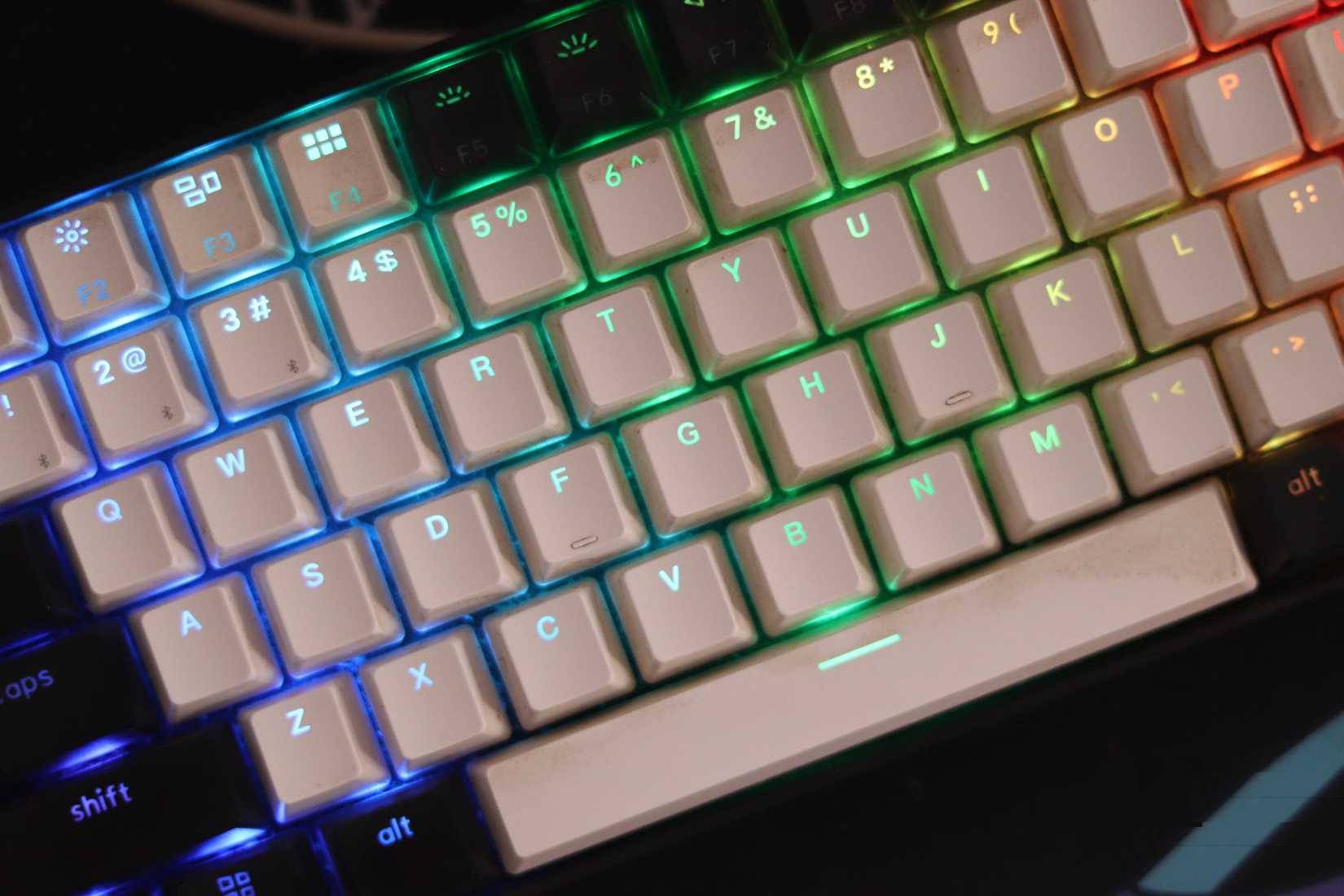
If you have a full-size keyboard, you'll notice the navigation keys ( Insert , Delete , and surrounding keys) are arranged in a grid. The keys on the numeric keypad are similar. Although these keys aren't found on typewriters, this grid layout is very practical because they are the keys you type with one hand.
The numeric keypad is arranged like a pocket calculator, a one-handed device, and there's no reason to have to reach for the navigation keys with your left hand. Therefore, the offset keys are only used for the numeric keys, where most of the typing takes place, and you are encouraged to use both hands.
You could try a properly aligned keyboard
But it's not cheap
If you think your current keyboard is getting in your way, you can buy a keyboard with keys that are aligned; these are called 'ortholinear'. These are specialized devices, so you won't find many good ones on e-commerce sites. The Keychron Q15 Max is often recommended, although its price is quite high.
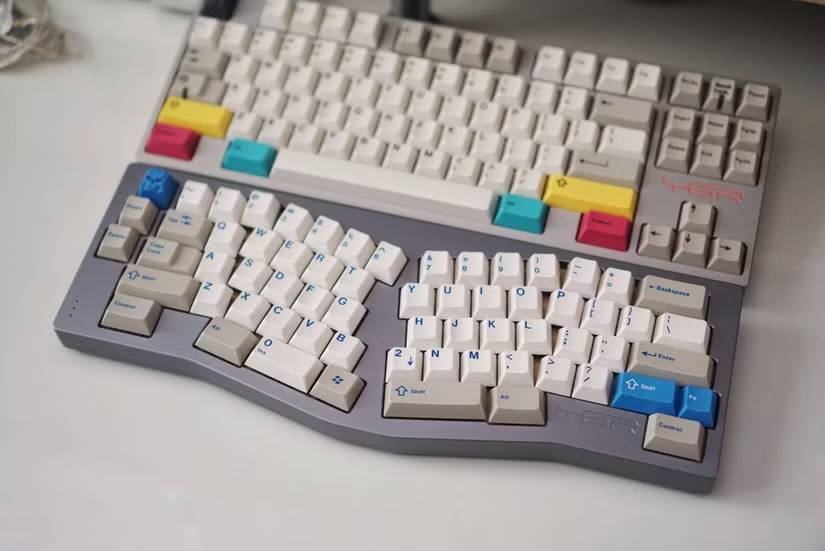
If an ortholinear keyboard is out of your budget, you might consider the Alice keyboard. Although its keys aren't grid-aligned, they offer greater comfort due to their split-level and angled layout.
The history of keyboards affects all of us
It's difficult to change what we're used to
'Reliance on established patterns' is the term used to describe this concept, where decisions made in the past heavily influence what we do today. While 'resetting' keyboard standards and requiring people to use more ergonomic designs sounds reasonable, it's impractical. Therefore, we remain stuck with designs built on concerns from 150 years ago that are no longer relevant.
Although this concept is present in other fields as well, it's particularly prevalent in computing, as backward compatibility is a common concern. That's why there are features in Windows 11 that have been around for decades – even though 98% of users don't use them, some do, and Microsoft would face complaints if they were removed.
You can use non-standard keyboard layouts and designs, but that's very expensive and means you'll have trouble with any computer you use that isn't your own. It's frustrating that these designs can't be easily updated for the modern world. The best we can do is master them.
Final Thoughts
Understanding why aren't the keys on the keyboard aligned makes it easier to evaluate the information and apply the most relevant recommendations. Focus on the key points above and verify details that may change over time.
FAQ
What is why aren't the keys on the keyboard aligned?
Discover why aren't the keys on the keyboard aligned and explore the main causes, risks, practical effects, and recommended actions.
What key points does this article cover?
The article focuses on Much of the keyboard's history stems from the typewriter, Other considerations regarding keyboard layout, We've kept this layout the same for a long time, with practical explanations and examples.
How can you use this information in practice?
Use the explanations to compare options, verify important details, and make a more informed decision. Apply the recommendations that best match your goals and situation.
Related Articles
 How to Add Number Keys to the Windows 10 Keyboard5 minutes read
 Website Test Keyboard Computer Keyboard Online, Free6 minutes read
 How to Fix Some Keys on the Keyboard Not Working9 minutes read
 Why Do the F and J Keys on the Computer Keyboard Have Horizontal4 minutes read
 How to Fix Laptop Keyboard Error Does Not Type Any Keys6 minutes read
 Using a Computer for a Long Time, Do You Know the Meaning of These5 minutes read
Reader Comments 0
Sign in with email or Google to join the discussion.