Table of Contents
This guide explains a Crawl? What Is Index, why it matters, how it works, and how to evaluate or use it in practical situations.
Crawl and index are two very common terms in SEO. If you've been digging through the web for a while, you've probably heard these words. Crawl and index are two terms that the whole web world depends on.
Let's define and find out some in-depth information about crawl and index through the following article.

What is a crawl?
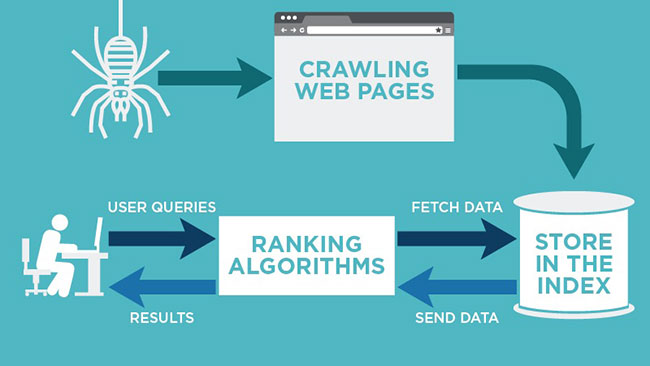
Crawl basically means following a path. In the SEO world, crawling means tracking links and collecting data on websites. When bots come to your site (or any other site), they also track other linked pages on your website.
This is one reason why it's important to create sitemaps, because they contain all the links in blogs and Google bots can use them to look deeper into a website.
What is index?
Indexing is the process of adding web pages to Google Search.
Depending on which meta tag you have used (index or no-index), Google will crawl and index your pages. The no-index tag means that the page will not be added to the web search index.
By default, every post and WordPress site is indexed.
In order to rank higher in search engines, it is a smart idea to just index important parts of your blog or website.
Do not index unnecessary things like tags, categories and all other useless pages.
Factors affecting the crawl process
There are millions of websites on this earth. Is everyone happy with the crawl and index speed? The answer is no! Most people are constantly wondering why their posts are not indexed.
Let's take a look at some key factors that play an important role in crawling and indexing.
Backlink
The more backlinks you have, the more trustworthy and reputable your site in the eyes of search engines. If you have good rankings but don't get any backlinks to the site, search engines may assume that you have low quality content.
Internal linking
There has been a lot of discussion regarding internal linking (also known as deep links). People even suggest using the same anchor text in posts, as it helps to gather deep data about a website.
It is important to remember that internal linking is a good thing, not only for SEO but also to keep users active on the site.
XML sitemap
The moment you set up a website in WordPress, you should use XML sitemaps so that sitemaps can be created automatically. In this way, Google is notified that your site has been updated and will want to crawl it.
Duplicate content
This can adversely affect your site. Please try not to have any duplicate content on the site.
Create friendly URLs
Create SEO friendly URLs for every page on your website. This has great implications for the SEO process.
Meta tag
Your website should have a unique and non-competitive meta tag. This will ensure that you have top rankings in search engines.
Ping
Ensure that you have added all the main ping sites to your WordPress website. WordPress has an automatic ping feature, which will inform search engines about site updates.
When you optimize your site based on these factors, Google will make the process of crawling and indexing the page faster and more accurate.
FAQ
What should I know about a Crawl? What Is Index?
Focus on the key features, requirements, limitations, and practical use cases explained in this guide.
How do I get the best results with a Crawl? What Is Index?
Follow the recommended steps, use current software or information, confirm compatibility, and review settings before major changes.
Are there any risks or limitations?
Potential limitations depend on compatibility, data quality, cost, privacy, support, and how the product or method is used.
Related Articles
 Index (INDEX) in SQL5 minutes read
 How to Make Your Google Index Website as Fast as Possible?9 minutes read
 Database Index: Use Index in Access 20164 minutes read
 The Index Function in Excel: Formulas and Usage9 minutes read
 How to Write the Above Index, Below Index in Excel15 minutes read
 The Simplest Tips to Deal with Ants Crawling into Your Laptop at Home8 minutes read
Reader Comments 0
Sign in with email or Google to join the discussion.