Article on the subject of "delete apps"
-
Instructions on how to delete apps from iCloud on any device
by default, each icloud account only has 5gb of free storage. if your iphone or ipad is full and cannot be backed up, here's how to delete apps from icloud on any device to free up memory.
-
Customize and restore Start Menu Windows 10 by default
windows 10 has been around for a long time, but not all users know all the functions of this operating system. in this article, tipsmake.com will guide you how to delete the most used applications so that they no longer appear in start menu.
-
Instructions to restore deleted applications on Android / iOS
what if you accidentally delete the application on android or ios and want to restore it? this article will show you how to recover deleted apps on android and ios.
-
4 ways to uninstall apps for Android devices
are you installing too many software on your beloved android phone without needing to use them? storing these unused applications both consumes memory and sometimes even drains the battery due to applications running in the background.
-
Instructions for using Cydia for iPhone owners
cydia has become very familiar to users who have jailbroken ios devices. it is a third-party application store that provides users with (free and paid) applications to intervene deeply into the system so that ios devices can be used more flexibly at the discretion of the person. use.
-
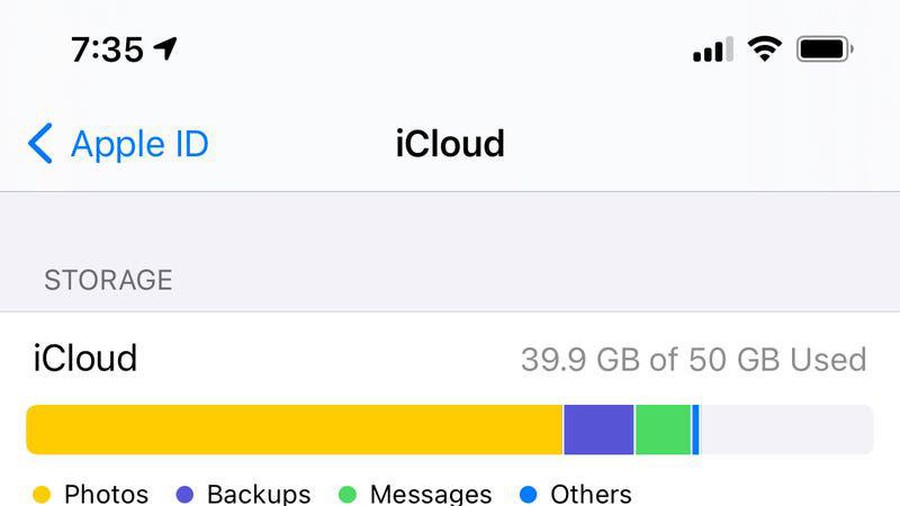
Increase free memory capacity for iPhone, iPad
delete photos and videos, use cloud storage services, deleting unnecessary applications will increase the amount of free memory available for ios devices.
-
How to Delete Apps on a Mac
it is an undeniable fact that mac users often have too many applications on their computers. regardless of whether a computer has a lot of apps on the dock or loads of infrequently used apps in a finder folder, it's easy for mac users to rearrange. this is an article on how to delete applications on
-
Don't delete these apps, even if you never use them!
what about apps you rarely use? you might want to free up space by deleting them, but there are some apps that you should always keep on your phone.
-
Instructions to restore deleted applications on Android / iOS
what if you accidentally delete the application on android or ios and want to restore it? this article will show you how to recover deleted apps on android and ios.
-
10 Android Apps You Should Delete Immediately to Protect Your Privacy
your favorite apps don't just collect information for their own use; they also share it with third parties, all for profit.
-
Removing original apps on iOS 10 has never been so simple
apple always installs about 30 applications on the device. and of course you will not be able to delete them. but with the ios 10 operating system, we can absolutely do that impossible thing easily.
-
How to uninstall installed applications on Mac OS
the applications installed on the mac are no longer used, so users want to delete the application. so how to delete the application installed on the mac?
-
How to remove 'spy' apps on Facebook
to protect your facebook account, you should remove suspicious applications on facebook. however, how can i remove these applications? please refer to some solutions below of network administrator.
-
How to Delete Apps from Launchpad on a Mac
os x lion includes a new feature for managing your apps called launchpad. unfortunately, deleting apps from launchpad can be a difficult process. deleting apps that you purchased from the app store is a simple process but there are some...
-
Instructions on how to delete apps from iCloud on any device
by default, each icloud account only has 5gb of free storage. if your iphone or ipad is full and cannot be backed up, here's how to delete apps from icloud on any device to free up memory.
-
The best 5 apps to delete photos on Android
today, smartphones are a popular means of taking photos of amateurs. after a while, your device will become messy with the same or not-so-good photos. the article will introduce you to the 5 best duplicate photo removal apps on android.
-
Delete These 10 Pre-Installed Apps Immediately After Buying Your iPhone!
the iphone comes pre-installed with dozens of apps to get you started, but not all of them are worth keeping. sure, some are really useful and indispensable, but others just sit there without adding much value.
-
How to delete apps on Chromebook
sometimes, you will need to delete an app. luckily, it's easy to uninstall chromebook apps and restore them.
-
Google removed Chrome Apps from Chrome Web Store, prepared to say goodbye
chrome has officially deleted chrome apps from the desktop, you no longer see the apps section when you access the chrome web store.
-
How to Delete Preloaded Applications on Android
android is a very popular operating system. it's no wonder, what with android gadgets reaching you already loaded with lots of pre-installed apps. some of these default apps are very useful, the others not so much. there are built-in apps...
-
Customize and restore Start Menu Windows 10 by default
windows 10 has been around for a long time, but not all users know all the functions of this operating system. in this article, tipsmake.com will guide you how to delete the most used applications so that they no longer appear in start menu.
-
Apps you need to remove from your iPhone soon
if you accidentally install these apps on your iphone, delete them quickly if you don't want to lose money.
-
How to deactivate and delete Kik accounts
kik is a popular messaging app for android and ios, but it's not for everyone. so, if its appeal has faded for you, it's probably time to delete or deactivate your kik account.
-
Why You Should Delete These 4 Apple Apps From Your iPhone? What Can You Replace Them With?
apple is known for making great hardware, be it macbooks or iphones. but many people don't really like its software; that's why they've ditched these apple apps and replaced them with some third-party options.
-
If your device has these two Android apps installed, delete them now
google removed the two apps from the play store because it violated its policies.
-
How to fix errors cannot delete apps on iPhone and iPad
the best way to free up space on iphone and ipad is to delete unnecessary applications. however, when you press and hold an application, you only see it wobbly but don't see the delete button (the x is lost). therefore, this article will guide you how to fix errors that cannot be deleted on iphone