How to Download and Install TypingMaster on Windows
Download the current TypingMaster installer safely, review optional setup choices, start a touch-typing course, and understand licensing.
Fix Windows problems, troubleshoot devices, understand AI, secure your accounts and get more from your technology with tested step-by-step guides.

Download the current TypingMaster installer safely, review optional setup choices, start a touch-typing course, and understand licensing.

Learn home-row finger placement, build an accuracy-first routine, compare typing tutors, and measure progress with consistent tests.

Take a consistent online typing test, understand WPM and accuracy, explore practice modes, and use the results to target weak keys.

Understand WPM and accuracy, compare practical typing-speed ranges, take a consistent test, and set a useful personal target.

Install Kiran's Typing Tutor safely, configure the correct keyboard, follow its learning path, and use tests and progress charts effectively.

Compare ten typing games for children by skill level, gameplay, classroom use, and how well each supports accurate touch-typing practice.

Make removable USB disks read-only with Windows policy or the legacy USB WriteProtector tool, understand the limits, and restore write access.

Encrypt a removable USB drive, choose a secure password, back up the BitLocker recovery key, test access, and decrypt it safely.

Protect USB data and Windows PCs with Defender scans, BitLocker, write-access policies, AutoPlay controls, and reliable backups.

Disable AutoPlay, scan removable storage with Windows Security, and avoid unsafe legacy autorun.inf workarounds when protecting a USB drive from malware.
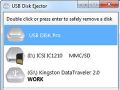
Safely disconnect a USB flash drive or external disk with Windows, fix device-in-use warnings, and decide whether a third-party eject utility is necessary.

Troubleshoot a USB drive that Windows cannot format by checking write protection, using Disk Management safely, and recognizing signs of hardware failure.

Close apps and background tasks that are using a USB drive, restart Windows Explorer if needed, and disconnect the device without risking incomplete writes.

Encrypt a USB drive with BitLocker To Go, store the recovery key safely, and understand the risks of relying on legacy USB Flash Security software.

Resolve the Windows 'Generic volume cannot be stopped' USB error by closing active files, pausing background tasks, and ejecting without data loss.

Choose a reliable USB encryption method, set up BitLocker To Go, protect the recovery key, and recover files from a legacy USB Security drive.
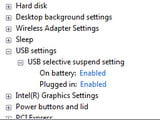
Diagnose repeated USB disconnects by testing ports, cables, power, and drivers before using selective suspend as a temporary troubleshooting step.

Protect USB files with verified backups, encryption, malware scanning, write controls, and safe handling while avoiding ineffective hidden-partition tricks.

Understand how malicious ads use redirects, fake updates, downloads, and browser exploits, then reduce the risk with current browser and Windows protections.

Learn how to install and using Perfect Keylogger with clear steps, practical tips, and troubleshooting guidance for common issues.