Table of Contents
BitLocker To Go encrypts a removable USB drive so its files cannot be opened without an unlock password, recovery key, or organization-approved method. It protects data if the drive is lost, but it does not replace backups or malware scanning. Before starting, copy important files elsewhere and prepare a safe location for the 48-digit recovery key.

Requirements and compatibility
- Turning on BitLocker manually requires Windows Pro, Enterprise, or Education. Windows Home can generally unlock an existing BitLocker To Go drive but does not provide the full management interface.
- A work or school PC may enforce organization-specific encryption and recovery policies. Contact IT before encrypting removable media.
- Devices that do not support BitLocker may not be able to read the encrypted drive.
- Keep the USB connected and the computer powered during encryption.
Microsoft's current steps are documented in BitLocker Drive Encryption.
Encrypt a USB drive with BitLocker To Go
1. Open Manage BitLocker
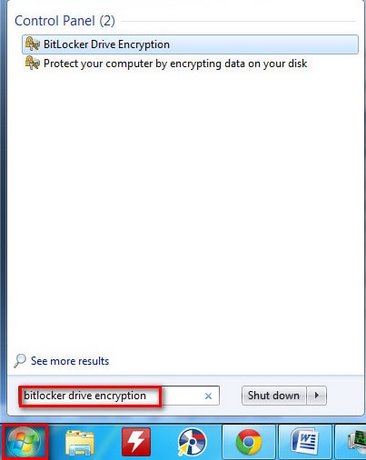
Connect the USB drive. Open Start, type BitLocker, and select Manage BitLocker. You can also open Control Panel > System and Security > BitLocker Drive Encryption.
2. Turn on BitLocker for the correct drive
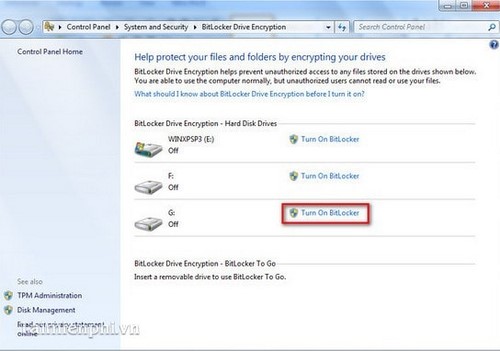
Under Removable data drives – BitLocker To Go, locate the USB by its drive letter and label. Verify both before clicking Turn on BitLocker.
3. Choose an unlock method
Select Use a password to unlock the drive unless your organization provides a smart card or another required method. Create a long, unique password that you can store in a password manager.
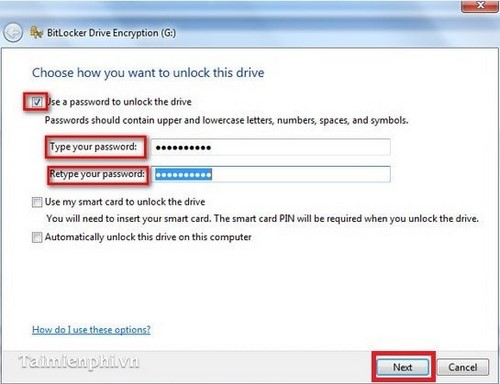
Do not reuse your Windows sign-in password, and do not write the password on the USB drive.
4. Back up the recovery key
Save the 48-digit recovery key to your Microsoft account, a separate file location, or a printout as offered by the wizard. Do not store the only copy on the USB being encrypted or in the same bag as the drive.
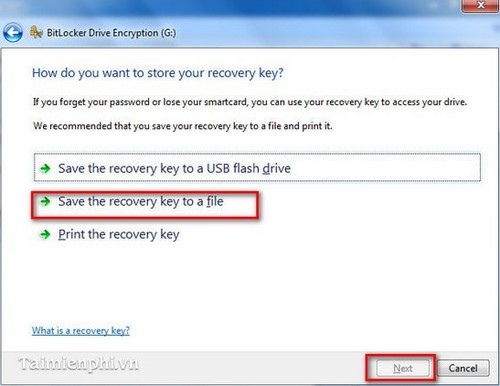
Microsoft cannot recreate a lost BitLocker recovery key. Its recovery-key backup guide recommends keeping more than one secure copy.
5. Choose how much of the drive to encrypt
- Encrypt used disk space only: faster for a new or empty USB drive.
- Encrypt entire drive: better for a drive that has previously stored files, because deleted space may still contain recoverable data.
Choose the compatibility mode presented for removable drives if you need to use the USB with older supported Windows systems. The exact wizard wording depends on your Windows version and organization policy.
6. Start encryption
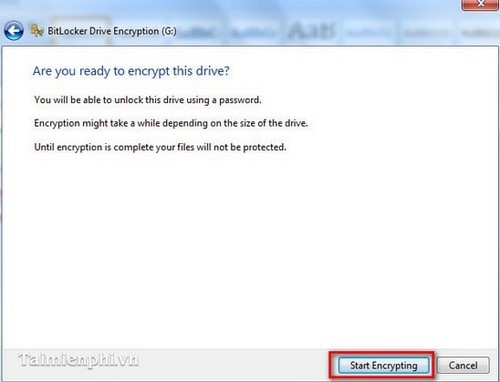
Review the choices and click Start encrypting. Wait until Windows reports completion before ejecting the USB.
Test the encrypted drive
- Use Safely Remove Hardware to eject the USB.
- Reconnect it.
- Confirm that Windows asks for the password.
- Open a noncritical file and verify that it is intact.
- From another device, confirm that you can retrieve the recovery key without relying on the encrypted USB.
Unlock and lock the USB
When you connect the drive, open File Explorer, select it, and enter the password. The drive remains unlocked for the current Windows session. Ejecting it locks it again.
Use Automatically unlock on this PC only on a trusted personal computer. Anyone with access to that Windows account may then be able to open the drive without re-entering its password.
Change the password or back up the key again
Open Manage BitLocker, expand the removable drive, and select the appropriate action to change the password or back up the recovery key. Make a new recovery-key backup after any management change and label it with the key ID, not just the USB name.
Decrypt the drive
To remove encryption, back up the files, open Manage BitLocker, select Turn off BitLocker for the USB, and confirm decryption. Keep the drive connected until it finishes.
What BitLocker does not protect against
- Malware running while the drive is unlocked
- Accidental deletion or drive failure
- Someone who knows the password or obtains the recovery key
- Files copied elsewhere before encryption
Keep a separate backup and scan removable media. TipsMake also explains how to find a BitLocker recovery key, unlocking a BitLocker drive from Command Prompt, and recovering access to a removable drive. For a different control, see how to block writing to USB drives.
Use conservative language about security
No encryption makes data “absolutely secure.” BitLocker significantly reduces the risk of offline access when the password and recovery key are protected, Windows is maintained, and the drive is locked before it leaves your control.
Related Articles
 Should I Use Windows BitLocker to Encrypt My Hard Drive?6 minutes read
 How to Use Bitlocker to Encrypt Data on Windows 85 minutes read
 Bitlocker: What It Is and How to Use It to Encrypt Data6 minutes read
 How to Use Bitlocker to Encrypt Data in Computers8 minutes read
 How to Change Your BitLocker PIN Quickly4 minutes read
 Turn Off Bitlocker: Complete Guide7 minutes read
Reader Comments 0
Sign in with email or Google to join the discussion.