Table of Contents
The fastest way to check Windows activation is Settings > System > Activation in Windows 11. Activation confirms that the installed Windows edition has an accepted product key or digital license for the device. It is useful before reinstalling Windows, changing major hardware, or buying a used PC.
Activation status alone is not perfect proof that a seller supplied a legitimate transferable license. A counterfeit or improperly reused key can sometimes activate and later fail validation. Keep the purchase receipt or other proof of license when ownership matters.
Check activation in Windows 11 Settings
- Press Windows+I to open Settings.
- Select System.
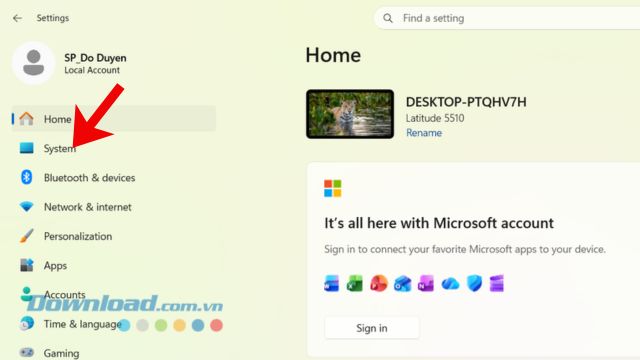
- Select Activation.
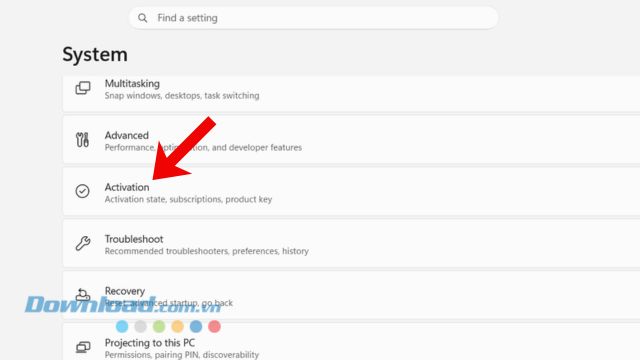
- Read Activation state and expand it for license details.
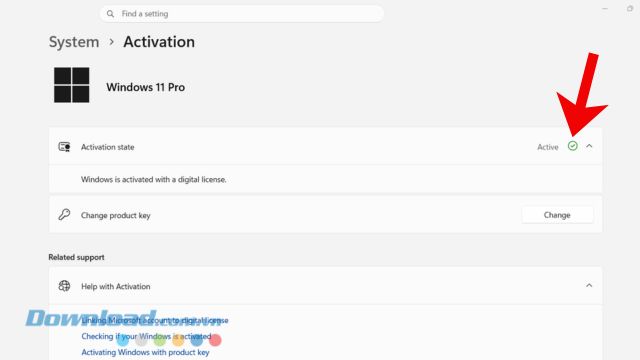
What the activation messages mean
- Windows is activated: The current installation is activated, but the message does not indicate that a Microsoft account is linked.
- Windows is activated with a digital license: Activation is associated with the device hardware; the Microsoft account is not linked to that license.
- Windows is activated with a digital license linked to your Microsoft account: The digital license is linked, which can help with reactivation after a qualifying hardware change.
- Windows is activated using your organization's activation service: The device uses volume activation such as KMS. This is normal for a computer managed by the organization that owns the license. On a personal used PC, ask the seller why an organization license is present.
- Windows is not activated: Expand the message to see an error code, then run the Activation troubleshooter before purchasing another license.
The state should say Active or Windows is activated. The word “Activate” by itself is normally a prompt to activate, not confirmation that activation succeeded.
Windows 10 path
On Windows 10, open Settings > Update & Security > Activation. The message types are similar. Standard Windows 10 support ended on October 14, 2025, so activation does not make an unsupported Windows 10 installation current or secure; check whether the PC can move to a supported Windows version or program.
Check activation expiration with slmgr
The built-in slmgr.vbs tool can display the activation expiration date. It is most informative for volume-licensed KMS clients because retail and MAK activation is normally perpetual.
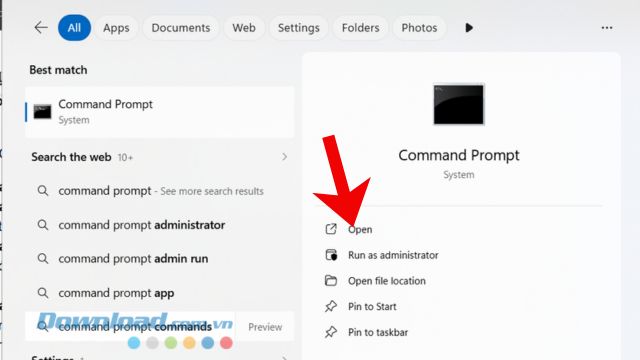
- Open Start, type Command Prompt, and open the result. Administrator rights are not required for this read-only check.
- Enter
slmgr /xprand press Enter.
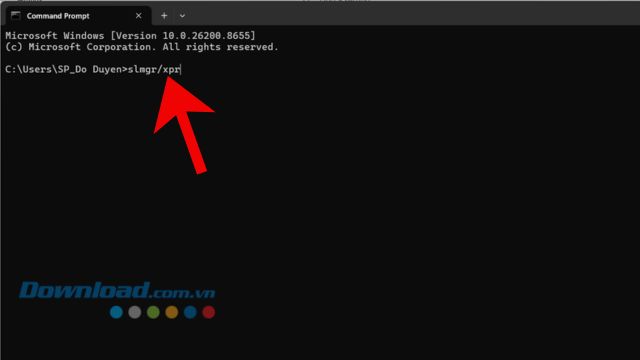
- Wait for the Windows Script Host dialog.
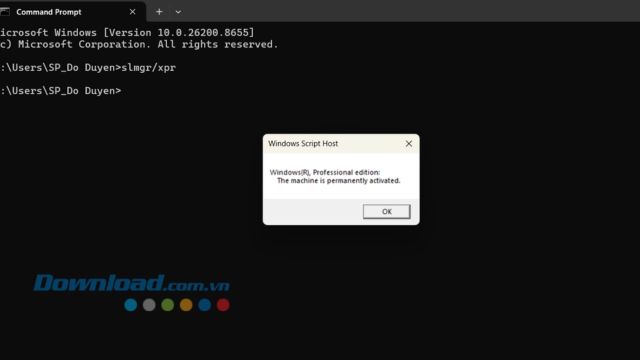
- The machine is permanently activated: the current activation has no displayed expiration date. This confirms status, not the source or transfer rights of the license.
- An expiration date appears: the installation may be using renewable volume activation. A legitimate organization-managed device periodically contacts its activation service.
- Notification mode or unlicensed: Windows is not currently activated or activation needs attention.
For additional read-only details, slmgr /dli shows basic license information and slmgr /dlv shows a more detailed dialog. Do not post screenshots publicly because they may reveal partial product identifiers and organization details.
Activation is not the same as proof of purchase
Microsoft defines genuine Windows as software published by Microsoft, properly licensed, and supported by Microsoft or a trusted partner. For a new or used PC, verify more than the green activation message:
- buy from Microsoft, the PC manufacturer, or a reputable retailer;
- keep the invoice, confirmation email, or Microsoft account order record;
- match the installed edition—Home, Pro, or Enterprise—to the purchased license;
- treat an organization activation message on a privately sold PC as a reason to investigate;
- avoid unusually cheap standalone keys with no proof of origin or transfer rights.
Microsoft notes that non-genuine Windows can still receive critical security updates, although some updates and benefits are reserved for genuine software. Therefore, the strongest reason to resolve licensing is legal use, reliable activation, and access to the full supported experience—not a claim that every unactivated PC receives no security updates.
If activation fails
- Confirm that the installed edition matches the license.
- Check the internet connection and date, time, and region settings.
- Open the Activation page and run the troubleshooter or the Get Help activation troubleshooter.
- After a motherboard or other significant hardware change, sign in with the Microsoft account linked to the digital license and follow the reactivation process.
- If a seller supplied the license, contact the seller before buying a replacement key.
For authoritative status messages and troubleshooting, use Microsoft's Activate Windows and About Genuine Windows pages.
Related Articles
 Instructions for Checking Genuine Samsung Phones6 minutes read
 How to Quickly Fix the Error Your Windows License Will Expire Soon11 minutes read
 Activate Windows 11 with Win 7 License Key3 minutes read
 How to Turn Off the Notification Your Windows License Will Expire4 minutes read
 Here's How to Uninstall the Product Key on a Windows Computer1 minutes read
 How to Turn Off the Notice Your Windows License Will Expire Soon on Windows5 minutes read
Reader Comments 0
Sign in with email or Google to join the discussion.