Table of Contents
If Windows says a USB drive is in use, do not unplug it. A document, File Explorer window, backup task, security scan, or background application may still be reading from or writing to the device. Close the activity, wait briefly, and try Eject again.

1. Stop visible activity
- Wait for every copy, move, download, backup, or synchronization job to finish.
- Save and close documents, photos, videos, and projects opened from the USB drive.
- Close all File Explorer windows showing the drive. If a Command Prompt or terminal is open in that drive, change to another folder or close the window.
- In the taskbar notification area, select Safely Remove Hardware and Eject Media > Eject [device]. You can also right-click the drive in This PC and select Eject.
Check the device name and drive letter carefully when several removable drives are connected. The complete safe USB ejection guide explains both the built-in Windows method and optional shortcut tools.
2. Close background apps that may be using the drive
Pause backup and cloud-sync applications, media cataloging tools, archive utilities, disk-indexing tools, virtual machines, and any antivirus scan that you started manually. Use Task Manager to close an application only when you recognize it and have saved its work.
Do not end random Windows processes. If you cannot identify the program, signing out of your account is safer than force-closing system services. After signing out, sign back in and try ejecting the drive again.
3. Restart Windows Explorer
If no file transfer is active but File Explorer appears stuck, press Ctrl+Shift+Esc to open Task Manager, select Windows Explorer, and choose Restart task. The taskbar and desktop may disappear briefly. Then retry Eject.
4. Shut down before disconnecting
If the drive still will not eject, save your work and shut down the computer normally. Once the PC is fully off, disconnect the USB device. This avoids guessing which background process owns an open file and is preferable to pulling the drive while Windows reports that it is busy.
Should you use an unlocker utility?
The original article recommended the legacy Unlocker application and showed the interface below. That recommendation is no longer appropriate: force-unlocking a file can interrupt a write, close a file without saving, or destabilize the application using it.
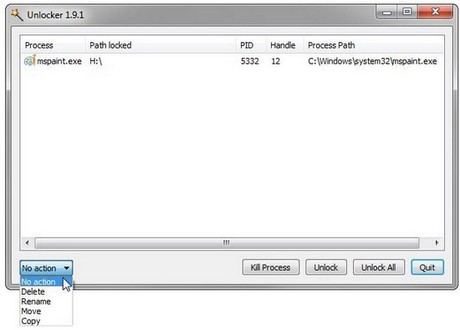
A third-party unlocker should not be the first response to an ejection warning. Use the built-in checks above, sign out, or shut down instead. If you install any storage utility, obtain it from its current official developer and scan the installer rather than using an old mirror.
When malware or drive errors may be involved
An ejection warning alone does not prove that the USB drive is infected, and formatting it immediately is unnecessary. Scan the drive with Windows Security if it contains unexpected shortcuts, unknown executables, or files that reappear after deletion. Review the guide to protecting USB drives from autorun malware.
If Windows also reports read/write or formatting errors, back up accessible files first and follow the steps for a USB drive that cannot be formatted. Repeated failures on multiple computers can indicate that the drive is wearing out and should be replaced.
Related Articles
 20 Useful Troubleshooting Tools for Windows 1014 minutes read
 Fixing the Issue of CD/DVD Drives Not Showing Up on Windows 10/8.1/7 Computers9 minutes read
 Turn on // Off the Computer Disconnect Feature from the Network4 minutes read
 5 Ways to Securely Disconnect a Removable Hard Drive on a5 minutes read
 Fixing the Windows 10 Issue Where You Can't Change the Wallpaper/Background4 minutes read
 Fix Problem of Displaying 'No Internet, Secured' Message on2 minutes read
Reader Comments 0
Sign in with email or Google to join the discussion.