Table of Contents
Summary of main content
- MISA Mimosa Online is online accounting software for administrative units, supporting financial and budget management.
- The software offers a variety of features such as budget management, document automation, financial reporting, and regulatory compliance.
- There are plans ranging from 10,000,000 VND to 22,000,000 VND, with a free trial. Usage includes web access or mobile app, with detailed instructions on the support page.
This guide provides a clear, practical overview of "MISA Mimosa Online: Features and How to Use It". It organizes the most useful details, explains important considerations, and highlights the steps or choices that matter most.
Software Overview
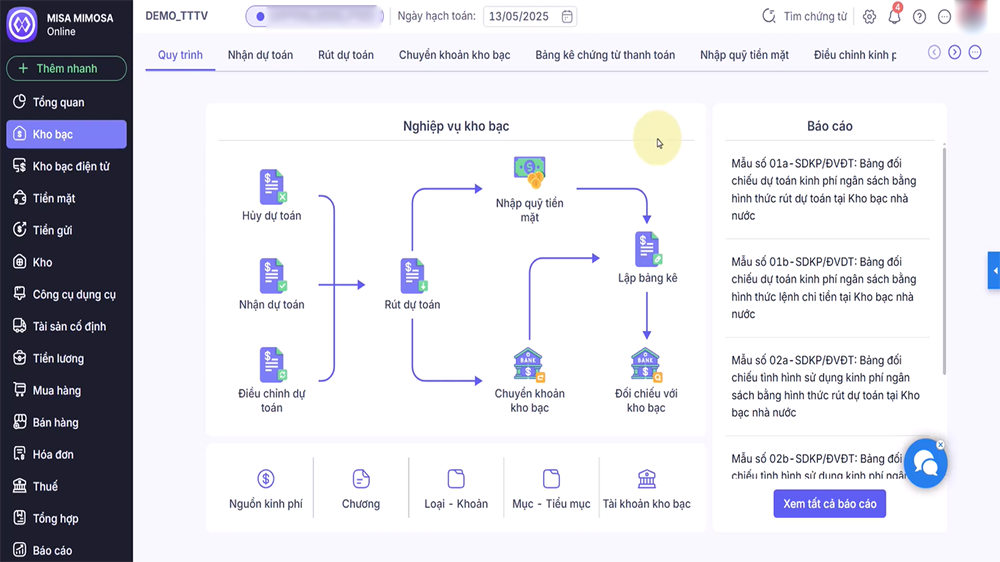
MISA Mimosa Online is an online accounting solution, suitable for financially autonomous units or units funded by the state budget. This software operates on a cloud platform, allowing work anytime, anywhere, and integrates with online public services of the State Treasury (KBNN). It also has a mobile application, helping to manage finances even when not sitting in front of the computer.
Detailed analysis of each feature
Budget Management
This feature helps units track and manage budgets from multiple sources, such as state budget, target programs, and projects. The software supports receiving budget estimates according to the State Budget Table of Contents (MLNS) and withdrawing budget estimates in multiple forms, such as cash, deposits, or transfers.
- Support: Helps accountants easily record and track budget usage, ensuring no budget overruns. Automatically generate budget-related reports, supporting reconciliation with the State Treasury.
- For example, if a unit is granted 1 billion VND for a project, the software will record this amount, track each expense, and report the surplus or deficit.
- Helpful: Reduces pressure on accountants in managing complex budgets, especially for units with multiple funding sources.
Document automation
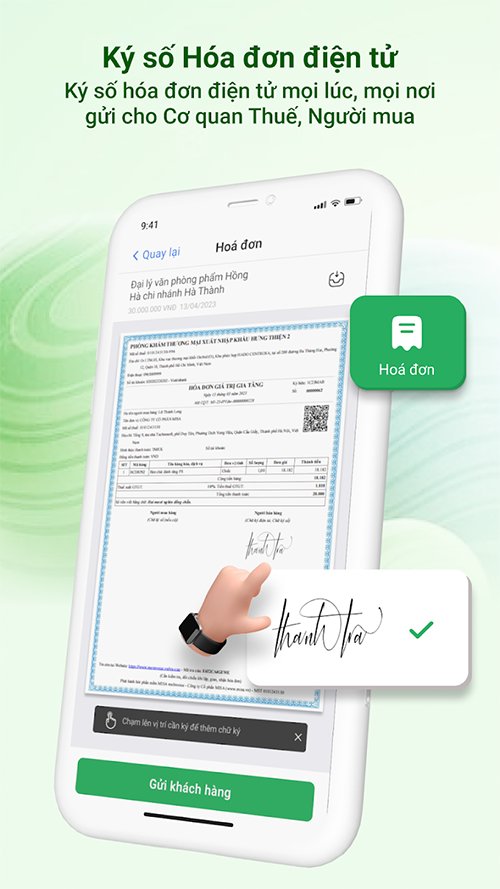
Description: The software automatically generates necessary documents, such as payment voucher lists, advance payment requests to the State Treasury, and reconciliation tables of fund usage. This replaces manual work, which is time-consuming and prone to errors.
- Support: Automatically create forms according to regulations, such as Circular 24/2024/TT-BTC. Connect directly with the State Treasury to submit reports, reducing processing time.
- For example: When creating a payment request, the software automatically fills in the information based on the entered data, just check and sign.
- Benefits for users: Save time, reduce errors, especially useful during settlement season when the workload is large.
Cash and deposit management
This feature helps track cash balances in detail at the fund and deposits at the bank, supporting reconciliation with data from the bank to ensure accuracy. In addition, it manages temporary receipts and temporary payments.
- Support: Check balance at any time, help accountants know immediately how much money can be spent. Compare data with the bank, detect discrepancies if any.
- For example: If the unit receives money from tuition fees, the software will record it in the cash fund, and the accountant can immediately check the balance to create a payment voucher.
- Benefits: Ensure transparency and accuracy in cash flow management, avoiding shortages or overspending.
Fixed assets (FA) and tools and equipment (T&E) management
Manage fixed assets such as machinery, vehicles, and tools such as pens and paper in detail from purchase to disposal. The software automatically calculates depreciation and wear and tear according to regulations.
- Support: Track by type, department of use, source of formation, helping the unit know where the asset is, who is using it. Support operations such as recording increases (new purchases), recording decreases (sales, liquidations), re-evaluating values, transferring between departments, and periodic inventory. Automatically calculate depreciation according to Circular 23/2023/TT-BTC, ensuring compliance with the law.
- For example, if a unit purchases a computer, the software will record and calculate monthly depreciation, and when it is disposed of, automatically update the balance.
- Benefits: Helps units manage assets effectively, avoid loss, and easily create inventory reports.
Warehouse Management
Manage materials and goods in the warehouse, including warehousing, warehousing, and inventory. The software supports calculating the cost of goods sold using many methods, such as average at the end of the period, instantaneous average, specific, or first in first out (FIFO).
- Support: Tracking details of import, export, and inventory for each type of material and goods, helping the unit know the current quantity. Calculating flexible warehouse prices, suitable for the characteristics of the unit, for example, schools managing books, hospitals managing medicines. Supporting the transfer of goods between warehouses and adjusting when there are discrepancies.
- For example: When 100 books are imported, the software records them, and when 50 books are exported to the class, the inventory is automatically updated and the export price is calculated.
- Benefits: Ensure tight inventory management, avoid loss, and support quick inventory reporting.
Reporting and Analysis
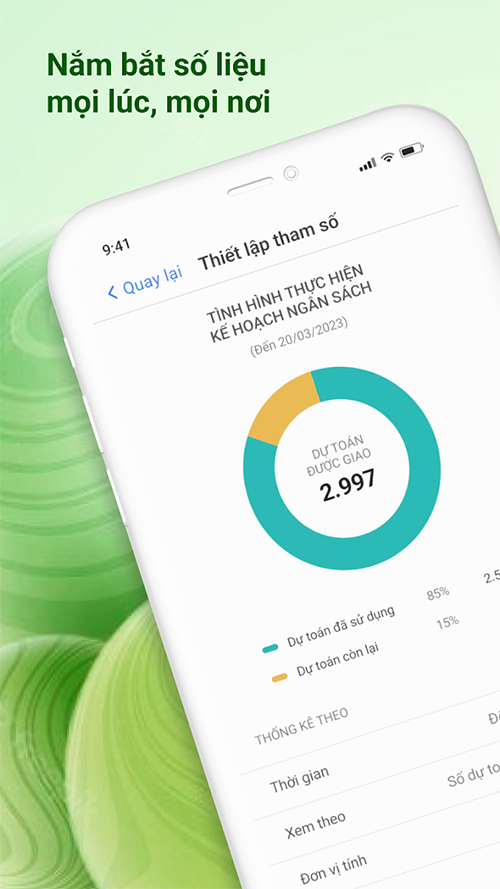
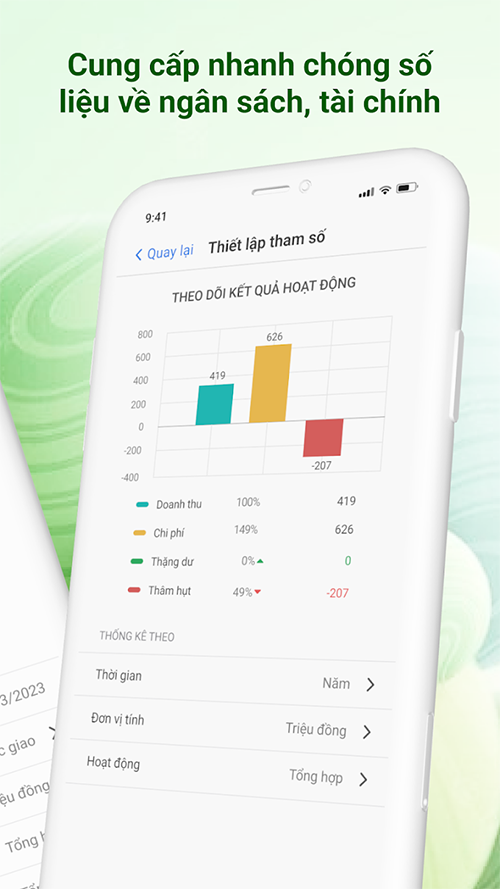
Provide full legal reports such as financial statements, settlement reports, and support online submission to authorities. In addition, there are management reports with analytical charts.
- Support: Full treasury forms, reports, and books according to Decree 11/2020 and Circular 24/2024. Automatically synthesize settlement reports, financial reports, and support checking and sending online to the owner according to Circular 99/2018/TT-BTC and Circular 137/2017/TT-BTC. Provide smart analysis charts, helping leaders easily assess the financial situation.
- For example, leaders can view a chart of budget implementation and immediately know whether the unit is in surplus or deficit.
- Benefits: Helps units prepare reports quickly and accurately, and supports decision making based on analytical data.
Payroll and Taxes
Automatically calculate employee salaries based on coefficients, grades, allowances, back pay, and contributions. At the same time, manage personal income tax (PIT), social insurance, and tax settlement.
- Support: Automatically calculate salaries based on employee information, ensuring compliance with regulations. Manage provisional and final personal income tax, support tax declaration submission to the General Department of Taxation.
- For example: When calculating monthly salary for teachers, the software automatically calculates coefficients, allowances, and deducts personal income tax, and outputs a payroll for comparison.
- Benefits: Reduce manual work, ensure accuracy in human resource and tax management.
Debt management
Track receivables from customers (such as tuition, hospital fees) and payables to suppliers, and monitor employee advances.
- Support: Track debts by source, invoice, and subject, helping the unit know who owes and how much. Monitor advances, ensuring employees repay on time.
- For example, if a hospital collects hospital fees from a patient, the software records it in accounts receivable, and when payment is made, it is automatically updated.
- Benefits: Helps manage cash flow effectively, avoid bad debt, and support quick debt reporting.
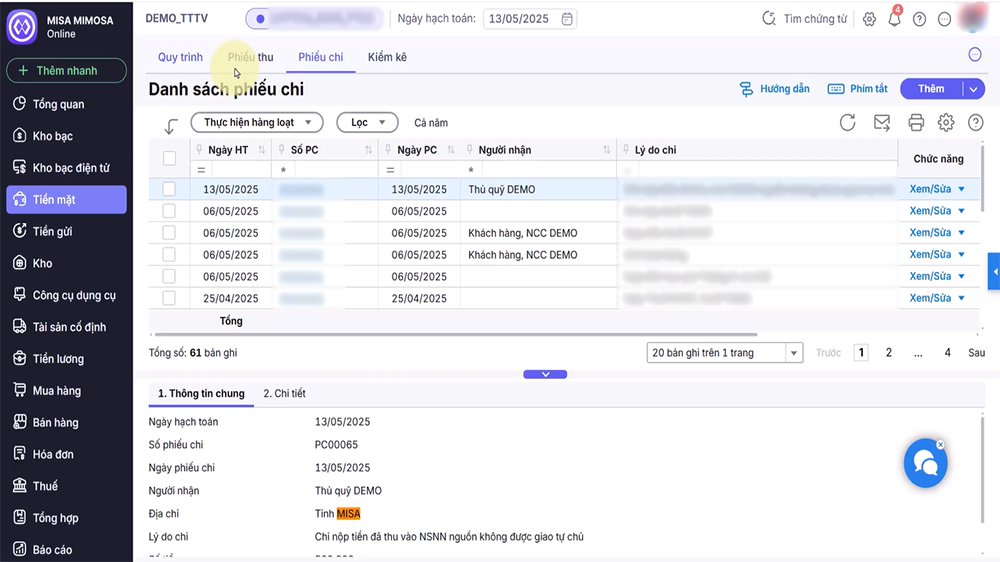
Support utilities
Support tools such as automatic transaction posting, quick document search, copying similar documents, and flexible data import/export support.
Support:
- Automatic accounting helps accountants enter data quickly and accurately, reducing errors.
- Quickly search for documents, trace back to the original document, saving time when looking up.
- Copy documents of the same type for quick data entry, especially useful when there are many similar transactions.
- Supports data import/export in multiple formats, such as Excel, PDF, making it easy to share or store.
For example, when creating a payment voucher for multiple employees, the accountant can copy the old voucher, edit the information, and complete it quickly.
Benefits: Increase work efficiency, reduce pressure on accountants, especially during peak days such as month-end and year-end.
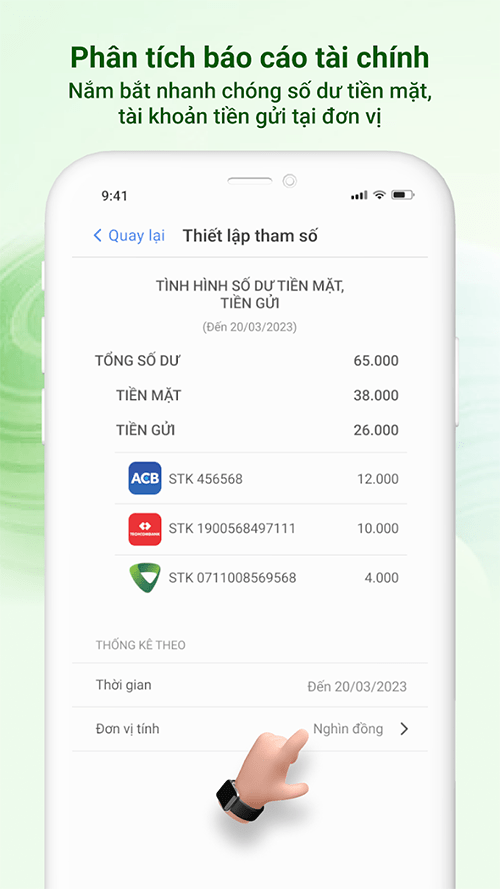
Below is a summary table of key features and their respective benefits, to help visualize:
- Budget Management
- Track and draw estimates from multiple sources
- Ensure proper use of budget
- Document automation
- Automatically generate invoices and requests
- Save time, reduce errors
- Cash and deposit management
- Track balances, bank reconciliation
- Transparent, accurate cash flow
- Fixed Asset Management
- Tracking, depreciation, inventory
- Effective asset management, avoiding loss
- Warehouse Management
- Import, export, inventory, export price calculation
- Tightly manage goods, quickly report
- Reporting and Analysis
- Prepare financial reports and analytical charts
- Support decision making, online reporting
- Payroll and Taxes
- Calculate salary, personal income tax, insurance
- Ensure accuracy and compliance with the law
- Debt management
- Track receivables, payables, advances
- Cash flow management, avoiding bad debt
- Support utilities
- Search, copy documents, import/export data
- Increase work efficiency, save time
MISA Mimosa Online not only helps administrative units manage finances effectively but also reduces the workload for accountants, especially during the settlement season. The software integrates MISA AVA Digital Assistant, suggesting correct accounting methods, reducing errors, and supporting work anytime, anywhere via mobile applications. This is very useful for units with employees working remotely or needing to check financial status quickly.
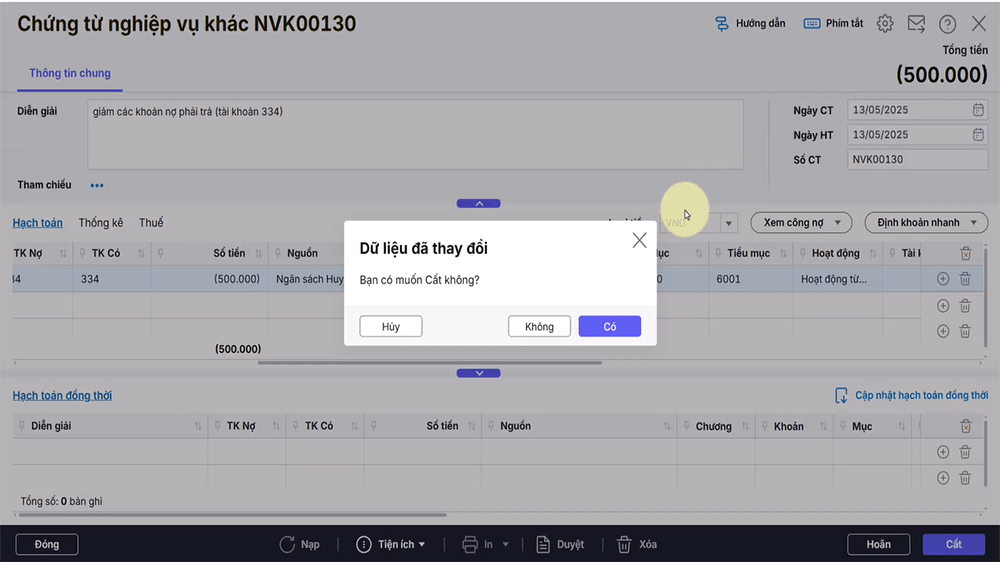
User manual
To use, users can access the website at mimosaapp.misa.vn with the provided account, or download the mobile application from CH Play or Appstore. Detailed instructions for each feature are available on the support page. If you need support, you can join the MISA community on Facebook or chat directly with the support team.
MISA Mimosa Online is a powerful tool that helps administrative units manage finances easily, comply with the law, and work effectively.
FAQ
What should you know about software Overview?
MISA Mimosa Online is an online accounting solution, suitable for financially autonomous units or units funded by the state budget. This software operates on a cloud platform, allowing work anytime, anywhere, and integrates with online public services of the State Treasury (KBNN). It also has a mobile application, helping to.
What should you know about budget Management?
This feature helps units track and manage budgets from multiple sources, such as state budget, target programs, and projects. The software supports receiving budget estimates according to the State Budget Table of Contents (MLNS) and withdrawing budget estimates in multiple forms, such as cash, deposits, or transfers.
What should you know about document automation?
Description: The software automatically generates necessary documents, such as payment voucher lists, advance payment requests to the State Treasury, and reconciliation tables of fund usage. This replaces manual work, which is time-consuming and prone to errors.
What should you know about cash and deposit management?
This feature helps track cash balances in detail at the fund and deposits at the bank, supporting reconciliation with data from the bank to ensure accuracy. In addition, it manages temporary receipts and temporary payments.
Related Articles
 How to Make Mimosa Eggs: Step-by-Step Guide5 minutes read
 How to Fix Errors Cannot Type Vietnamese on MISA6 minutes read
 Misa: App Effectively Manage Spending on Phone and Usage5 minutes read
 How to MAKE COCKTAIL MIMOSA DELICIOUS: Step-by-Step Guide4 minutes read
 How to Play Among Us Online, Download Among Us Online4 minutes read
 Who Are the Users of CRM Software in the Business: Main Insights10 minutes read
Reader Comments 0
Sign in with email or Google to join the discussion.