Table of Contents
Maxwell, Pascal, and Volta GeForce GPUs no longer receive regular Game Ready Driver updates. NVIDIA’s support plan moves these architectures to critical security updates beginning in October 2025 and continuing through October 2028. The Pascal-based GTX 1080 Ti is among the affected cards.
This is the end of new Game Ready optimizations for those GPUs, not an immediate end to all driver support or a requirement to stop using a working card.
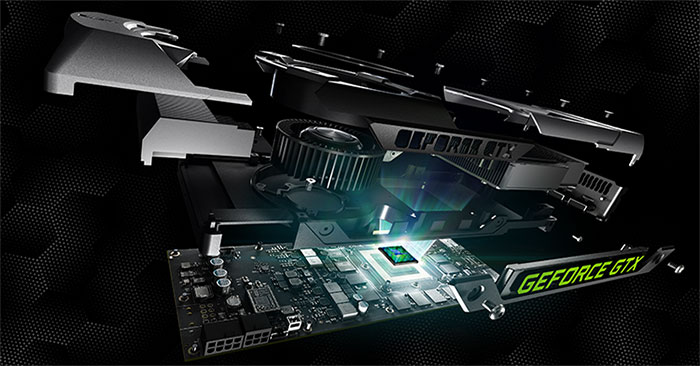
What changes for an older GeForce card?
NVIDIA’s published support plan distinguishes two paths:
- Maxwell, Pascal, and Volta: driver updates for critical security issues during the stated support period.
- Turing, Ampere, Ada, and Blackwell: continued Game Ready updates, including performance improvements, new features, and bug fixes, subject to the driver’s supported-product and operating-system lists.
A security driver should not be expected to add optimizations for a newly released game. Existing games may continue to work, but future software can introduce requirements an older card cannot meet.
Which driver should GTX 1080 Ti owners use?
Search NVIDIA’s official driver service for the exact GPU and operating system. Do not select a package merely because its version number is higher. For example, NVIDIA’s 582.66 security driver page, released in June 2026, lists the GTX 1080 Ti and other affected GeForce and TITAN cards. It illustrates the legacy security-update path; it is not a promise that this is the newest suitable driver when you read this.
For the Windows installation workflow, see how to update graphics drivers. On a laptop, also check the manufacturer’s recommended driver because notebook-specific features can depend on its package.
Desktop GPU examples in the newer driver path
The following table retains desktop model examples from the original list and removes repeated entries. It is not an exhaustive compatibility list for every driver release. Check the download page for the exact model, operating system, and package.
| GPU Name | Architecture |
|---|---|
| GeForce RTX 5090 | Blackwell |
| GeForce RTX 5090 D | Blackwell |
| GeForce RTX 5090 D v2 | Blackwell |
| GeForce RTX 5080 | Blackwell |
| GeForce RTX 5070 Ti | Blackwell |
| GeForce RTX 5070 | Blackwell |
| GeForce RTX 5060 Ti | Blackwell |
| GeForce RTX 5060 | Blackwell |
| GeForce RTX 5050 | Blackwell |
| GeForce RTX 4090 | Ada Lovelace |
| GeForce RTX 4090 D | Ada Lovelace |
| GeForce RTX 4080 SUPER | Ada Lovelace |
| GeForce RTX 4080 | Ada Lovelace |
| GeForce RTX 4070 Ti SUPER | Ada Lovelace |
| GeForce RTX 4070 Ti | Ada Lovelace |
| GeForce RTX 4070 SUPER | Ada Lovelace |
| GeForce RTX 4070 | Ada Lovelace |
| GeForce RTX 4060 Ti (16GB) | Ada Lovelace |
| GeForce RTX 4060 Ti (8GB) | Ada Lovelace |
| GeForce RTX 4060 | Ada Lovelace |
| GeForce RTX 3090 Ti | Ampere |
| GeForce RTX 3090 | Ampere |
| GeForce RTX 3080 12GB | Ampere |
| GeForce RTX 3080 | Ampere |
| GeForce RTX 3080 Ti | Ampere |
| GeForce RTX 3070 | Ampere |
| GeForce RTX 3070 Ti | Ampere |
| GeForce RTX 3060 | Ampere |
| GeForce RTX 3060 Ti | Ampere |
| GeForce RTX 3060 8GB | Ampere |
| GeForce RTX 3050 | Ampere |
| GeForce RTX 3050 OEM | Ampere |
| GeForce RTX 3050 6GB | Ampere |
| TITAN RTX | Turing |
| GeForce RTX 2080 SUPER | Turing |
| GeForce RTX 2070 SUPER | Turing |
| GeForce RTX 2060 SUPER | Turing |
| GeForce RTX 2080 Ti | Turing |
| GeForce RTX 2080 | Turing |
| GeForce RTX 2070 | Turing |
| GeForce RTX 2060 12GB | Turing |
| GeForce RTX 2060 | Turing |
| GeForce GTX 1660 Ti | Turing |
Laptop GPU examples
A laptop GPU with a similar name to a desktop card is a separate product. Confirm the notebook model and the supported-products list rather than assuming the desktop entry applies.
| GPU Name | Architecture |
|---|---|
| GeForce RTX 5090 | Blackwell |
| GeForce RTX 5080 | Blackwell |
| GeForce RTX 5070 Ti | Blackwell |
| GeForce RTX 5060 | Blackwell |
| GeForce RTX 5050 | Blackwell |
| GeForce RTX 4090 | Ada Lovelace |
| GeForce RTX 4080 | Ada Lovelace |
| GeForce RTX 4070 | Ada Lovelace |
| GeForce RTX 4060 | Ada Lovelace |
| GeForce RTX 4050 | Ada Lovelace |
| GeForce RTX 3080 Ti | Ampere |
| GeForce RTX 3080 | Ampere |
| GeForce RTX 3070 Ti | Ampere |
| GeForce RTX 3070 | Ampere |
| GeForce RTX 3060 | Ampere |
| GeForce RTX 3050 | Ampere |
| GeForce RTX 3050 Ti | Ampere |
| GeForce RTX 2080 SUPER | Turing |
| GeForce RTX 2080 | Turing |
| GeForce RTX 2070 | Turing |
| GeForce RTX 2060 | Turing |
| GeForce GTX 1660 Ti | Turing |
| GeForce GTX 1650 | Turing |
| GeForce MX450 | Turing |
Should you replace the GPU?
Base the decision on software requirements, performance, and available security updates. If existing applications run acceptably, this announcement alone does not establish an urgent need to replace the card. If a new game or application needs features or driver support the card lacks, compare an upgrade against that specific requirement.
Use the guide to finding your PC specifications to identify the rest of the system before choosing a replacement. Power supply capacity, case clearance, cooling, and CPU performance also affect whether a GPU upgrade makes sense. Linux users should check NVIDIA’s Linux package documentation separately; Windows support details do not automatically describe every Linux installation.
Related Articles
 NVIDIA stops supporting driver updates for some GPU lines
 NVIDIA Ampere GA100 officially launched: the world's largest 7nm GPU, 8192 CUDA graphics cores, 48 GB HBM2 vRAM, 20 times more powerful than Volta
 Download Pascal and install Pascal on Windows
 NVIDIA releases Game Ready and Studio drivers for Windows 11
 When should you upgrade an older graphics card?
 Free Pascal - 3.2.2
Reader Comments 0
Sign in with email or Google to join the discussion.