Table of Contents
The new version of Notepad on Windows 11 adds the ability to create tables, improves AI engine and supports streaming results, now released to Windows Insiders.
Notepad Windows 11 Overview
If you've ever opened Notepad in Windows 11 and thought, "I wish I could add data tables here" — Microsoft has finally made that happen. Alongside the latest Windows 11 preview build with a full-screen Xbox experience and a revamped right-click menu in File Explorer, Microsoft has also released a new version of Notepad that supports… tables.
Microsoft said:
We're expanding Notepad's lightweight formatting capabilities with table support! You can easily insert tables to better organize your content. Look for the new Table item on the formatting toolbar, or insert directly using Markdown syntax. Once you've created a table, you can quickly add or remove rows/columns via the right-click menu or the Table item on the toolbar.
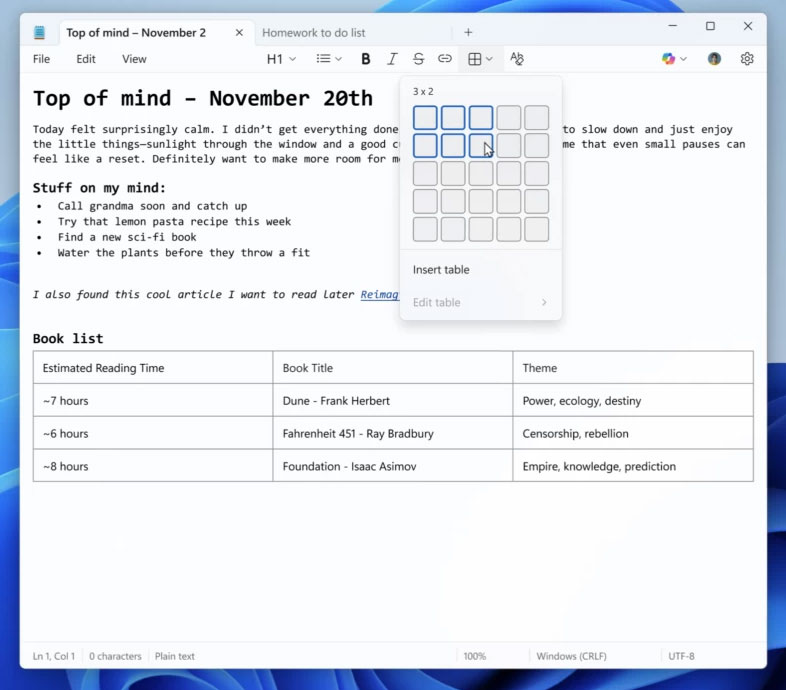
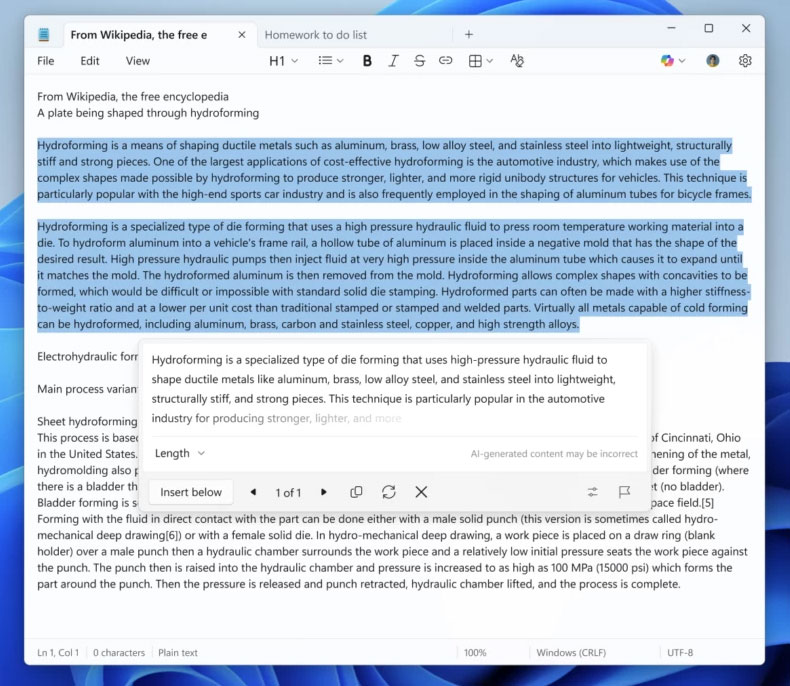
The new table feature combines Notepad's built-in editing toolset, including basic formatting and AI-powered features. This update also adds streaming results , Making it faster to write, rewrite, or summarize text:
Results appear sooner rather than waiting for full feedback, providing a quick and interactive preview.
That said, users also need to note some points:
- Streaming for Rewrite currently only works on Copilot+ PCs, with processing happening directly on the device.
- AI features in Notepad require signing in with a Microsoft account.
Notepad version 11.2510.6.0 , which includes table insertion support and AI enhancements, is rolling out to Windows Insiders in the Dev and Canary channels. The remaining Insider channels will receive the update in the coming weeks, before Microsoft releases it to the general Windows 11 audience.
FAQ
What should you know about notepad on Windows 11 now supports creating tables and upgraded a series of?
In practical terms, the new version of Notepad on Windows 11 adds the ability to create tables, improves AI engine and supports streaming results, now released to Windows Insiders.
Why does notepad on Windows 11 now supports creating tables and upgraded a series of matter?
The article highlights that alongside the latest Windows 11 preview build with a full-screen Xbox experience and a revamped right-click menu in File Explorer, Microsoft has also released a new version of Notepad that supports… tables.
What is the main takeaway?
The main takeaway is that notepad version 11.2510.6.0 , which includes table insertion support and AI enhancements, is rolling out to Windows Insiders in the Dev and Canary channels.
Related Articles
 Detailed Video Tutorial on Creating Tables in Notepad: Explained3 minutes read
 How to Create Tables in Notepad4 minutes read
 How to Install Notepad++ on Linux9 minutes read
 What Is Notepad ++? Compare Notepad ++ and Regular Notepad4 minutes read
 These 'Hack' Tips Are Only Notepad Can Do22 minutes read
 How to Create Text Using AI on Notepad Windows 113 minutes read
Reader Comments 0
Sign in with email or Google to join the discussion.