Table of Contents
This guide provides a clear overview of microsoft, including the main concepts, practical steps, and common questions. Use it to understand the topic, compare the available options, and make a more informed decision.
According to a newly published report, the US software giant is weighing the idea of adding a bunch of AI-based features to the Windows 11 ecosystem. The company recently announced a 'megaproject'. Windows Copilot, AI virtual assistant is considered to be rich in potential. And future updates may introduce even more notable AI-based features.
According to a disclosure from Windows Central (quoting internal Microsoft sources), the company is testing a number of completely new artificial intelligence-based features and utilities developed for the Windows 11 environment. Microsoft plans to add a general AI algorithm to Microsoft Paint, its auto-personalizing image editor. All the user has to do is simply open Paint, click the "Magic Paint" button (as shown in the screenshot below) and tell the AI what to create. The same experience offered by Dall-E is now available in Bing Chat.
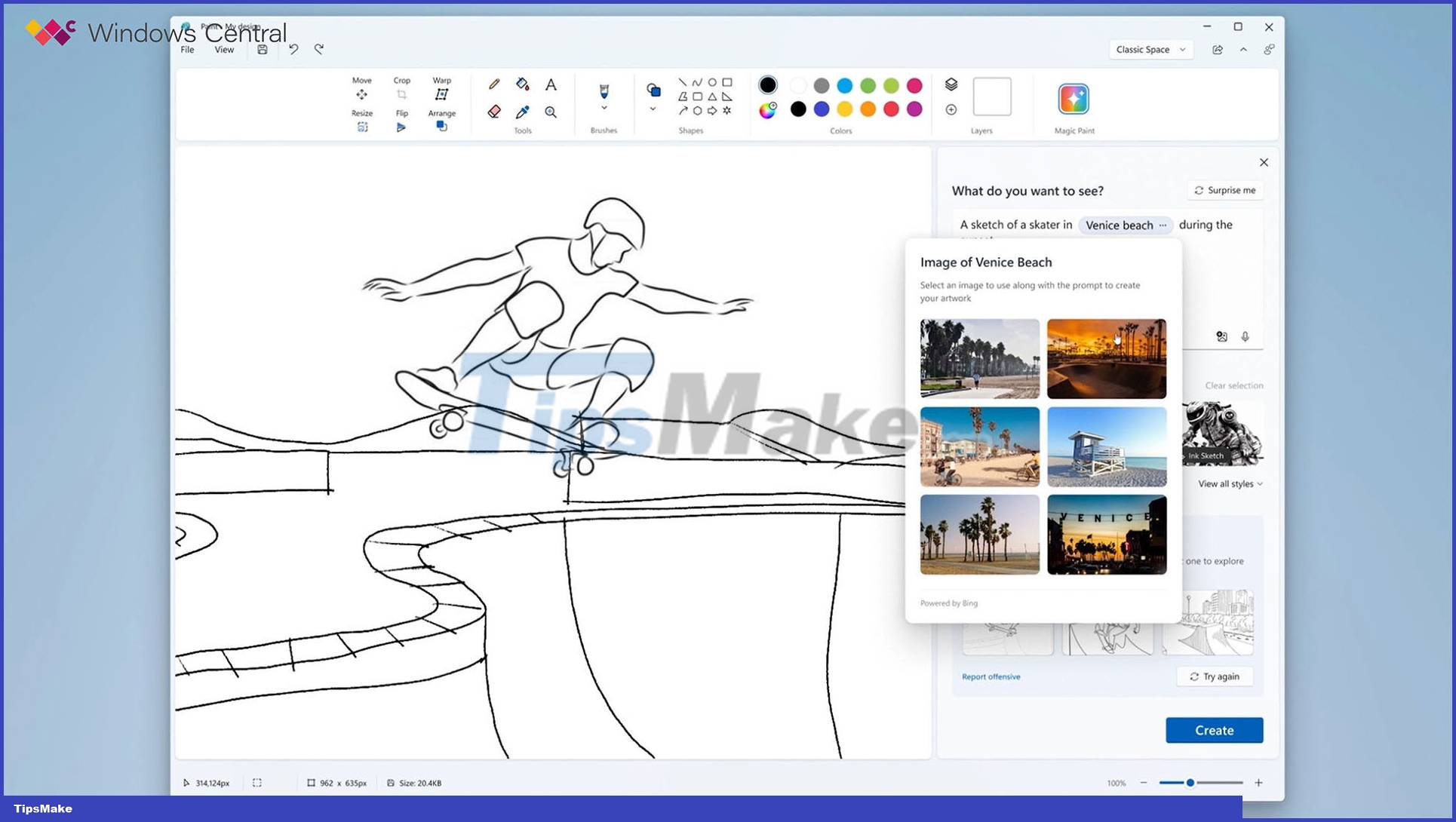
Optical character recognition (OCR) is another capability that users can expect to appear soon on Windows 11, specifically in some native apps like Photos, Windows Camera, and the Snipping Tool. Additionally, Microsoft wants to make the Photos app capable of recognizing and cutting out people and objects on photos, similar to what Apple introduced in iOS 16. Interestingly, some of these features are already available. partly for Windows 10 and 11 users — the PowerToys utility now has a built-in OCR tool that allows you to quickly extract text from a selected area of the screen.
The report claims that some of the features Microsoft plans to add to Windows 11 may require specialized hardware. For example, in the case of Windows Studio Effects, it only works on devices with a dedicated neural processing unit (NPU). Other extras will work on existing systems with "regular" processors from AMD and Intel.
Conclusion
Understanding Microsoft makes it easier to compare options, avoid common mistakes, and apply the information in this guide more effectively. Review the relevant requirements before making changes or choosing a solution.
FAQ
What is Microsoft?
According to a newly published report, the US software giant is weighing the idea of adding a bunch of AI-based features to the Windows 11 ecosystem.
Why is Microsoft important?
Understanding Microsoft helps you evaluate features, compatibility, performance, and potential limitations before you choose a product or follow a procedure.
What should you consider when using or choosing Microsoft?
Consider your specific goal, compatibility requirements, available features, cost, security, and the practical recommendations described in this guide.
Related Articles
 Microsoft Paint Gets Generative AI Tools: What You Need to Know6 minutes read
 Microsoft Paint - Download the Latest Microsoft Paint Here6 minutes read
 Microsoft Released a New Update for MS Paint with Many Interesting Features6 minutes read
 Paint: Complete Guide3 minutes read
 Uninstalling Paint Will No Longer Be an 'Impossible Task'.4 minutes read
 Fix MS Paint Not Working on Windows: Main Insights9 minutes read
Reader Comments 0
Sign in with email or Google to join the discussion.