Table of Contents
This updated guide explores Microsoft edit is the command prompt editor you've been waiting for with practical details, clear explanations, and useful takeaways. If you're an MS-DOS fan from the 90s, you'll love Microsoft Edit – a fully open source command-line interface (CLI) editor. Microsoft Edit fills a specific need for a default CLI editor in 64-bit Windows.
Install Microsoft Edit
There are two ways to install Microsoft Edit, using the Github source file or via winget in PowerShell. It supports both Windows 10 and Windows 11.
GitHub
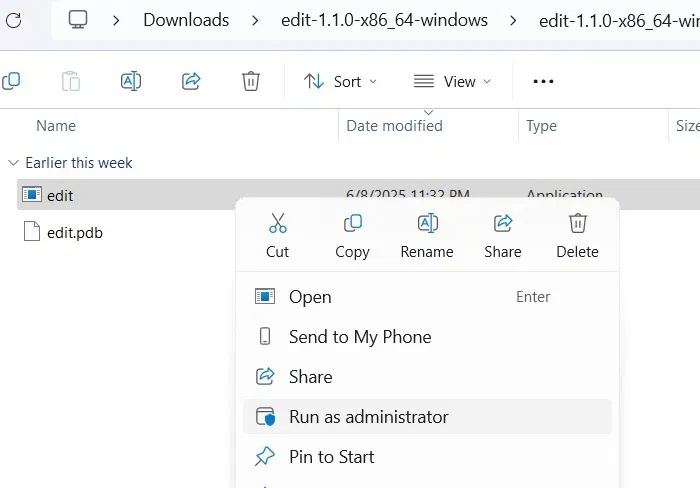
open the official Microsoft Edit GitHub repository page. Download the ZIP file to your PC and extract its folders.
From the extracted inner folder, you can run the application with admin rights with just a right choose.
You can launch the Edit application, seen as "edit.exe" from the search menu. it is always better to choose Run as administrator .
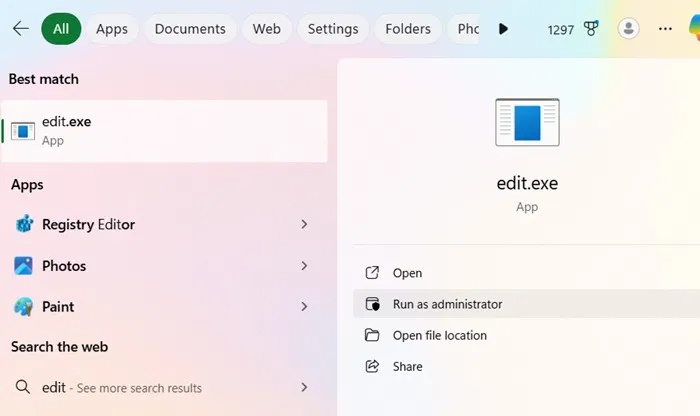
To get the full benefits of Edit's features, it is best to install the full application as shown below.
Winget
Open a PowerShell window in admin mode. Type these command, then press Y to agree to all the terms of the source agreement.
winget install Microsoft.Edit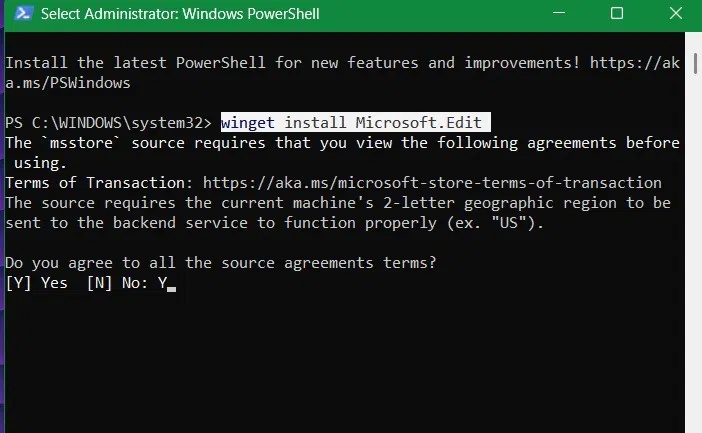
As you play around with Microsoft Edit, you'll discover many useful features and uses. Unlike the previous MS-DOS Editor, which only supported 16-bit applications, the new Edit is fully extensible with the future 64-bit Windows 11.
Extremely Simple Windows Command Line Editor
As a Windows developer, you will find Microsoft Edit to be an ideal tool for your needs. It strikes the perfect balance between simplicity and functionality, allowing you to modify the code behind software applications without having to memorize complex commands and steps.
Completely open source, Microsoft Edit has gained many traction because of its overall simplicity with a clean green screen interface. Only 4 buttons represent its minimalist design, with File, Edit and View containing everything you need.
Like Notepad, the Edit button in this app supports all the common keyboard shortcuts, such as Ctrl + S to save a text file, along with shortcuts like Ctrl + Z, Ctrl + Y, Ctrl + F to find files, Ctrl + R to replace, and Ctrl + A to select all. naturally, cut, copy, and paste shortcuts are also available.
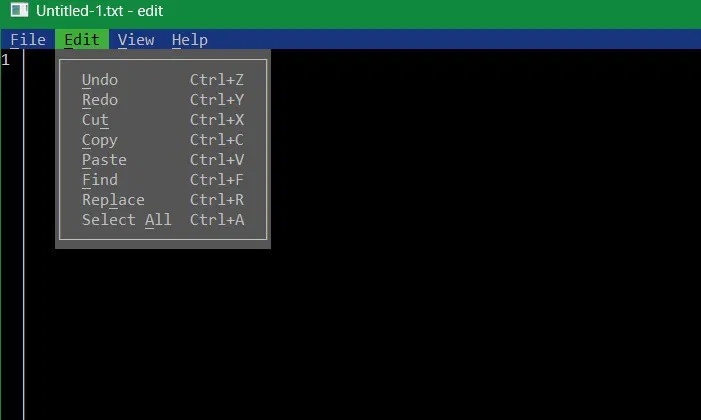
Still, unlike Notepad which is a GUI editor, you can access these commands in a CLI interface, which is ideal for developers.
Because the core Edit application file is less than 250KB in size, opening the file takes a fraction of a second compared to the processes of other console-based applications.
Using Edit in Command Prompt and PowerShell
A big reason to use winget to install Edit is that it adds itself as a command-line alias, supporting all existing consoles in Windows, including Command Prompt, PowerShell, and Windows Terminal.
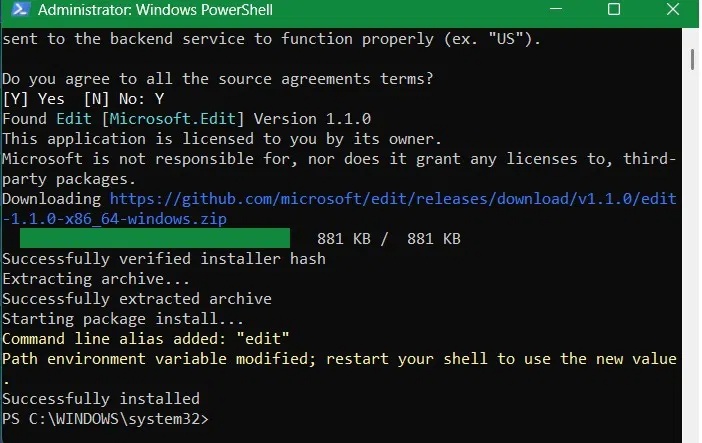
Once the alias is added, all you have to do is type edit or edit.exe in any command-line interpreter, such as Command Prompt, PowerShell, or Windows Terminal. Edit integrates with all of these environments to edit text files, Along with their command-executing capabilities.
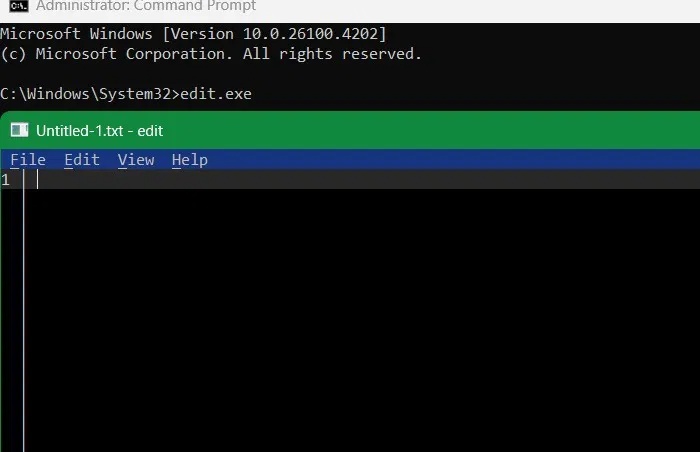
Note that Edit does not execute any commands by itself, so you cannot use it to run system commands like ipconfig. Still, you can use it to write any PowerShell script, with PS1 files.
Create and Edit Batch Files
Edit serves as a replacement for many of Notepad's text editing functions, most notably the ability to edit batch scripts, although it cannot create them.
Open Command Prompt and use cd to put yourself in the path of the file where you store some BAT scripts. Here, for instance, there is a script named "Myscript" stored in the C:Files folder path. Now, all you have to do is use cd to open the correct folder location and enter these command:
edit "Batch file script name".bat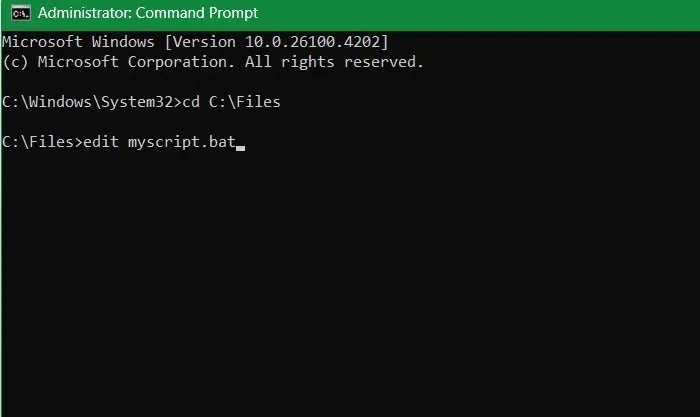
Before Microsoft Edit, editing batch scripts directly in a command-line interpreter like PowerShell or Command Prompt was cumbersome and challenging. You had to use a third-party editor like Vim or leave the interpreter and open Notepad or Visual Studio Code. This frequent window switching disrupted the workflow of most developers.
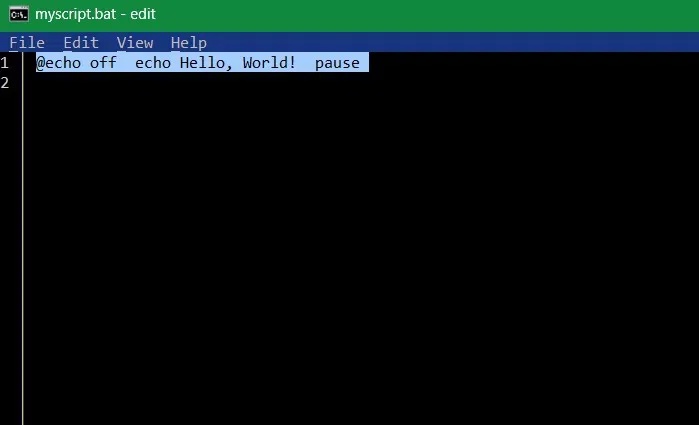
Manual file management is a pain. Remember all that 'echo on' and 'echo off' just to move files around within your own system. All that is now a thing of the past, as the Edit app launches directly into the folder path of your choice.
FAQ
What is the main takeaway about Microsoft Edit Is the Command Prompt Editor You've Been Waiting For?
The key is to understand the core idea, compare the available options, and apply the practical guidance that matches your situation.
What should beginners know about Microsoft Edit Is the Command Prompt Editor You've Been Waiting For?
Start with the essential steps and terminology. Avoid changing advanced settings until you understand how they affect performance, privacy, cost, or compatibility.
How can I use this information in practice?
Follow the relevant section in order, test one change at a time, and confirm the result before moving to the next step or recommendation.
Related Articles
 Edit Command in Windows: Tips and Examples3 minutes read
 How to Use the Command History Function in Command Prompt9 minutes read
 Add Command Prompt to Power User Menu on Windows 103 minutes read
 How to Open Microsoft Excel from Command Prompt5 minutes read
 Launch Microsoft PowerPoint from Command Prompt: Complicated7 minutes read
 How to Use Xcopy Command in Command Prompt7 minutes read
Reader Comments 0
Sign in with email or Google to join the discussion.