Table of Contents
This guide provides a clear, practical overview of "If You See This Email in Your Inbox, Delete It Immediately". It organizes the most useful details, explains important considerations, and highlights the steps or choices that matter most.
Email spoofing
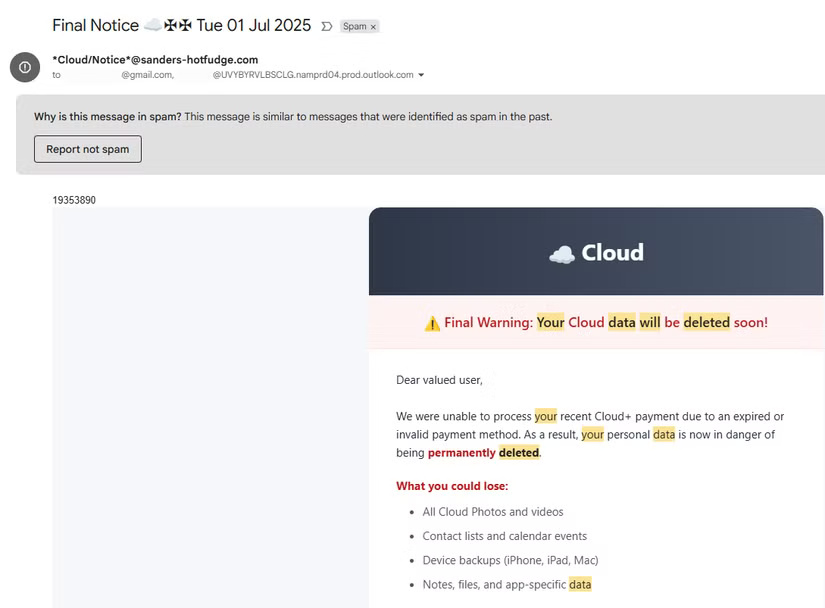
Here are examples of emails the author has received. The sender is listed as Cloud/Storage , Security/ Support, or something similar. And the subject line is always something shocking, like Your Membership Will Be Cancelled Tomorrow, with a 'warning' emoji.
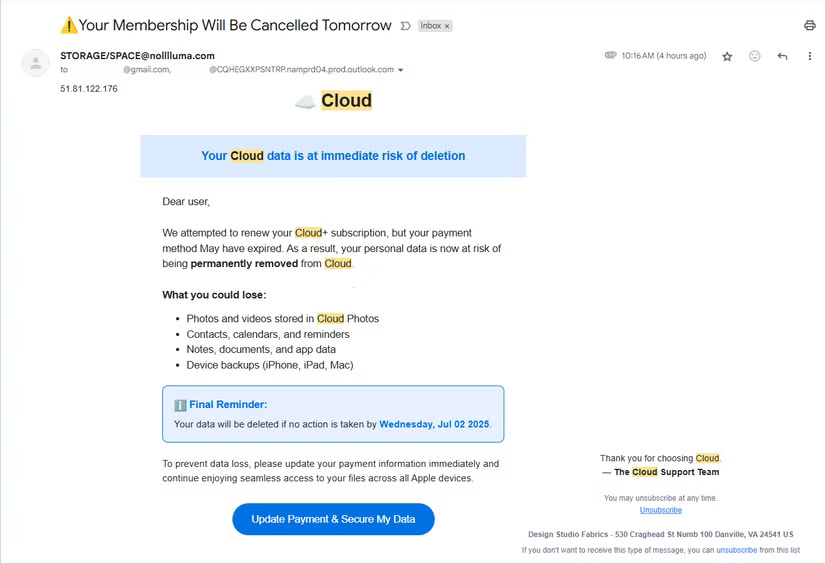
The emails do not name a specific service; the first line reads 'Your cloud data is at risk of being deleted immediately ,' while the following paragraph names the service as 'Cloud+.' However, the following bullet points name three Apple devices (iPhone, iPad, and Mac), and the message also mentions 'seamless access to your files across all your Apple devices . '
Like most phishing emails, the goal is to get you to select the Update Payment & Secure My Data button, which will take you to a fake login page. Entering your username and password here will give your login information to the thief, who can use it to break into your real account.
Signs that this email is fake
Whenever dealing with a phishing email, it is helpful to analyze the telltale signs. Each time you receive a fake email, it is an opportunity to improve your skills so that you can avoid being scammed by email the next time, which can be harder to detect.
This has some classic warning signs of a spoof. The sender's email address is from an unfamiliar, unrecognizable domain, and the message is also sent to another address with a very long, strange domain. There's an IP address (or some random one of them) at the top of the email, which is not something a legitimate company would do.
In the email body, there is a spelling error: "May" is capitalized when it shouldn't be. There are two separate "unsubscribe" links in the footer, whereas a typical email usually has one.
Another common sign of a fake email is a lack of personalization, which you can see here from the generic 'Dear User' greeting and no mention of payment method in the profile. Most real emails about declined payments will list your card provider and the last 4 digits or an alternative payment method like PayPal.
And you may have noticed the company name at the end: 'Design Studio Fabrics' in Danville, VA. Obviously, it doesn't make sense for a fabric company to offer cloud storage. Searching for that name online will return results for a legitimate company called Barbee Fabrics Of Danville, Inc.
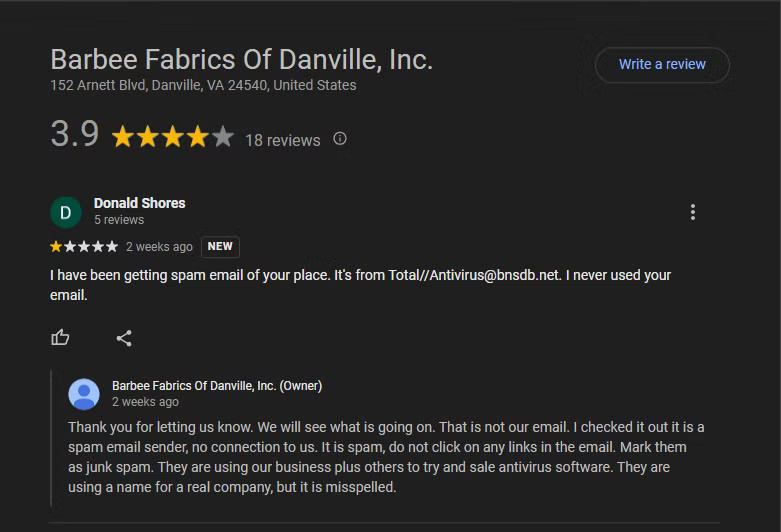
Unfortunately, that company has received negative reviews on Google from people who received the same email, even though it has nothing to do with these scam messages. Meanwhile, the address listed is that of another business in the area—a restaurant that has since closed permanently.
Some of the emails you receive have different company names and addresses, none of which match the real company. Some of the addresses are residential, not business.
Report and delete scam emails
Whenever you receive a phishing email in Gmail, you should click the three-dot button in the upper-right corner of the email and select Report phishing . As more people report it, Google will recognize it and take action against the sender.
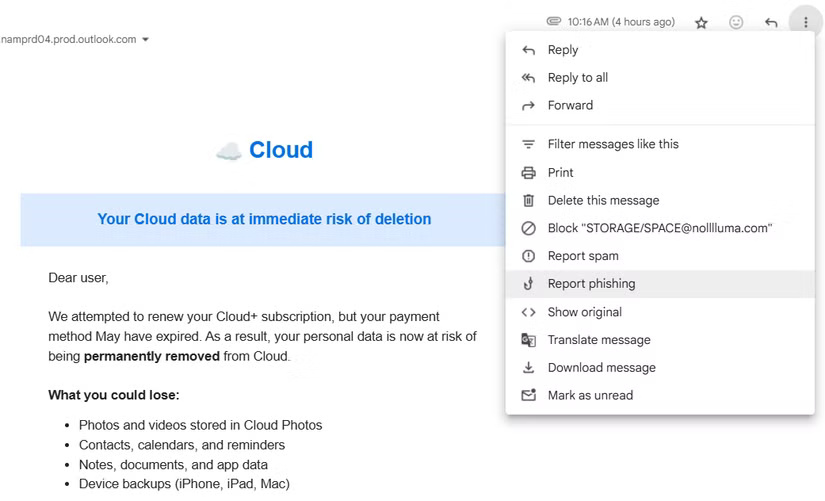
Of course, you shouldn't interact with anything in this email; instead, report it (which will mark it as spam in Gmail) and move on. These emails demonstrate another great rule of thumb for online security: If you didn't ask for it, it's fake. Even if you actually use iCloud, which these emails are bad impersonations of, you should still know what a real email from Apple looks like.
This is a particularly nasty phishing campaign because it doesn't stop with just one message. Gmail's spam and phishing protections are usually strong, so you might be surprised to see these messages in your inbox — and without any warning. You may need to take stronger steps to block phishing emails if you keep getting them.
FAQ
What should you know about email spoofing?
Here are examples of emails the author has received. The sender is listed as Cloud/Storage, Security/ Support, or something similar. And the subject line is always something shocking, like Your Membership Will Be Cancelled Tomorrow, with a 'warning' emoji.
What should you know about signs that this email is fake?
Whenever dealing with a phishing email, it is helpful to analyze the telltale signs. Each time you receive a fake email, it is an opportunity to improve your skills so that you can avoid being scammed by email the next time, which can be harder to detect.
What should you know about report and delete scam emails?
Whenever you receive a phishing email in Gmail, you should click the three-dot button in the upper-right corner of the email and select Report phishing. As more people report it, Google will recognize it and take action against the sender.
Related Articles
 Google Talks About New Features Coming Soon for Inbox4 minutes read
 How to Delete Inbox Categories in Gmail4 minutes read
 6 Simple Ways to Find and Delete Spam in Gmail: Recommended Choices10 minutes read
 Learn About Google Inbox Email Application4 minutes read
 12 Ways to Manage Smart Inbox to Increase Productivity5 minutes read
 Google Inbox Will Support the Recovery / Deletion of Sent Mail4 minutes read
Reader Comments 0
Sign in with email or Google to join the discussion.