Table of Contents
This guide provides a clear, practical overview of "Google Launches Gemini CLI, Bringing Gemini to the Terminal". It organizes the most useful details, explains important considerations, and highlights the steps or choices that matter most.
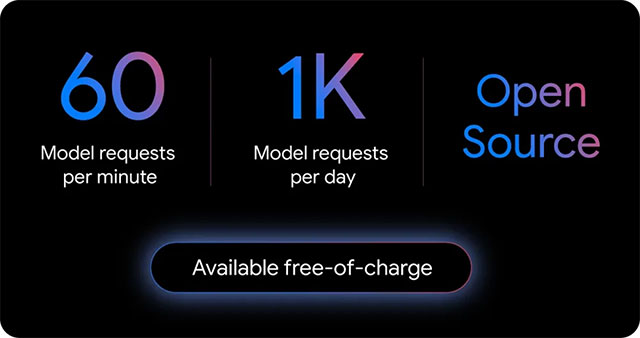
What seems to be Google's main advantage here is its usage limits, which are surprisingly generous for a free service. Logging in with a personal Google account allows users to make up to 60 model requests per minute, and a total of 1,000 free requests per day. This access is directly tied to Gemini 2.5 Pro, Google's powerful model known for its massive context window of up to 1 million tokens, giving individual developers plenty of room to experiment and build without hitting a paywall.
If you're a professional developer who needs to run multiple agents at once or want to use specific models beyond the defaults, Google has other options. You can use Google AI Studio or Vertex AI keys for pay-as-you-go billing, or just purchase the Gemini Code Assist Standard/Enterprise license to unlock additional power.
Here's what you can do with the CLI:
- Align commands (Ground prompts) with Google Search to retrieve web pages and provide real-time external context to the model
- Extend the capabilities of the Gemini CLI through built-in support for the Model Context Protocol - (MCP) or packaged extensions
- Customize prompts and instructions to tailor Gemini to your specific needs and workflow
- Automate tasks and integrate with existing workflows by calling the Gemini CLI non-interactively in your scripts
Installation is simple, assuming you're already set up for modern web development. To install the Gemini CLI, you'll first need to make sure you have Node.js 18 or higher installed. From there, you can run it directly with npx like this:
npx https://github.com/google-gemini/gemini-cli
Or set it globally for easier access later:
npm install -g @google/gemini-cli
Since the tool is open source, anyone can review the source code (hosted on GitHub) to understand exactly how it works or verify its behavior. Powered by Yargs and licensed under Apache 2.0, the tool will be familiar to anyone who has built CLI applications with Node.js, making it easy to contribute.
The CLI also shares technology with Google's Code Assist IDE plugin. This creates a more unified experience for developers using Google's AI tools, whether they're working in VS Code or directly in the terminal. This integration works for free tier users and developers subscribed to the Standard or Enterprise plans.
You can find more information in Google's official announcement post.
FAQ
What does this guide cover?
This guide explains Google launches Gemini cli, bringing Gemini to the terminal, including the main steps, important details, and practical considerations.
Who is this guide for?
It is designed for readers who want a clear, practical overview and a reliable process they can follow without unnecessary complexity.
What should you check before getting started?
Review the requirements, confirm that your software or device is up to date, and save any important data before changing settings.
Related Articles
 How to Run Gemini CLI AI Agent on Terminal10 minutes read
 Google Launches Gemini 3: Surpasses GPT-5.1 on Many Important AI: Key Details4 minutes read
 Gemini 3.1 Pro or Gemini 3 Pro: Better?8 minutes read
 Google Launches Gemini 2.5 Deep Think - Surpassing OpenAI o3 and3 minutes read
 Google Launches Gemini 2.5 Computer Use: AI Models That Superiorly Control3 minutes read
 Google Launches Gemini CLI GitHub Actions: Automate PR Review, Issue3 minutes read
Reader Comments 0
Sign in with email or Google to join the discussion.