Table of Contents
This guide provides a clear, practical overview of "Google Claims Chrome Is Now Faster Than Ever". It organizes the most useful details, explains important considerations, and highlights the steps or choices that matter most.
Interestingly, Google isn't the only company making such claims lately. Microsoft also highlighted Edge's significant speed boost not too long ago. Both Microsoft and Google have cited the Speedometer 3.0 benchmark to gauge the performance of their platforms.
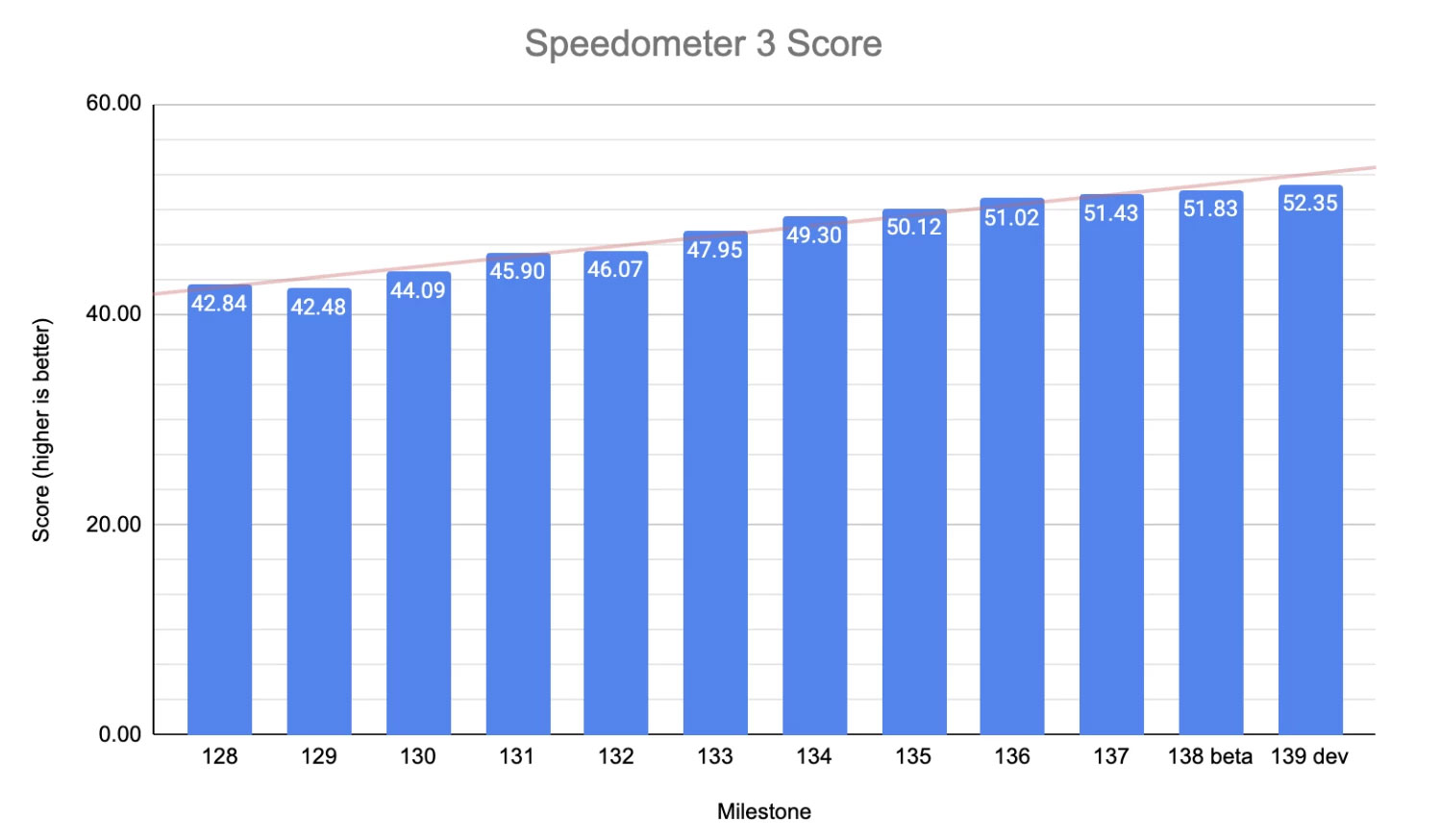
Specifically, Google said the Chrome team has made significant improvements to memory management and caching. This includes several efforts to redesign the memory layouts for many internal data structures used in components like the DOM, CSS, layout, and painting.
Google says that Blink, the rendering engine in Chromium, now 'avoids a lot of unnecessary churn' to better utilize CPU caches. In areas where memory handling previously relied on garbage collection in Oilpan, like the DOM (Document Object Model), the team has expanded that by switching from using malloc (memory allocation) to using Oilpan entirely.
( Note : Oilpan is the garbage collector in Blink).
Some of the memory management and caching improvements Google has made are the foundation for good code optimization. A senior Microsoft engineer recently pointed out many of these issues in apps that slow down Windows.
There are also improvements to string handling within the renderer; the hashing method has been updated to rapidhash, which is said to significantly improve performance. For cases where rendering tasks are inherently resource-intensive, such as computing CSS styles for different elements, Google added that caching techniques have been enhanced to achieve a higher cache hit rate and fewer cache misses.
FAQ
What does this guide cover?
This guide explains Google claims Chrome is now faster than ever, including the main steps, important details, and practical considerations.
Who is this guide for?
It is designed for readers who want a clear, practical overview and a reliable process they can follow without unnecessary complexity.
What should you check before getting started?
Review the requirements, confirm that your software or device is up to date, and save any important data before changing settings.
Related Articles
 Google Claims the New Occlusion Feature Makes Chrome on3 minutes read
 Google Chrome Is Now 23% Faster, Have You Tried It?3 minutes read
 Dolphin Browser Claims to Be 2x Faster Than Chrome: Is This True: Explained7 minutes read
 How to Speed up the Operation of Chrome and Firefox?: Google Chrome3 minutes read
 The Trick Is to Reduce RAM When Using the Chrome Browser3 minutes read
 Google Chrome Can Be up to 20% Faster Thanks to Microsoft3 minutes read
Reader Comments 0
Sign in with email or Google to join the discussion.