Table of Contents
Getting Over It Game Guide is easier to approach with a clear overview and reliable steps. This guide organizes the essential information, highlights practical details, and explains what to check along the way.
Key Takeaways
- Follow the recommended steps in order to avoid common mistakes with getting over it game guide.
- Review compatibility, settings, or requirements before making changes.
- Use the troubleshooting notes to confirm the final result.

Step 2: In the Settings section, in addition to customizing the configuration, you can choose to play with mouse or trackpad.

Step 3: Now open Newgame to start playing the game.

Step 4: The game is very simple: you only have a hammer and move with the mouse.

Step 5: The first challenge is to get over the tree, which is not easy at all. Be prepared for it!

There's no way to fix it, just exit and start over if you get stuck like this.

Step 6: Luckily, after a few dozen hammer throws, I finally got past the tree.

Next are the cliffs, the obstacles in the game will gradually increase.
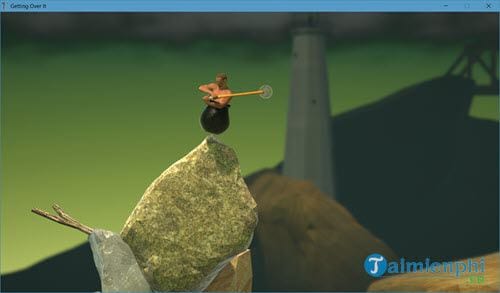
 The game requires many patience. It will take you many time and you need to learn from other players if you want to conquer it. AMPOK
Final Thoughts
The most reliable way to handle getting over it game guide is to follow the process in order, verify each important setting, and test the result before moving on. Use the guidance above as a practical reference, then adjust the details for your device, software version, or specific goal.
FAQ
What should I know first about Getting Over It Game Guide?
Getting Over It is one of the hottest entertainment games today.
How do I get the best results with Getting Over It Game Guide?
Use current software or equipment, follow the steps in order, review the recommended settings, and test one change at a time so you can identify what improves the result.
What should I do if Getting Over It Game Guide doesn't work as expected?
Check compatibility, permissions, connectivity, and version-specific settings. Restart the relevant device or app, then repeat the process carefully before trying a more advanced fix.
Related Articles
 How to Remove Xbox Game Bar Windows 11 App3 minutes read
 How to Create Games in Builda21 minutes read
 When There Is No Online Tutorial, Our Previous Generation Played 'Manual' Games Like This?3 minutes read
 How to Create an Educaplay Unscramble Letters Game10 minutes read
 XenoFeels Beginner Guide5 minutes read
 How to Make a Piano Game Using Scratch5 minutes read
Reader Comments 0
Sign in with email or Google to join the discussion.