Table of Contents
Clipboard History on Windows 10 and 11 serves as an upgraded copy-paste tool, allowing you to save up to 25 items, sync across devices, and integrate PowerToys.
Clipboard History Windows Overview
When promoting Windows, Microsoft often focuses on highlighting the 'flashy' and supposedly groundbreaking features. Recently, we've seen the controversial Windows Recall or the AI-powered Copilot. But often, it's the small, less talked-about features that really make a difference in day-to-day productivity.
A good example is Clipboard History On Windows 10 and 11. This is a feature that Microsoft has not really done a good job of promoting, even though it was introduced in beta over seven years ago and officially released in the Windows 10 October 2018 update. In fact, we have a short guide on how to use Clipboard History from 2022. But if you don't have time to read, just press Win + V To get a quick understanding of how this feature works.
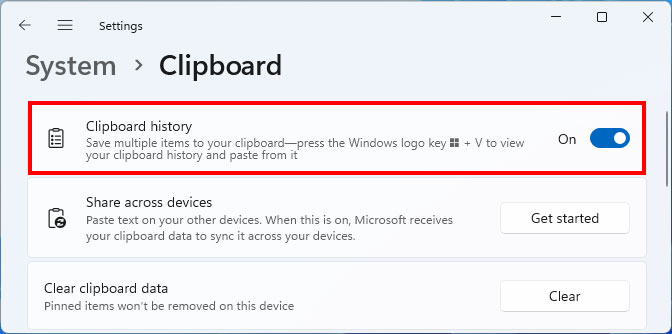
Traditionally, copy-pasting is done using Ctrl + C And Ctrl + V . However, this only lets you save one item at a time. If you copy new content, the previous content will be overwritten. This is where Clipboard History Comes in – it's like an 'upgraded' version of the traditional copy-paste operation.
Clipboard History can store up to 25 items , including text, images, emojis, etc. You can pin frequently used items and manually delete what you no longer need. It's also very intuitive to use: just place the cursor where you want to paste, press Win + V , and select the content you want to insert.
A big plus for those using Microsoft accounts on multiple devices is that Clipboard History can be synchronized across devices . You just need to enable this feature in Windows Settings, which is very useful if you often work flexibly between multiple machines. In addition, Clipboard History also integrates well with Microsoft PowerToys Through the Advanced Paste utility - where you can enable more advanced AI features thanks to OpenAI. A third-party tool called WindowSill Has also integrated with Clipboard History, expanding many new capabilities.
Personally, I use Clipboard History regularly, both on my personal and work computers. Writing articles and needing to cite old content many times becomes much faster. If I only rely on the traditional Ctrl + C, Ctrl + V, my performance will definitely decrease significantly. Those who know this feature are considered to have the 'ultimate weapon' to support work, and those who have not used it will be very surprised to know the effectiveness it brings.
Clipboard History is actually an Essential productivity tool In Windows. Microsoft may not think it's 'flashy' enough to promote it, but in my opinion, it's much more useful than the AI features they're trying to force on users in the name of 'productivity'.
FAQ
What should you know about clipboard history?
In practical terms, clipboard History on Windows 10 and 11 is an upgraded copy-paste tool, allowing you to save up to 25 items, sync across devices, and integrate PowerToys.
Why does clipboard history matter?
The article highlights that in fact, we have a short guide on how to use Clipboard History from 2022.
What is the main takeaway?
The main takeaway is that you just need to enable this feature in Windows Settings, which is very useful if you often work flexibly between multiple machines.
Related Articles
 How to Pin Text and Images to the Windows 10 Clipboard History4 minutes read
 How to Access and Use Clipboard History on Windows 114 minutes read
 Clipboard History: How to Delete the Clipboard on Windows 106 minutes read
 How to Clear Clipboard History on Windows 113 minutes read
 How to Use Clipboard History in Windows 106 minutes read
 How to Turn on and Use the Clipboard History Feature on Windows 104 minutes read
Reader Comments 0
Sign in with email or Google to join the discussion.