Table of Contents
This guide organizes the entries in "6 Signs the Video You're Watching Is AI-Generated" and explains what each option, idea, or example offers. It also highlights practical details that matter when comparing the choices.
Almost, but not quite.
How to spot AI-generated videos
While some people want to avoid using AI to turn text into video, AI-generated videos are popping up everywhere these days, from YouTube to TikTok and every social media platform you can think of, which means we all need to start tuning in to determine whether a video is generated by artificial intelligence or not.
Why is this important? Since videos are such a vital source of information in the modern age, it is important to understand what is real and what is not to avoid being misinformed.
There are still some key telltale signs that can help us figure out whether a video is AI or not. None of these signs are foolproof, and as AI continues to improve, some of them will become less reliable (as you'll see in the final section!). But for now, there are still some key telltale signs that you should look for when trying to spot AI use.
1. Impossible physical phenomenon
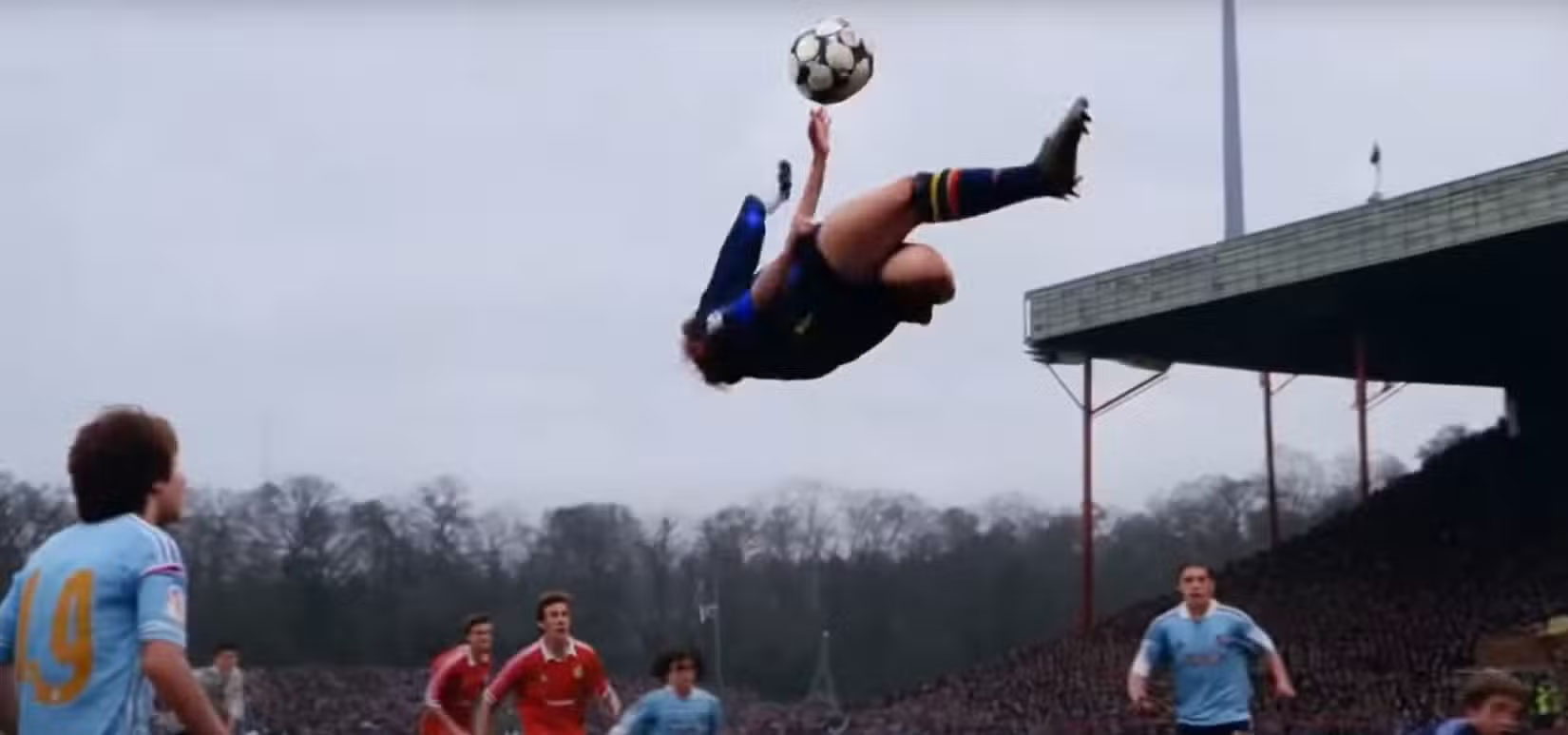
One of the main telltale signs that the video you're watching was generated by AI is any sign of action that violates the laws of physics. Sure, special effects mean that not every legitimate video will always follow those laws, but you can usually tell the difference between intentional special effects and random anomalies that were introduced by mistake.
Examples of physically impossible phenomena include objects changing direction without any external force acting on them, people jumping too high or looking like they belong in The Matrix, and liquids acting like solids (or vice versa). These problems arise in AI-generated videos because the AI models are based on data rather than a realistic understanding of real-world physics.
2. Poor transitions between scenes
If you've seen an example of a bad AI-generated video, you'll be familiar with bad transitions between scenes. But while these example videos often highlight silly or funny transitions, even more subtle videos can provide clues. Look for images or objects that transform into other things; something that wouldn't happen in real life.
A clear example of a bad transition would be meaningless cuts between scenes, which makes your brain jump. If a human were filming something, they would make sure the cuts made some kind of narrative sense, whereas that's irrelevant to the Generative AI model, which would generate it on the fly. This is because the way the AI generates video frame by frame, it doesn't apply logic unless the human prompts are specific enough to ensure a narrative pattern is followed.
3. Human movement/expression
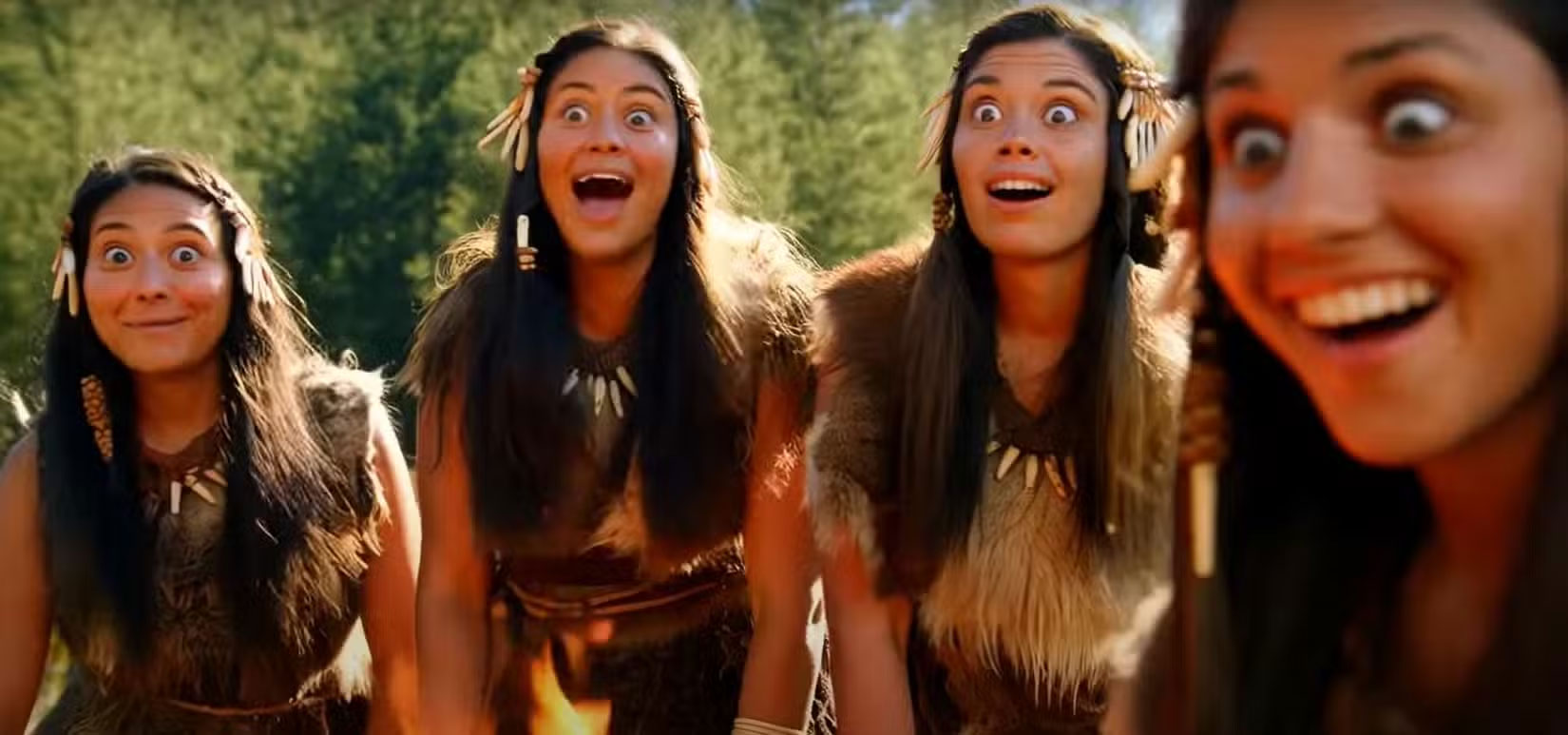
Human expressions are notoriously difficult to replicate, making them one of the best indicators when it comes to determining whether a video was created with AI. We constantly look at each other and can see the expressions forming on people's faces, so we know what subtle cues to look for. Generative AI still doesn't fully understand the nuances of human expressions and emotions, let alone develop the skills to replicate them.
In AI-generated videos, these issues manifest themselves in both obvious and subtle ways. Movement is the most obvious, as a human arm or leg flailing (for example) will immediately trigger your brain to know that something is 'off.' Less obvious but still noticeable examples include a twitching mouth, unnatural blinking, and expressions that change too abruptly from one extreme to the other.
4. Visual background noise
While human-shot videos capture the entire scene in the frame, AI often ignores the background, focusing instead on getting the subject right. But that gives us a simple way to spot if a video is AI-generated. Look beyond the foreground subject and see what's going on in the background. It may be gibberish, but it's also likely to include blurry textures, tearing, or artifacts that shouldn't be there.
People using AI to create videos will be very focused on getting the subject right, but won't pay much attention to what's going on in the background. While text-to-video AI models will do their best to create suitable backgrounds, they have a hard time removing image noise. So you might see flickering textures or swaying trees. And these artifacts might appear in some frames but not others.
5. Mismatch in actions and emotions
If the main subject of the video you're watching is a person, look for a mismatch between what's being done (by or to them) and the emotion they're expressing. Often, the two will be slightly out of sync, and sometimes, completely out of sync. For example, if someone is in danger but still has a goofy, innocent smile on their face, that's a complete mismatch.
While AI can do a good job of rendering people and objects with broad strokes, when it comes to depicting someone's lips moving or facial expressions, it often falls short. This is because AI struggles with fine details. Accurately identifying human emotions is extremely difficult for AI models that rely on data fed to them rather than any natural understanding of nuance and meaning.
6. Nonsense string
Last but not least on the list of telltale signs when deciding whether a video you're watching is AI-generated is gibberish. Again, these issues show up in many examples of poor quality AI videos that have been widely shared on social media. Gibberish is a story that makes no sense. If you find yourself wondering why or how something in a video happened, chances are it was AI-generated.
A classic example of a nonsense sequence is Will Smith eating spaghetti. While Smith can eat spaghetti in real life, he doesn't have the voraciousness that is often seen in these AI videos (although the difference between the early AI videos and the latest models, like Veo 3, is quite dramatic). Another example that has come up many times is Gordon Ramsay cooking in the kitchen, where he cooks himself, lights up everything around him, and does a bunch of other completely pointless things.
Trust your instincts!
While these are all specific signs to look for, the most important thing to do when trying to spot an AI-generated video is to trust your instincts. Humans have great instincts, as long as they choose to use them. Just like you shouldn't believe everything you read online, you shouldn't just accept a video as it appears. Because more and more videos are being generated by AI thanks to some great AI video generators and detailed prompts from effective prompts.
Unfortunately, the rise of AI coincides with a decline in the attention span of the general population. As a result, many people will not pay enough attention to what they are watching to spot AI products, which is a big problem. So pay attention to the videos you watch and trust your instincts. Always remember, if something seems too good to be true, it probably is.
FAQ
How to spot AI-generated videos?
While some people want to avoid using AI to turn text into video, AI-generated videos are popping up everywhere these days, from YouTube to TikTok and every social media platform you can think of, which means we all need to start tuning in to determine whether a video is generated by artificial intelligence or not.
What should you know about 1. Impossible physical phenomenon?
One of the main telltale signs that the video you're watching was generated by AI is any sign of action that violates the laws of physics. Sure, special effects mean that not every legitimate video will always follow those laws, but you can usually tell the difference between intentional special effects and random anomalies.
What should you know about 2. Poor transitions between scenes?
If you've seen an example of a bad AI-generated video, you'll be familiar with bad transitions between scenes. But while these example videos often highlight silly or funny transitions, even more subtle videos can provide clues. Look for images or objects that transform into other things; something that wouldn't happen in real.
What should you know about 3. Human movement/expression?
Human expressions are notoriously difficult to replicate, making them one of the best indicators when it comes to determining whether a video was created with AI. We constantly look at each other and can see the expressions forming on people's faces, so we know what subtle cues to look for. Generative AI still doesn't fully.
Related Articles
 AI Content Checker: 4 Reasons Your Article Markup Is AI-Generated6 minutes read
 Tips for Recognizing AI-generated Text6 minutes read
 Meta Launches Vibes: New AI Video Feed, Potential TikTok Rival?4 minutes read
 How to Use Gemini to Determine If a Video Is Real or AI-generated7 minutes read
 Adjust the Speed of Watching Videos in Kmplayer2 minutes read
 Some Signs of PC Video Card Failure and Effective Ways to Fix It7 minutes read
Reader Comments 0
Sign in with email or Google to join the discussion.