Table of Contents
Explore 5 common habits that are silently draining your laptop battery.
Use Sleep instead of Hibernation on Windows laptops
Even on Windows desktops, many people avoid using Sleep mode, and on Windows laptops it's even more important to limit it.
Modern Standby (aka InstantGo or S0 sleep state) has been problematic since Windows 8 in 2012. After more than a decade, Sleep mode on battery-powered Windows devices is still not working properly.
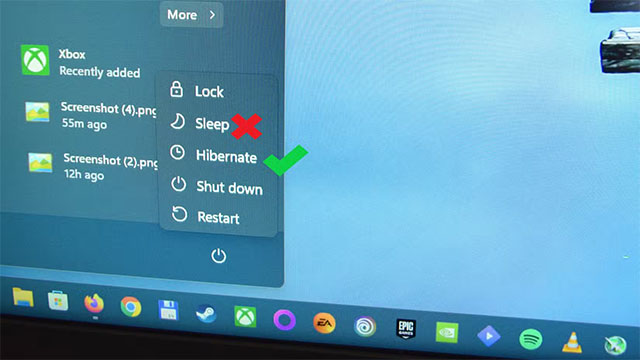
Modern Standby sometimes causes laptops to wake up when they've been sitting idle, draining the battery quickly. Worse, the laptop may turn on but the fan won't run, causing the body of the laptop to heat up to dangerous levels. It will continue to heat up until the user turns it off or the battery is completely drained and it shuts down.
These situations all accelerate the battery aging process because Li-ion batteries hate high temperatures and being completely discharged.
Even if you haven't encountered any errors, Windows users should still switch to Hibernation to reduce long-term risks.
Using a USB hub without its own power source

USB hubs are an important tool for many people, especially laptops with only USB-C ports. However, hubs that draw power directly from the laptop (bus-powered) can degrade the battery faster.
As soon as it is connected, the hub starts consuming power from the machine. If you plug in other power-hungry devices like a portable monitor or phone charger through the hub, the consumption will increase even more.
Occasional use won't hurt much, but leaving the hub plugged in 24/7 – especially with multiple devices – will degrade the battery over time.
Wait for the battery to drop below 20% before charging
Li-ion batteries don't like to be completely discharged. Regularly letting the battery drop to 20% – or lower – before recharging will cause it to degrade faster.
According to Battery University, Li-ion batteries last best when kept between 30% and 80%. If you let the battery get to 10% and then plug it in, its maximum capacity will drop rapidly. Charging to 100% is also not ideal, as the high voltage at full charge causes the battery to degrade rapidly over time.
The optimal way is to charge to about 75%, then plug it back in when there is about 25%. Many Windows laptops have manufacturer applications (myASUS, MyDell, HP.) that allow you to limit the charge level. You can also adjust it in the BIOS. On macOS, you can use Optimized Battery Charging or the AlDente application.
Always use laptop on battery, rarely plug in charger
Another harmful habit is to always use the laptop on battery, rarely plugging it in. Constantly discharging and charging makes the battery 'lose power' faster than using direct power when possible, and only using the battery when really needed.
Modern laptops have good charge controllers, so when the battery is full, the laptop will run on the mains without overcharging the battery. By limiting the charge to 60–80%, users can safely use the laptop plugged in without the battery being 100% full.
Occasionally, users should still calibrate the battery by charging it to 100%, using it until the device turns off, then charging it fully again so that the system displays the correct battery level.
Use maximum screen brightness at all times

Leaving the brightness at its highest when using battery power causes the device to consume more power, discharge the battery faster, and force users to charge it more often – all of which contribute to rapid battery degradation.
When plugged in, increasing brightness does not affect the battery, but in the long run it will reduce the life of the backlight system (with LCD screens) or reduce the durability of the panel (with OLED).
If the laptop battery is not easy to replace, users should avoid the above habits to prolong the battery life. For Windows laptops or MacBooks, there are many settings and instructions to optimize the battery effectively.
Final Thoughts
Understanding 5 common habits that are silently draining your laptop battery makes it easier to evaluate the information and apply the most relevant recommendations. Focus on the key points above and verify details that may change over time.
FAQ
What is 5 common habits that are silently draining your laptop battery?
Explore 5 common habits that are silently draining your laptop battery.
What key points does this article cover?
The article focuses on Use Sleep instead of Hibernation on Windows laptops, Using a USB hub without its own power source, Wait for the battery to drop below 20% before charging, with practical explanations and examples.
How can you use this information in practice?
Use the explanations to compare options, verify important details, and make a more informed decision. Apply the recommendations that best match your goals and situation.
Related Articles
 Bad Habits That Are Destroying Laptop Batteries: Complete Guide8 minutes read
 How to Check Which Apps Use a Lot of Battery on Windows 118 minutes read
 Apps That Are Secretly Draining Your Phone Battery: Complete Guide6 minutes read
 iOS 26 Tips to Solve the Problem of iPhone Battery Draining: Key Takeaways6 minutes read
 4 Tips to Help Laptop Battery Last Longer5 minutes read
 11 Daily Habits Silently Destroy Health without You Knowing7 minutes read
Reader Comments 0
Sign in with email or Google to join the discussion.