Table of Contents
This guide organizes the entries in "4 Tools to Detect Fake AI Videos" and explains what each option, idea, or example offers. It also highlights practical details that matter when comparing the choices.
4. Deepware
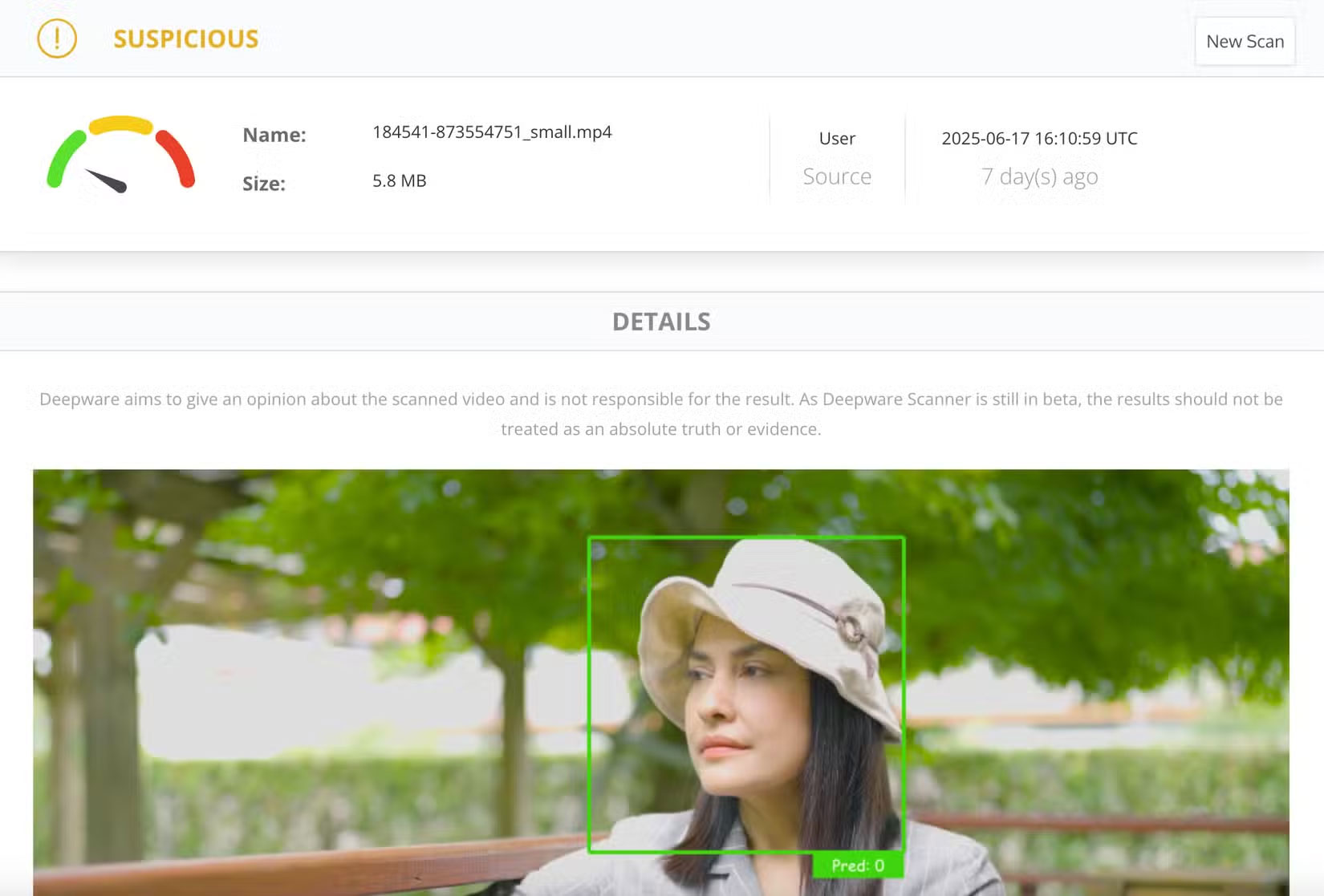
Deepfake technology has been around for a while, but not all doctored videos are created equal. With some videos, the inconsistencies are very obvious, so as long as you know what to look for, you should have no trouble spotting AI videos. Unfortunately, there are also some incredibly convincing deepfakes. Just checking for strange facial expressions or strange shadows in the background won't solve these clips. In fact, some of these AI-generated videos are so polished that they mimic real-life emotions and speech with startling accuracy.
That's where a tool like Deepware comes in. The best part is that it's free to use. While Deepware offers enterprise solutions, the basic version is available to anyone and is incredibly easy to use. All you have to do is navigate to Deepware's website and select Go To Scanner . You have the option to enter a video link or upload a video file directly from your laptop or phone. Once you do, you'll see the verdict (in this case, one of the videos being examined was labeled 'Suspicious'). It's fast, free, and easy to use. Plus, you can request an expert review if you want to analyze it further.
3. Attestiv. Video
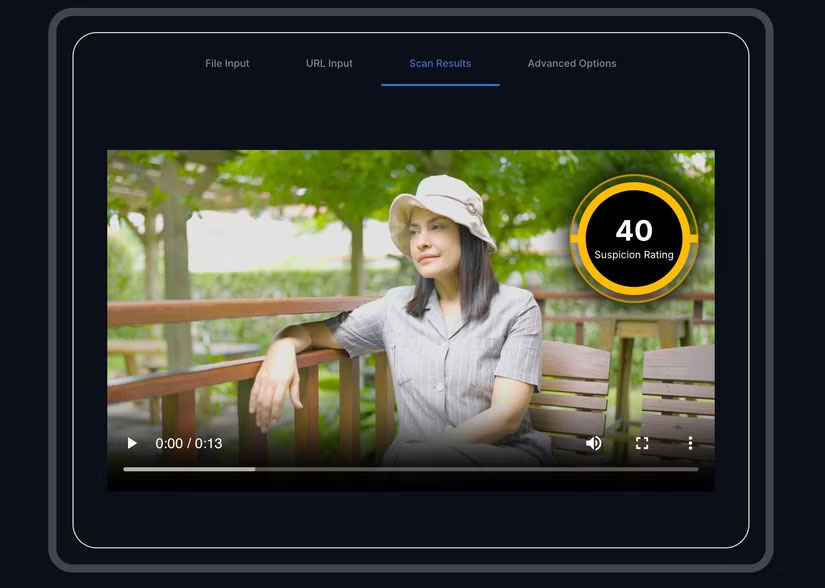
Another platform that can help you detect AI videos is Attestiv. Video. It offers a free and premium plan. Free users get up to five free scans per month, which is more than enough if you only need to scan a few suspicious videos. Keep in mind, however, that the free plan only allows you to upload videos under 2 minutes long and doesn't give you access to advanced analytics settings. If you want faster scan results and more scans per month, the premium plan is a good option (it costs $9.99/month, but you can run up to 25 scans). There are a few other plans, aimed primarily at business and enterprise users, which are understandably more expensive.
To use the tool, you'll need to navigate to Attestiv. Video's website, then upload a file or enter a URL. Once done, you'll have to wait a few seconds for the scan to complete. The platform will then generate a Technical Suspicion Rating; higher scores indicate a higher likelihood that the video has been edited, while lower scores indicate that the video is likely safe.
2. InVID
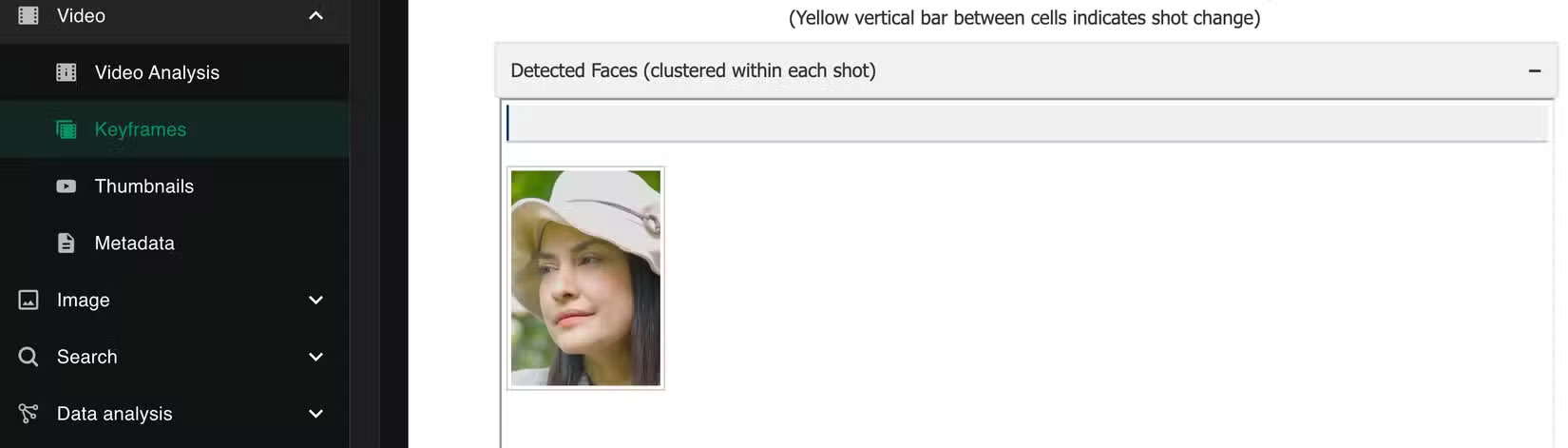
InVID doesn't work like other deepfake detection tools that give you a score or a real/fake verdict. Instead, it breaks down the video into key components and frames, allowing you to manually verify its authenticity. Additionally, unlike other tools on this list that let you upload a video or enter a video link on a website, InVID works as a browser extension via the Chrome Web Store.
Once you download the extension, you'll have access to a comprehensive suite of scanning tools, including both image and video scanning. To scan a video, go to the Video tab and select Keyframes . You can enter a URL or upload one. After the analysis, you'll be able to see any detected faces, detected text areas, and keyframes. This is a great starting point for reverse image searches, and you can also check for inconsistencies yourself. Of course, InVID won't automatically tell you whether a video is fake or suspicious, but once you've isolated the keyframes and faces, you can easily check for yourself.
1. ChatGPT
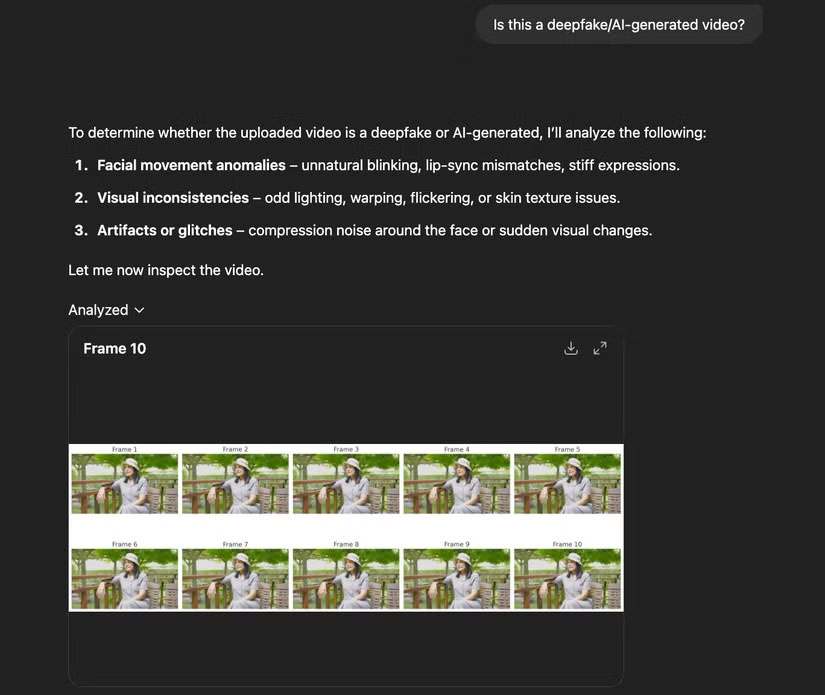
ChatGPT isn't an AI-generated video detection tool in the traditional sense, but it can still be a great way to determine if a video you have on hand needs further investigation. All you have to do is upload a video you have on your laptop (or add a URL) and enter a simple prompt like "Is this an AI-generated video?"
ChatGPT then breaks the video into multiple frames and analyzes them for facial movement anomalies, visual inconsistencies, and other strange or glitchy phenomena. It doesn't provide a score, but it did share a pretty thorough breakdown of its analysis.
Spotting AI-generated images has gotten easier over time. There are plenty of telltale signs that can help you spot them quickly. But with video, it's not so easy. Extra movement, background noise, and clever editing can easily fool even the most vigilant of people. That's why it's best not to rely on your eyes alone. Fortunately, these tools can help you spot AI videos, or at least flag ones that need a closer look.
FAQ
What should you know about 4. Deepware?
Deepfake technology has been around for a while, but not all doctored videos are created equal. With some videos, the inconsistencies are very obvious, so as long as you know what to look for, you should have no trouble spotting AI videos. Unfortunately, there are also some incredibly convincing deepfakes. Just checking for.
What should you know about 3. Attestiv. Video?
Another platform that can help you detect AI videos is Attestiv. Video. It offers a free and premium plan. Free users get up to five free scans per month, which is more than enough if you only need to scan a few suspicious videos. Keep in mind, however, that the free plan only allows you to upload videos under 2 minutes long.
What should you know about 2. InVID?
InVID doesn't work like other deepfake detection tools that give you a score or a real/fake verdict. Instead, it breaks down the video into key components and frames, allowing you to manually verify its authenticity. Additionally, unlike other tools on this list that let you upload a video or enter a video link on a website.
What should you know about 1. ChatGPT?
ChatGPT isn't an AI-generated video detection tool in the traditional sense, but it can still be a great way to determine if a video you have on hand needs further investigation. All you have to do is upload a video you have on your laptop (or add a URL) and enter a simple prompt like "Is this an AI-generated video?"
Related Articles
 AI Tools for Detecting Fake News May Not Be as Effective as You Think5 minutes read
 How to Detect Fake Microsd Card9 minutes read
 5 Easy Tips to Spot Fake Virus Warnings7 minutes read
 How to Spot Fake QR Codes and Keep Your Data Safe7 minutes read
 Tips to Avoid Fake Download Button7 minutes read
 GPU-Z V2.12.0 Is Equipped with the Ability to Detect Fake NVIDIA Video Cards3 minutes read
Reader Comments 0
Sign in with email or Google to join the discussion.