Table of Contents
Snapchat can use certain generative AI Lenses to turn a still photo into a short themed video. Instead of writing a detailed video prompt, you choose an available Lens—such as a travel, dance, or action effect—and provide a photo for it to animate.
Feature names, clip length, subscription requirements, and eligible regions can change. If you do not see the controls described below, update Snapchat and check the current Lens or Snapchat+ options shown in your account.
What you need
- the latest Snapchat version available for your device;
- access to a generative AI video Lens;
- a clear photo that you own or have permission to use;
- enough time to review the generated result before sharing it.
Some AI Lenses may be limited to a paid Snapchat subscription, a staged rollout, or selected regions. The price displayed inside Snapchat or your device's app store is the price that applies to your account.
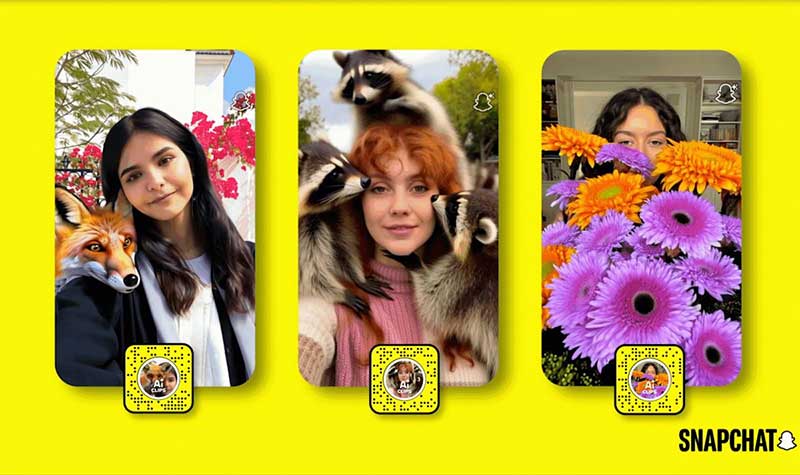
Create an AI video from a photo
1. Open the Lens carousel
Open Snapchat's camera and swipe through the Lens carousel. Use Lens Explorer or search if an AI video option is not visible among the suggested effects. Look for a Lens whose description says it animates or transforms a photo.
2. Check access requirements
Open the Lens information before continuing. If Snapchat asks you to start or upgrade a subscription, review the billing period, renewal terms, and current feature description. Do not rely on an old monthly price quoted by an article.
3. Choose the effect
Select a theme that fits the image and the result you want. Generative Lenses usually constrain the scene, motion, and style, so a racing Lens will not provide the same creative control as a general text-to-video editor.
4. Take or select a photo
Use a new photo or choose an eligible image from your camera roll. A front-facing portrait with good lighting, a visible face, and a simple background will often give the system clearer source material. Avoid blurry, heavily cropped, or low-resolution images.
5. Generate and inspect the clip
Start generation and wait for processing. Before saving, watch the entire result and check faces, hands, clothing, background details, text, and sudden scene changes. Regenerate with a different source photo or Lens if the animation distorts the subject.
6. Save or share
Use Snapchat's available controls to save the clip, send it to friends, add it to a Story, or export it where permitted. The exact buttons depend on your app version and device.
Why the result may look wrong
- The face changes: Use a sharp, front-facing portrait without strong shadows or obstructions.
- Hands or objects are distorted: Choose a simpler pose or crop the source around the main subject.
- The background flickers: Try an uncluttered image with clear separation between subject and background.
- The wrong person moves: Use a photo with one prominent subject.
- The Lens is missing: Update the app and check availability; the feature may not be enabled for your account.
Privacy and consent
Use your own image or obtain the subject's permission. Do not animate a private photo, a child's image, or another person's likeness in a misleading or embarrassing context. A photo uploaded for AI processing may be handled differently from an ordinary local edit, so review Snapchat's current privacy information and in-app notice.
Remove visible addresses, school names, ID cards, license plates, financial information, and other personal details before uploading. If the clip could be mistaken for a real event, label it as AI-generated when sharing outside a context where the effect is obvious.
AI Lens vs. full text-to-video editor
A themed Lens prioritizes speed and simplicity. It supplies the scenario, movement, framing, and visual style, leaving the user to choose the source image. A full text-to-video tool generally offers more control over subject, camera movement, duration, and scene details, but it also requires more prompting and editing.
Use a Snapchat AI Lens for a quick social clip. Choose a dedicated video editor when you need precise timing, brand consistency, captions, multiple shots, licensed audio, or detailed control over the final composition.
Before posting
Confirm that the clip does not reveal personal information, misrepresent someone, violate copyright, or make a false claim about a real event. AI video can look convincing even when it contains impossible details. A short review and a clear disclosure protect both the subject and the audience.
Related Articles
 How to Use Hailuo AI to Turn Photos Into Videos3 minutes read
 Apple Clips Has Just Been Updated with Many New Features Worth3 minutes read
 What Are Compound Clips in Davinci Resolve? How Does It Use?7 minutes read
 Google Photos Integrates Veo 3: Upgraded AI Photo-to-video Feature4 minutes read
 How to Watch Videos from the Thumbnail Screen on Opera4 minutes read
 How to Turn Off Moving Photos in Google Photos: Step-by-Step Guide4 minutes read
Reader Comments 0
Sign in with email or Google to join the discussion.