Table of Contents
Many people think that the only way to experience Linux on a computer is to create a bootable USB. In fact, there are simpler methods to try a Linux distribution (distro) without booting from USB. Here are 3 popular ways.
1. Using Virtual Machine
A virtual machine allows you to run another operating system right inside your current computer. In other words, you are 'running a computer inside your computer'.
The biggest advantage is that you can try almost any Linux distribution without rebooting your computer. With enough resources, you can experience Linux as smoothly as when installing directly.
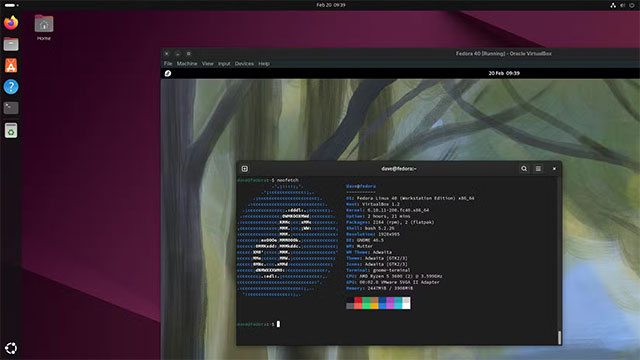
Points to note:
- The virtual machine will share CPU, RAM… with the main operating system. If the computer is weak or has few free resources, the experience may be slow.
- If your computer is powerful, you can give the virtual machine enough RAM and CPU cores to experience a near real installation.
Virtual machines also support testing operating systems that are not compatible with current hardware, such as DOS, old Debian versions (pre-2005) or Windows XP.
2. Use DistroSea – experience Linux right on your browser
DistroSea is a website that allows you to run more than 60 Linux distributions directly in your browser, without installing or downloading ISO files.
Just select the Linux version you want to try, press Start , wait for the system to initialize for a few seconds and you can experience it. During the Linux Mint test on DistroSea, the system ran quite smoothly, although sometimes it lagged a bit due to the use of remote technology (noVNC).
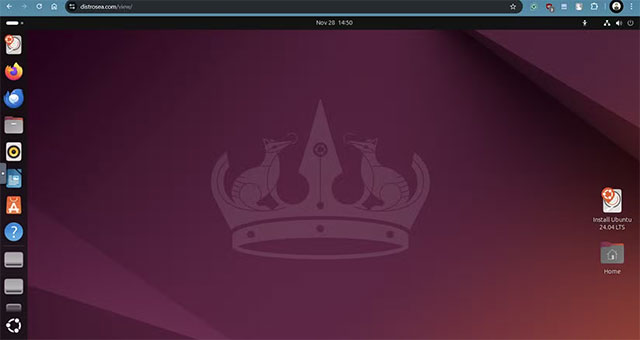
Advantage:
- No need to install software or USB boot.
- Quick operation, only takes a few minutes.
Disadvantages:
- Limited to Linux distros available on DistroSea.
- Quality of experience depends on internet speed.
If you just want to 'take a look' at the interface and basic usage of a distro, this is an extremely convenient choice.
3. Run Linux via Docker
Docker is best known for deploying services, but it can also be used to run Linux on your machine.
Docker provides command line access by default, but you can also install a graphical user interface (GUI) via noVNC, like DistroSea.
Some developers like LinuxServer.io have provided 'webtop' containers that let you use Linux right in Docker. However, the list of supported distros is limited, mainly Alpine, Arch, Debian, Fedora, Ubuntu…
Pros: No reboot required, customizable to your needs. Cons: Setup is a bit complicated if you're new to Docker, not the best option for trying out different Linux distributions.
In short:
- If you want the full experience: Virtual Machine is the best choice.
- If you want a quick and convenient try: DistroSea is number 1.
- If you like tinkering with technology: Docker is also worth a try.
Good luck!
Final Thoughts
Overall, 3 Ways to Try Linux Without Using USB is best understood by considering the main facts, practical context, and limitations together. Use the details above as a clear starting point and confirm time-sensitive information when necessary.
FAQ
What does this article explain about 3 Ways to Try Linux Without Using USB?
Many people think that the only way to experience Linux on a computer is to create a bootable USB. In fact, there are simpler methods to try a Linux distribution (distro) without booting from USB. Here are 3 popular ways.
What should you know about 1. Using Virtual Machine?
A virtual machine allows you to run another operating system right inside your current computer. In other words, you are 'running a computer inside your computer'.
Should time-sensitive details be verified?
Yes. Software features, game codes, product specifications, prices, and research findings can change. Confirm important details with an official or primary source when accuracy affects your decision.
Related Articles
 5 Ways to Make Your Switch from Windows to Linux Easier: Practical Guide7 minutes read
 How to Run Linux Software: 7 Ways to Run Linux Software on9 minutes read
 Check the Current User on Linux: What You Need to Know8 minutes read
 5 Ways to Make Linux Desktops Look Great8 minutes read
 7 Ways to Restart Linux from Terminal7 minutes read
 How Is Arch Linux Different from Other Linux Versions?8 minutes read
Reader Comments 0
Sign in with email or Google to join the discussion.