Table of Contents
Explore want to try Linux? installing ubuntu or fedora is enough for beginners.
You may have heard that CachyOS offers the best performance, Linux Mint is beginner-friendly, Zorin OS is suitable for those switching from Windows, or Bazzite is made for gaming. Those projects are all good, but this excessive diversity makes the question of 'how to leave Windows' unnecessarily complicated. Linux is indeed 'infinitely diverse,' but for newcomers, too many choices can be a barrier.
If you want to try Linux on your desktop, temporarily ignore the online debates and go straight for Ubuntu Desktop or Fedora Workstation. Later, when you're more familiar with it and want to personalize it further, distro hopping can always be done then.
Why choose Ubuntu?
Ubuntu Desktop can be considered the 'default' Linux distribution for many people. It's a versatile Linux operating system that uses the Canonical-tuned GNOME desktop environment and comes with many familiar system applications. Ubuntu is easy to install, has a rich software repository, and runs stably on most modern hardware.
A major strength of Ubuntu is its clear release cycle and long-term support. If you like new things, Ubuntu has major updates every six months (usually in April and October). If you prioritize stability, just use the LTS versions, and you won't have to worry about upgrades for years.
Ubuntu is commercially backed by Canonical and is now pre-installed on many machines from Dell, HP, Lenovo, Alienware, and more. This means the operating system must be stable, secure, and reliable to meet business needs. While Canonical doesn't always make perfect decisions, Ubuntu remains a safer choice compared to distros maintained by smaller teams.
If you don't like the default GNOME interface, you can try the official variants. Among them, Kubuntu is the most notable option, using KDE Plasma with a taskbar and application menu styled more like Windows.
If you're using Ubuntu (or its 'flavor' versions), you should install Flatpak and Flathub to expand your app store. If you play games, download Steam from Valve's official website, as the Steam version in the Ubuntu app store is Snap and not fully supported by Valve.
Fedora: a clean, modern choice
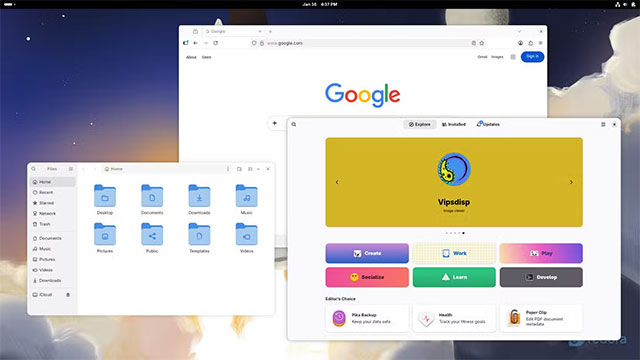
Another excellent option for beginners is Fedora Workstation. Fedora also uses GNOME like Ubuntu, but with fewer modifications, giving it a more 'pure GNOME' feel. It has a clean, modern interface, good hardware support, and almost all the same software as Ubuntu.
Fedora has existed since 2003 and is sponsored by Red Hat, serving as the foundation for Red Hat Enterprise Linux. It's a long-standing, stable project with a strong focus on security. However, Fedora doesn't have an LTS (Long Term Software) version; each release only receives support for about 13 months, with updates every 6 months.
If you don't like GNOME, Fedora has official Spin versions, which change the desktop environment and some applications. Fedora KDE Spin is a very reasonable choice for those familiar with Windows, thanks to its familiar taskbar and menu interface.
For those who are prone to messing up their systems (or want absolute security), Fedora Silverblue is a worthwhile option. It's an immutable system, applications are sandboxed, and the background system is protected. If an update fails, Fedora simply rolls back to its previous state – similar to how Android or Chromebooks work.
Ubuntu and Fedora are recommended because they are versatile, well-tested, and highly supported distros. Both perform well for work, entertainment, gaming, web browsing, and multimedia viewing. For most users, they will 'run as is'.
After using GNOME for a while, if you don't like it or want a different experience, it will be much easier to try other distros. Once you're familiar with Linux, you'll know what you need and which direction to take.
The good news is that now, migrating to a Linux distro is much easier than migrating from Windows to Linux. Thanks to Flatpak and Flathub, most popular applications are compatible with all distros, eliminating the "this application is only available on Ubuntu" situation that existed before.
In conclusion: if you're new to Linux, just choose Ubuntu or Fedora, and then explore further from there.
Final Thoughts
Understanding want to try linux? installing ubuntu or fedora is enough for beginners makes it easier to evaluate the information and apply the most relevant recommendations. Focus on the key points above and verify details that may change over time.
FAQ
What is want to try linux? installing ubuntu or fedora is enough for beginners?
Explore want to try Linux? installing ubuntu or fedora is enough for beginners.
What key points does this article cover?
The article focuses on Why choose Ubuntu?, Fedora: a clean, modern choice, with practical explanations and examples.
How can you use this information in practice?
Use the explanations to compare options, verify important details, and make a more informed decision. Apply the recommendations that best match your goals and situation.
Related Articles
 Linux: Compare Fedora and Ubuntu11 minutes read
 5 Things to Do When Installing Ubuntu on PC6 minutes read
 Run Linux from USB Flash Drive18 minutes read
 Why Do So Many People Switch from Ubuntu to Fedora Silverblue After Years Of?6 minutes read
 Instructions for Speeding Up Fedora Linux Application6 minutes read
 How Is Arch Linux Different from Other Linux Versions?8 minutes read
Reader Comments 0
Sign in with email or Google to join the discussion.