Table of Contents
This updated guide answers the question 'Why Instagram's Edits Tool Is the Best Free Video Editor for Beginners' with clear explanations and practical context. Even if CapCut isn't banned, it is not the best free video editor for you. Instagram's Edits tool is a great alternative, whether you're posting short-form videos to Instagram or doing any other type of video editing.
8. Faster Than CapCut
One of the first things you'll notice about Edits is that it is a lot faster than CapCut. While CapCut can feel clunky at times, Edits runs pretty smoothly. Even with multiple clips uploaded, you shouldn't have too much trouble piecing your content together.
Editing also seems more intuitive. You can do things like reduce clip length without the app crashing, and you will not have trouble finding music and the app crashing.
7. Better Integration with Instagram
If you're editing Reels for Instagram, Edits is the new tool you'll want to use. You can choose to post directly to the app or download the video for further editing first. If you already have the Instagram app installed, you can quickly connect your account.
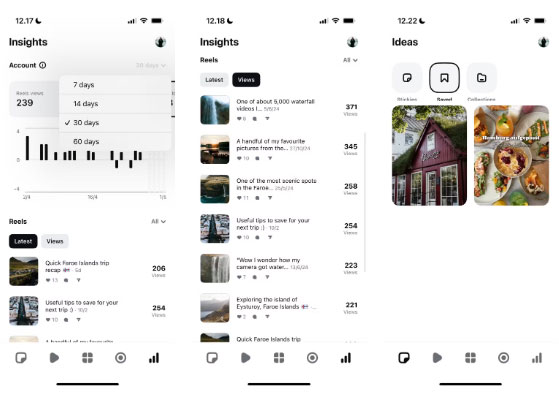
Along with uploading videos from Edits, you can see how your content is performing. The dashboard displays a variety of metrics for Reels, including likes and views. You can see how many followers, likes, comments, etc. you've received in the last 7-60 days.
With Edits, you can even view saved Reels without having to go into the Instagram app. Any Collections you create will appear in Edits, and you'll also see the Explore page available in the app.
6. Better Music Library
CapCut's music library is decent, but never stands out. Many users export their short videos from CapCut before adding music to Instagram, TikTok, and other apps. One of Edits' biggest advantages is its excellent music selection, making it one of the best apps for Instagram creators.
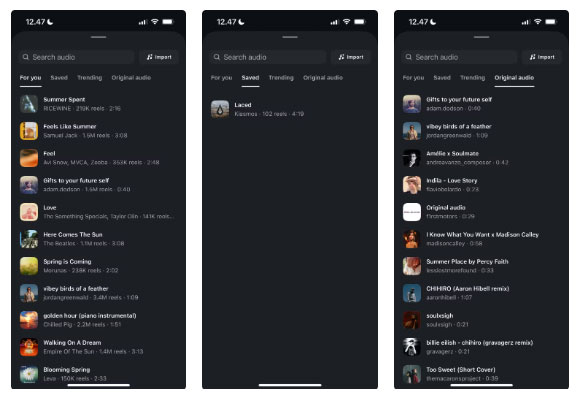
You can access the same music you find on Instagram, including many of the latest songs on the charts. naturally, you'll have to think about copyright when uploading these songs to another platform, but at least for Instagram, it is pretty good.
Along with selecting music from your library, you can import your own tracks. Plus, you can choose from saved music, trending songs, and your own original sounds.
5. User - friendly Edits
it is rare to find a free video editor that is also intuitive, but Edits delivers. It does it better than CapCut, too. Each section is easy to navigate, and the icons are intuitive.
While Edits does not have a ton of features, all the ones you need are easy to find. Learning how to use the app should take a few minutes at most.
Along with uploading videos easily, you can record your own short-form content directly in Edits. Doing so is simple; you just need to grant permissions to your camera and microphone. If you plan on using Edits to edit your videos, this is a better option than using the Instagram app.
4. Add Ideas with Stickies
Sometimes you may have creative ideas that you just cannot bring to life. Instead of letting them go unnoticed, you can keep track of them in Edits with Stickies.
Stickies are digital notes that you can use to brainstorm whenever you need to. You can customize the colors, making it easier to categorize your ideas. Creating Stickies is simple; just tap the + button, write down your idea, and tap Save .
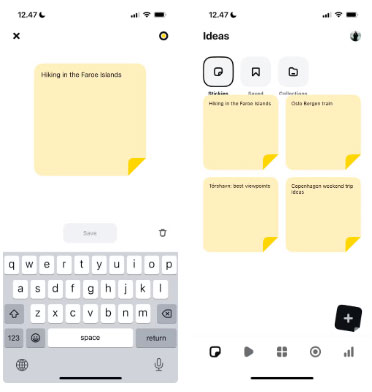
You can edit or delete Stickies at any time. Since you have many space to work with, feel free to add as many details as you like to your ideas.
3. Better Sound Control
Better music isn't the only thing Edits has to offer. Audio controls are more intuitive, making it easier to fine-tune what others hear when you post your content to Instagram.
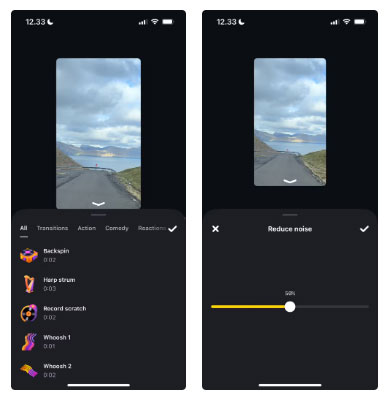
You can quickly reduce the noise in each clip using the slider, and to mute certain parts of your video, you can do that. Edits has a variety of audio effects features, such as reverse and reaction effects.
Edits also lets you extract audio, Along with adding imported audio subtitles when needed.
2. Powerful Export Options
Edits gives you more control over your exports. You can choose whether you want the colors in your video to be in high-definition (HDR) or standard-definition (SDR) range.
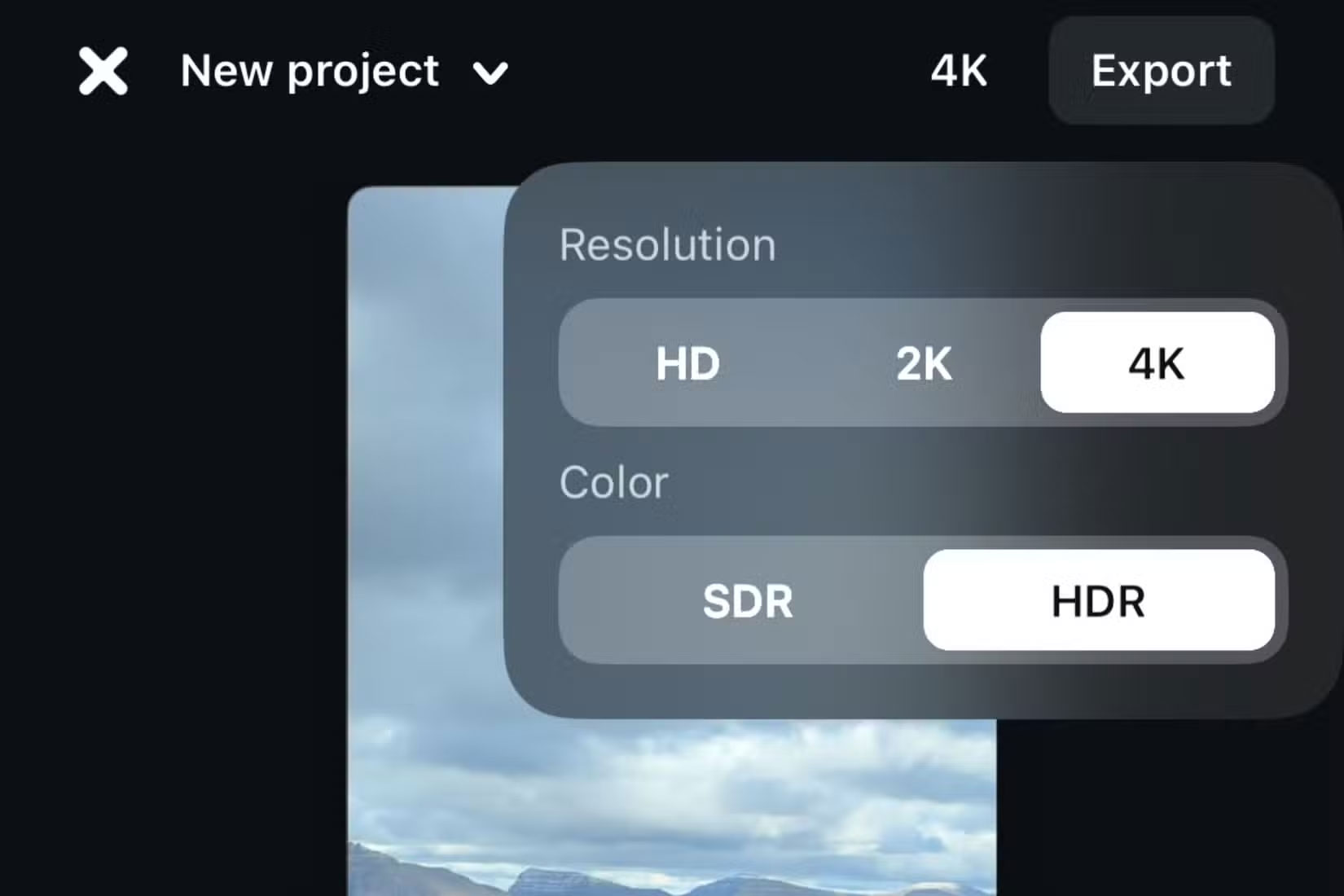
In terms of resolution, you can choose between HD, 2K, and 4K. In general, It is best to choose the original video quality to avoid any accidental complications. You can see how your video will look in the preview before editing.
1. No Paid Features
While CapCut has free and premium tiers, Edits is completely free. You do not have to worry about wanting to add a cool feature to your video and then having to pay for it.
Since all the tools are free, you can focus on creating with complete freedom. This also helps Edits outperform many other CapCut alternatives.
Edits is a free and easy-to-use video editor that is a great CapCut alternative. You have full control over your video editing and exporting features, and you can even upload to Instagram directly from the app. Even if you plan on sharing content on other platforms, it is worth using.
FAQ
What is the main takeaway about Why Instagram's Edits Tool Is the Best Free Video Editor for Beginners?
The key is to understand the core idea, compare the available options, and apply the practical guidance that matches your situation.
What should beginners know about Why Instagram's Edits Tool Is the Best Free Video Editor for Beginners?
Start with the essential steps and terminology. Avoid changing advanced settings until you understand how they affect performance, privacy, cost, or compatibility.
How can I use this information in practice?
Follow the relevant section in order, test one change at a time, and confirm the result before moving to the next step or recommendation.
Related Articles
 VN Video Editor: Complete Guide for Beginners6 minutes read
 7 Top AI Video Editors on Mobile: Best Options Compared9 minutes read
 Top 4 Free Video Editors for YouTube7 minutes read
 Download VSDC Video Editor PRO, Video Editing Application Worth5 minutes read
 How to Use Video Editor on Windows 109 minutes read
 Top Free Video Editing Apps Without Watermarks15 minutes read
Reader Comments 0
Sign in with email or Google to join the discussion.