Table of Contents
Spam drives people crazy, and you probably feel the same way. Filters catch some spam, but not all of it. Now, you can use a simple trick to completely bypass spammers instead of defending against them.
Create unique email addresses for every service
The core strategy is simple. Use your real email address for as few online services as possible. Instead, each website, app, or newsletter has its own email alias by category. But this doesn't involve dealing with dozens of inboxes. These aliases simply act as forwarders, redirecting everything to your main account while keeping your real address private from third parties.
This approach also solves a big privacy problem. When a service you use suffers a data breach or decides to sell its user list, your email is the first thing exposed. This is why a single sign-up can expose you to a lot of spam. By using an alias, you know which service is responsible when the spam arrives.
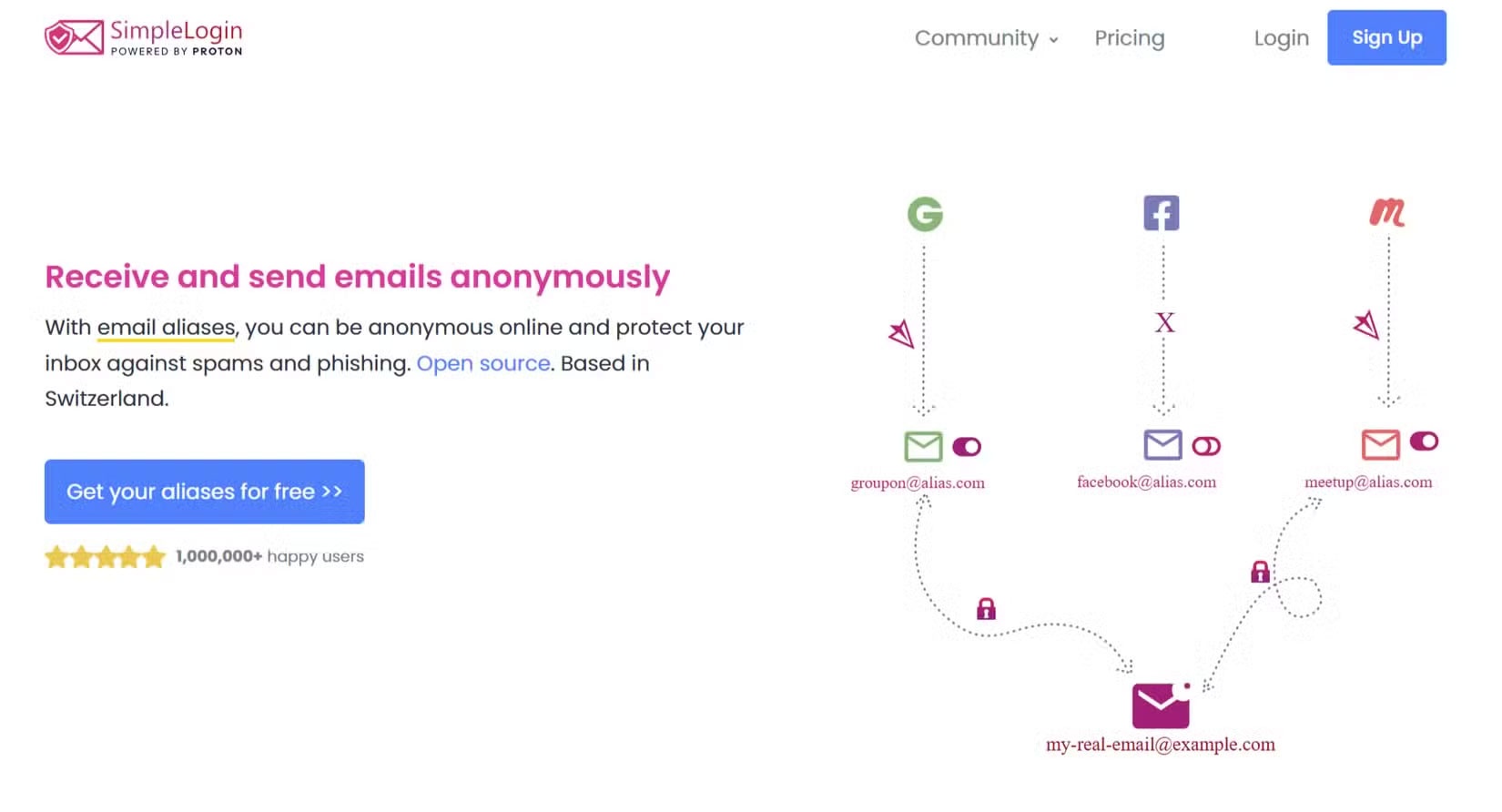
If an alias, such as shopping.site@mydomain.com, starts receiving spam, you know exactly who the culprit is. More importantly, you can disable that specific alias, blocking spam at the source without affecting any of your other accounts.
Many service providers offer this functionality. Some services, such as Gmail and Outlook, support address addition, allowing you to add tags to usernames (for example, yasir+tag@gmail.com ).
But you can use a service that has a custom domain. It allows you to create aliases that are easier to remember and more obvious. There are some other email clients that allow you to create additional addresses for security.
Setting up an email alias takes just minutes
Getting started with email aliases is quick and you don't need to be a technical expert. The method you choose depends on your email provider and the level of privacy you want.
For many people, the built-in features in their current inbox are more than enough to get started. But a dedicated service offers more robust protection.
Using plus address: Fastest method
If you use Gmail or Outlook, you can create an alias without any setup. This technique, called a plus address, works by adding a plus sign (+) and a unique identifier to your existing email address. For example, if your email is yasir@gmail.com , you can sign up for a newsletter using yasir+newsletter@gmail.com .
All mail sent to that address will go straight to your yasir@gmail.com inbox. The main advantage is simplicity, so you can create them right away.

That said, this method will reveal your primary username, and some websites unfortunately reject email addresses with a plus sign (+), which limits its widespread use.
- How to add, delete, edit Outlook Email Alias?
Using a dedicated alias service: The safest method
For maximum security, many people prefer to use a dedicated alias service like SimpleLogin, developed by Proton. This service allows you to create separate aliases without revealing your primary email.
For instance, use an alias for online shopping to separate and secure marketing emails. If that address gets spammed, you can log into your SimpleLogin account and disable it there.
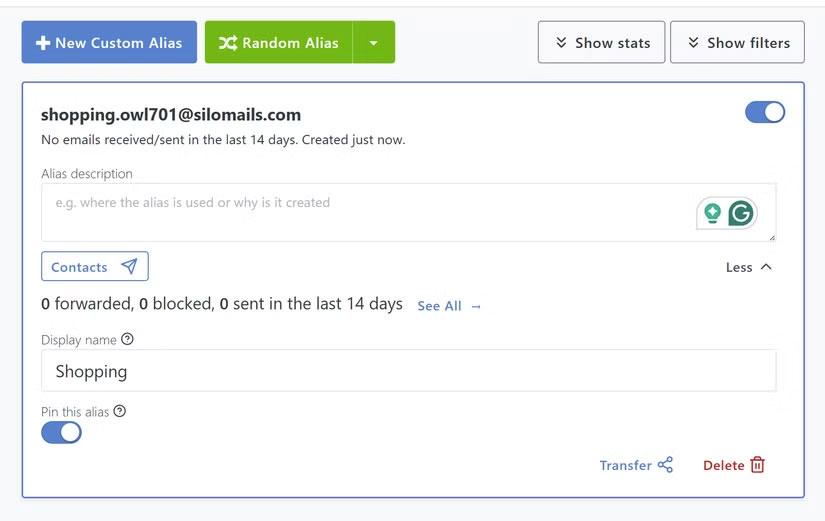
To set up SimpleLogin, you'll need to sign up and then use its browser extension or app to create a new alias for each login. It lets you create 10 free email aliases, which is enough to get you started. But if you need more, you can purchase a premium plan, which costs $36/year or $4/month for unlimited aliases.
Tip : This is also one of the effective ways to block email tracking pixels from your inbox before they have a chance to reach you.
Keep your inbox clean with simple filters
Using aliases is only half the battle; you should combine them with automatic filters. Since each service uses a unique address, you can create rules in your email client to automatically sort incoming mail based on the alias it was sent to. This is much more reliable than filtering by sender or subject.
For each new alias, set up a corresponding filter. For example, emails sent to the alias newsletter.service@mydomain.com will automatically be tagged as newsletters and moved to a dedicated folder, bypassing your main inbox. This helps you see only high-priority mail, not promotional messages.
This system also acts as a strong layer of security. If you receive an urgent email purporting to be from a particular service, but it isn't sent to the specific service folder, you'll know right away that it's a scam. Streamlined mail also makes it harder for you to be scammed, and it effectively blocks phishing emails from your inbox.
Spammers are constantly improving their tactics, but this method has been ahead of them for years. Not only does it help reduce spam, it also protects you from being tracked. Once you control who has access to your inbox, your inbox becomes much easier to manage.
Final Thoughts
Overall, Use This Simple Email Trick to Outsmart Spammers is best understood by considering the main facts, practical context, and limitations together. Use the details above as a clear starting point and confirm time-sensitive information when necessary.
FAQ
What does this article explain about Use This Simple Email Trick to Outsmart Spammers?
Spam drives people crazy, and you probably feel the same way. Filters catch some spam, but not all of it. Now, you can use a simple trick to completely bypass spammers instead of defending against them.
What should you know about Create unique email addresses for every service?
The core strategy is simple. Use your real email address for as few online services as possible. Instead, each website, app, or newsletter has its own email alias by category. But this doesn't involve dealing with dozens of inboxes.
Should time-sensitive details be verified?
Yes. Software features, game codes, product specifications, prices, and research findings can change. Confirm important details with an official or primary source when accuracy affects your decision.
Related Articles
 Popular Strategies and Strategies of Spammer12 minutes read
 How to Encrypt Email: Email Encryption10 minutes read
 Spam Uses Personal Style to Trick E-mail Users1 minutes read
 What Is Phishing Email? How to Prevent Phishing Email Effectively12 minutes read
 Spammers Are Getting... Smarter1 minutes read
 How to Add Email Addresses to an Address Book2 minutes read
Reader Comments 0
Sign in with email or Google to join the discussion.