Table of Contents
Microsoft disables preview feature in File Explorer on Windows 11 and Server versions to prevent NTLM data leakage, helping to increase security for users.
Earlier this October, Microsoft released the October 2025 security update for Windows 11, which included a notable change in File Explorer. From now on, the Preview Feature will no longer work with files downloaded from the Internet, and the main reason is to close a serious security hole related to user data leakage.
Why did Microsoft disable this feature?
As explained in a newly published support document, Microsoft said that disabling preview mode to fix a security vulnerability could expose NTLM hashes – a form of user authentication data in Windows systems.
Specifically, if a user opens a preview of a file containing HTML tags that lead to an external path, an attacker could exploit this to collect sensitive information, including user accounts or passwords.
To prevent this, Microsoft has disabled the default preview feature for files that have 'Mark of the Web' – that is, files downloaded from the Internet. When you try to preview a file like this, Windows will display a warning:
' The file You are attempting to preview could harm your computer. If you trust the file and the source you received it from, open it to view its contents.'
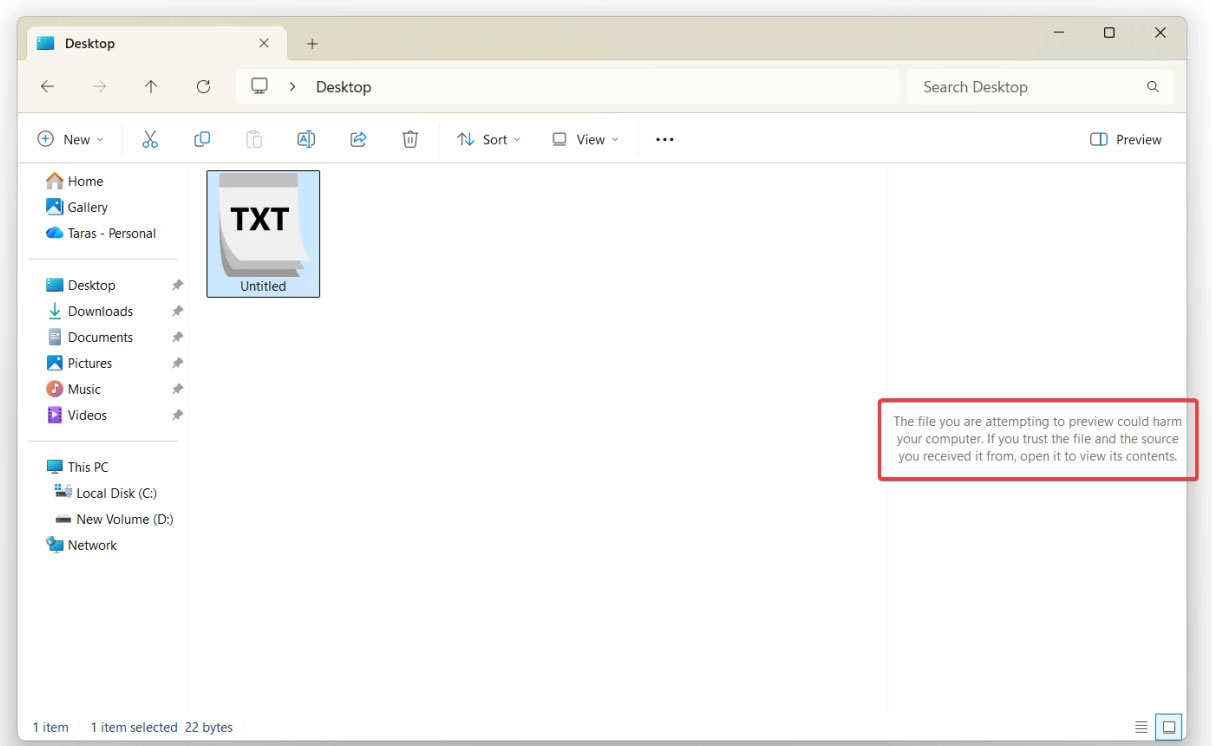
If you know the origin of the file and believe it is safe, you can remove The 'Mark of the Web' By:
- Right click on the file.
- Select Properties .
- Check the Unblock Box.
This change only affects the preview mode, it does not remove the ability to open or edit downloaded files directly.
According to Microsoft, previewing is currently disabled for files downloaded from the Internet on the following operating systems:
- Windows 11
- Windows Server 2012 / 2012 R2
- Windows Server 2016 / 2019 / February 23 / 2025
Windows 10 is not affected, but the operating system has reached the end of its official support lifecycle. Consumers can only get security patches if they sign up for the Extended Security Updates (ESU) program, which extends the update period by up to three years (with a paid business version).
You can refer to the details of this change in the support article KB5070960 on Microsoft's official website.
FAQ
What should you know about Microsoft disables previews in file explorer for security?
In practical terms, Microsoft disables preview feature in File Explorer on Windows 11 and Server versions to prevent NTLM data leakage, helping to increase security for users.
Why does Microsoft disables previews in file explorer for security matter?
The article highlights that from now on, the Preview feature will no longer work with files downloaded from the Internet, and the main reason is to close a serious security hole related to user data leakage.
What is the main takeaway?
The main takeaway is that as explained in a newly published support document, Microsoft said that disabling preview mode to fix a security vulnerability could expose NTLM hashes – a form of user authentication data in Windows systems.
Related Articles
 6 Free Tools to Make Windows File Explorer Better: Practical Guide5 minutes read
 6 Windows File Explorer Add-ons That Make Life Easier7 minutes read
 7 Useful Changes Microsoft Should Make to File Explorer7 minutes read
 How to Enable Photo Previews in Folders (Windows 10): Clear Instructions6 minutes read
 How to Speed up File Explorer on Windows 11: Step-by-Step Guide5 minutes read
 File Explorer Windows 11: Complete Guide3 minutes read
Reader Comments 0
Sign in with email or Google to join the discussion.