Table of Contents
This practical guide explains how to always get perfect replies from ChatGPT with these 7 prompts. Follow the steps in order, review the requirements first, and use the troubleshooting notes when a setting or option does not work as expected.
1. RAIN: Set clear goals
RAIN stands for Role, Aim, Input, and Numeric Target. It helps you set the right expectations for your AI chatbot.
First, give ChatGPT a clear role, such as a professional science writer or a book researcher. Then, define a goal, such as optimizing a paragraph or summarizing content. Next, provide precise input for the task. Finally, set a numerical limit, such as 'under 100 words' or 'x number of bullet points.'
The goal is to always get concise but accurate results.
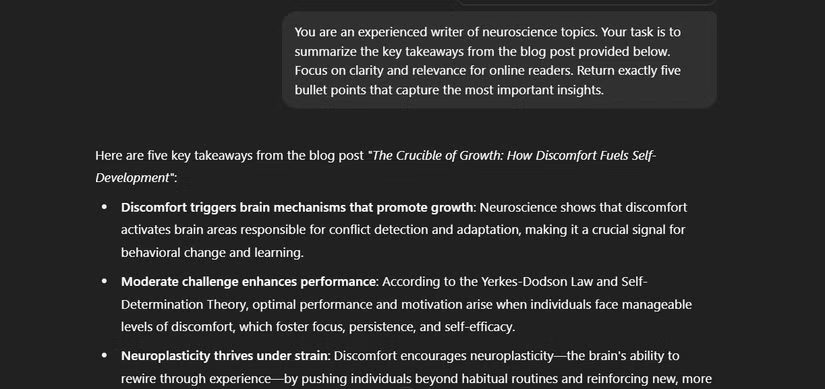
You are an experienced writer of neuroscience topics. Your task is to summarize the key takeaways from the blog post provided below. Focus on clarity and relevance for online readers. Return exactly five bullet points that capture the most important insights.
You are an experienced writer on neuroscience topics. Your task is to summarize the key points from the blog post provided below. Focus on clarity and relevance to online readers. Return exactly 5 bullet points that capture the most important insights .
This prompt checks every element of RAIN:
- Role : Scientific content writer
- Aim : Summarize the main points
- Input : Blog post
- Numeric Target : Five bullet points
2. RTF: Tell ChatGPT exactly what to do
RTF stands for Role, Task, Format. This method is ideal when you need something simple and clear.
Start by assigning a role to ChatGPT, such as science tutor. Then assign a task, such as rewriting or summarizing text. Finally, specify how you want the response formatted — bullet points, short paragraphs, or lists.
Act as a helpful science tutor. Your task is to rewrite the student's explanation of photosynthesis to make it clearer and more accurate. Format your response as a bullet-point list that simplifies key concepts for a middle schooler.
Input:
[Insert the student's original explanation here]
Act as a helpful science tutor. Your task is to rewrite your student's explanation of photosynthesis so that it is clearer and more accurate. Format your answer in bullet points, simplifying the key concepts for middle school students.
Input:
[Insert original student explanation here]
3. RISE: Easy Step-by-Step Answers
RISE stands for Roles, Inputs, Steps, and Expectations. RISE is useful when structured step-by-step guidance is needed.
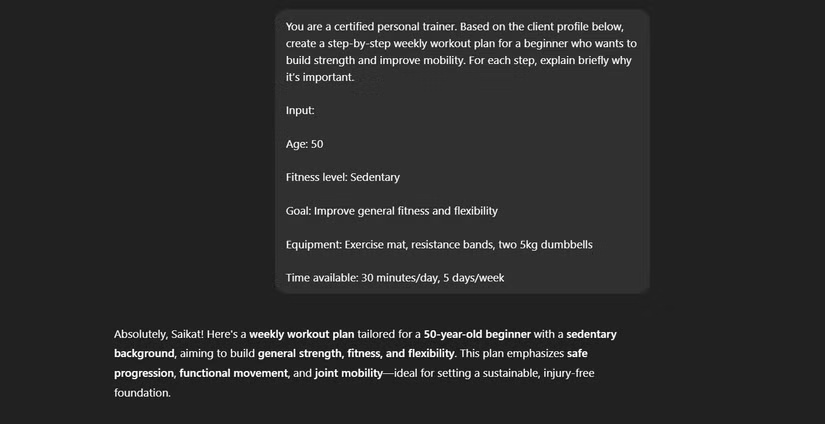
Give ChatGPT a role, such as a personal trainer. Then, provide input – perhaps a fitness goal. Then, ask ChatGPT to outline clear steps and explain each step. Finally, describe exactly what a successful outcome looks like.
When planning your workouts, RISE ensures that the advice given is detailed, sensible and practical.
4. FLOW: Optimizing technical or creative output
FLOW includes Function, Level, Output, Win Metric. It is perfect for high quality standardized results.
First, state the function of ChatGPT, like a UX designer or a digital marketer. Then, choose your skill level: Beginner, Intermediate, or Expert. Next, specify the type of output required, such as wireframes or marketing sketches. Finally, provide a clear win metric, such as compliance with specific standards or improved engagement.
You are an intermediate-level UX designer. Create a wireframe specification for a mobile app signup page. Make sure it meets WCAG 2.2 AA accessibility standards. Include labeled sections, form field descriptions, and key usability tips.
You are an intermediate UX designer. Create a wireframe specification for a mobile app registration page. Make sure it meets WCAG 2.2 AA accessibility standards. Include labeled sections, form field descriptions, and key usability tips.
5. ROSE: For perfect results
ROSE stands for Role, Objective, Steps, and Expected Result. Use it for strategic tasks that require clear outcomes.
You might start by assigning ChatGPT a role, such as a growth strategist or a CEO. Then, identify a specific goal, such as improving customer retention. Next, provide clear, actionable steps for ChatGPT to take. Finally, describe exactly what you want the outcome to be, often including measurable goals.
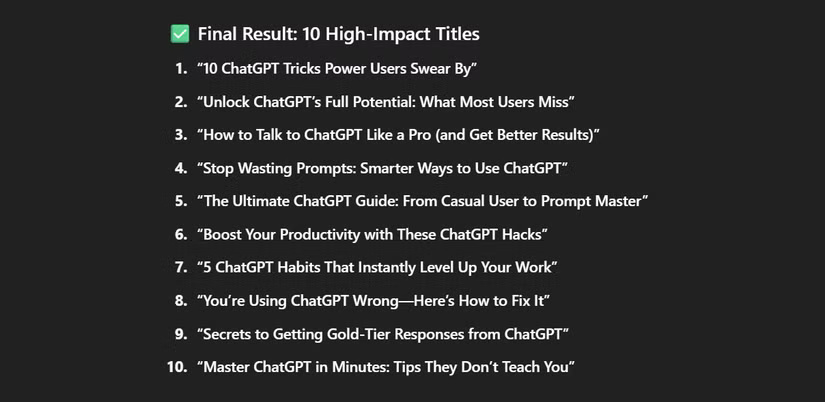
You are a creative headline specialist. Your objective is to generate attention-grabbing titles for an article about using ChatGPT more effectively. Outline the steps you'll take to brainstorm and refine these titles. The expected result is a list of 10 polished, high-impact titles suitable for online publication.
You are a headline writer. Your goal is to create attention-grabbing headlines for an article about using ChatGPT more effectively. Outline the steps you will take to brainstorm and refine these headlines. The desired result is a list of 10 well-crafted, impactful headlines that are suitable for online publication.
6. PIVO: Solving problems with systems
PIVO stands for Problem, Insight, Voice, and Outcome. For example, as a newsletter writer who offers creative coaching services to writers, you might use this prompt.
Be clear about the problem you're solving. Then, share an insight, such as a powerful fact or statistic, to support the content. Next, determine the tone—conversational, witty, formal, or friendly—to suit your audience. Finally, clearly outline the desired outcome, such as getting readers to sign up or download something.
Problem: Many writers feel stuck and uninspired while working on their drafts.
Insight: Studies show that short creative prompts can boost writing output by 20%.
Voice: Friendly, supportive, and encouraging—like a personal coach.
Outcome: Encourage readers to join my free weekly email series offering creative prompts and mindset tips. Now, write a 120-word newsletter blurb that hooks attention and inspires action.
Translation:
Problem: Many writers feel stuck and uninspired when writing manuscripts.
Insight: Studies show that brief creative prompts can increase writing productivity by 20%.
Voice: Friendly, supportive and encouraging - like a personal trainer.
Result: Encourage readers to join my free weekly email series, offering creative ideas and brainstorming tips. Now, write a 120-word newsletter introduction that grabs attention and calls for action.
7. PLAN: When you need short, actionable answers
PLAN stands for Problem, Limit, Action, and Number. Use this method when you need a short, actionable list.
First, clearly define the problem. Next, set a realistic limit, such as a budget or time constraint. Then, specify the exact action you need from ChatGPT, such as suggesting tools or tips. Finally, specify the number of suggestions needed.
For example, when notes get scattered, use this prompt:
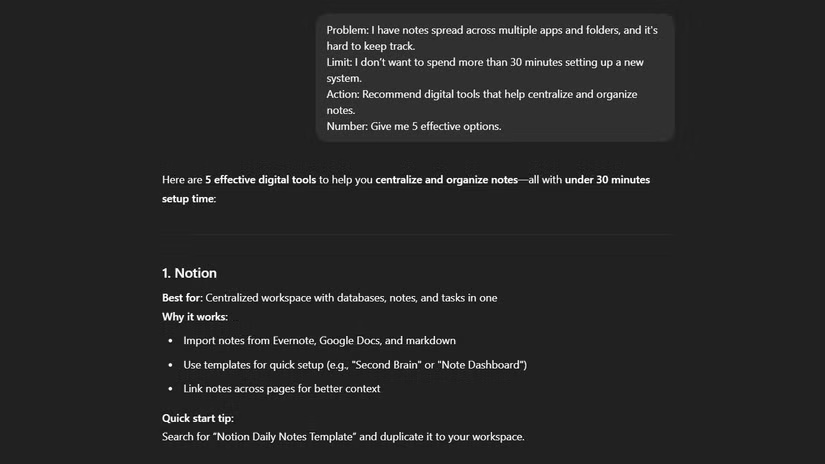
Problem: I have notes spread across multiple apps and folders, and it's hard to keep track. Limit: I don't want to spend more than 30 minutes setting up a new system. Action: Recommend digital tools that help centralize and organize notes. Number: Give me 5 effective options.
Problem : I have notes scattered across multiple apps and folders, making it difficult to keep track. Limit: I don't want to spend more than 30 minutes setting up a new system. Action: Suggest digital tools to help focus and organize notes. Quantity: Give me 5 effective options.
PLAN is perfect for quick, focused suggestions and can help turn ChatGPT into a personal assistant when time is tight.
FAQ
What should you know about 1. RAIN: Set clear goals?
RAIN stands for Role, Aim, Input, and Numeric Target. It helps you set the right expectations for your AI chatbot.
What should you know about 2. RTF: Tell ChatGPT exactly what to do?
RTF stands for Role, Task, Format. This method is ideal when you need something simple and clear.
What should you know about 3. RISE: Easy Step-by-Step Answers?
RISE stands for Roles, Inputs, Steps, and Expectations. RISE is useful when structured step-by-step guidance is needed.
What should you know about 4. FLOW: Optimizing technical or creative output?
FLOW includes Function, Level, Output, Win Metric. It is perfect for high quality standardized results.
Related Articles
 How to Come up with the Best Prompts to Learn with ChatGPT9 minutes read
 9 Great ChatGPT Prompts for a Productive Workday: Explained7 minutes read
 minutes read
 How to Create a ChatGPT Prompt That Works in All Cases: Step-by-Step Guide11 minutes read
 6 Prompts Make ChatGPT the Perfect Microlearning Tutor for Any Topic10 minutes read
 5 Tools to Help You Create the Perfect Prompt for Your AI Chatbot8 minutes read
Reader Comments 0
Sign in with email or Google to join the discussion.