Table of Contents
Claude can remember selected context across conversations, including preferences, recurring work, and ongoing projects. This can save repeated explanations, but it also means you should review what is stored and avoid importing passwords, confidential documents, health details, or other sensitive information unnecessarily.
Anthropic currently lists memory across conversations as a feature of Claude’s Free plan, although availability and menu labels can vary by account, app version, and region. If the controls below do not appear, update the app and check Claude on the web.
Turn on memory in Claude
- Open Claude on the web or in the mobile or desktop app.
- Select your profile icon and open Settings.
- Look for Capabilities or Memory.
- Enable the option that allows Claude to use or generate memory from chat history.
After activation, Claude can build a concise set of details that may be useful in later chats. It is not the same as replaying every previous conversation, and you should not assume it retained a fact unless it appears in the memory controls or Claude confirms it.
Review, pause, or reset saved memory
Open the same settings area to inspect the available controls. Depending on the version, you may be able to pause new memory while keeping existing entries, edit individual details, or reset memory completely.
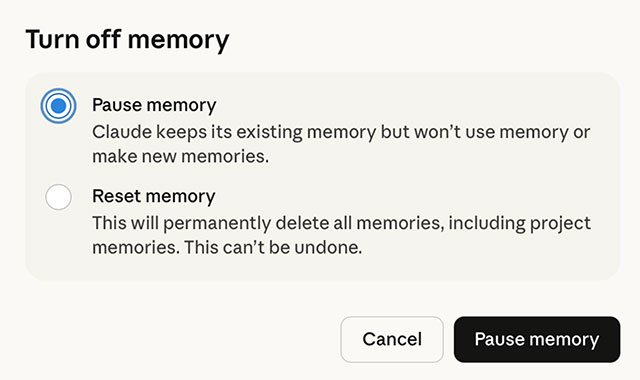
Use pause when you temporarily do not want new conversations to influence memory. Use reset or delete when stored context is incorrect, outdated, or too sensitive. Deleting a chat and deleting a saved memory may be separate actions, so check both areas when removing information.
Import context from ChatGPT or Gemini
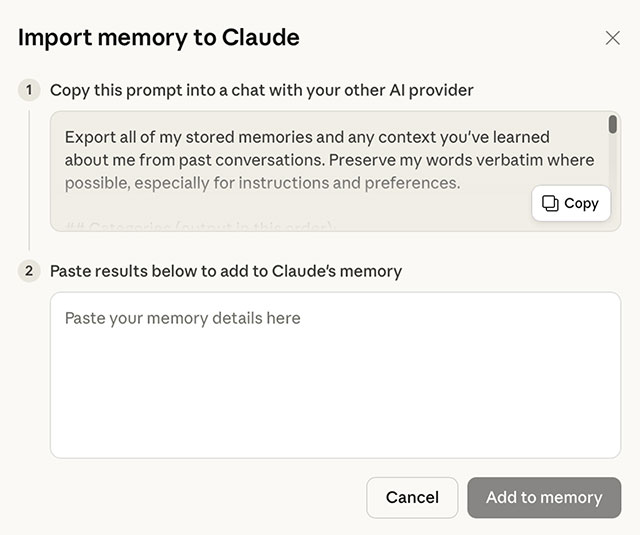
The import option is designed to transfer a useful summary, not a perfect copy of another service’s history. The exact workflow can change, but the process generally works as follows:
- In Claude’s memory settings, choose Import or Start import.
- Copy the prompt Claude provides.
- Paste that prompt into ChatGPT, Gemini, or the service from which you are moving.
- Review the generated summary or Markdown text carefully.
- Remove private, irrelevant, or outdated details before uploading or pasting it into Claude.
- Return to Claude and add the reviewed material to memory.
What should you transfer?
A compact, current summary is more useful than a large transcript. Good candidates include:
- preferred writing style and formatting;
- non-sensitive information about your role;
- project goals, terminology, and current status;
- software or tools you normally use;
- recurring constraints that affect answers.
Do not import authentication data, financial account details, private information about other people, unpublished company material, or anything your organization prohibits entering into an external AI service.
Check the result
Start a new conversation and ask Claude what it remembers about the relevant project or preference. Correct any mistaken or overly broad entry in settings. Memory can improve continuity, but it can also preserve an old assumption, so review it after a role change, completed project, or major shift in your preferences.
For current plan availability and account controls, consult Claude’s official site. Product features change, so the settings shown in your account are the final reference.
Related Articles
 Claude Offers Its AI Memo Feature for Free, Directly Competing with ChatGPT5 minutes read
 Claude vs ChatGPT: Which AI Assistant Should You Use?10 minutes read
 Should I Buy ChatGPT Plus or Claude Pro?10 minutes read
 minutes read
 What Is Claude Pro? How Does Claude Pro Compare to Chatgpt Plus?6 minutes read
 4 Ways AI Claude Chatbot Outperforms Chatgpt6 minutes read
Reader Comments 0
Sign in with email or Google to join the discussion.