Table of Contents
This updated guide examines How to Add Synonym Dictionary to Google Docs and organizes the essential facts, background, and practical takeaways in clear American English.
If you use Google Docs to create your documents, you have a few great thesaurus options, from basic built-in dictionaries to add-ons with extra features. Here's how to use a thesaurus in Google Docs.
Note : TipsMake.com has introduced how to use dictionaries on Google Docs. You can read for more details.
Thesaurus OneLook
While there is absolutely no problem with the Google Docs Dictionary tool, you might want something more powerful. And you can enjoy a tool that gives you some special features. This is where add-ons for Google Docs take effect.
OneLook Thesaurus is a great add-on for Google Docs. For example, with the word 'brochure', the Google Docs dictionary provides 14 synonyms, while OneLook Thesaurus provides as many as 42 words. Therefore, you have more options when using this add-on.
After installing the add-on, using it is easy. Select the word you want, click Add-ons from the menu, move the cursor to OneLook Thesaurus and click Synonyms. Your results will open in the sidebar.

Power Thesaurus
If you want more synonyms for selected text, consider Power Thesaurus, another great add-on for Google Docs.
For comparison, this dictionary provides 443 synonyms for the word 'brochure'. You will see the most common words first but can click the link to see the full list. This will take you to the Power Thesaurus website containing the word list.
After you install the add-on, be sure to refresh your Google Docs page. Then, select the word you want, click Add-ons from the menu, move the cursor to Power Thesaurus and click Search Selected Term to see the results in the sidebar.
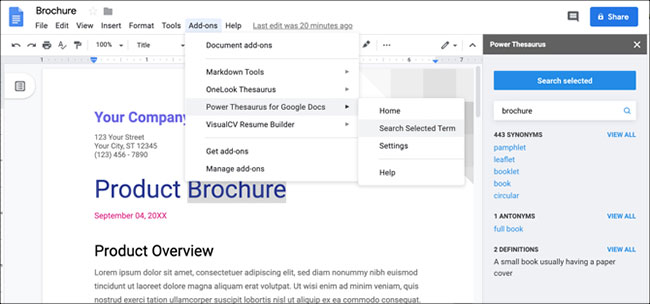
For additional features, Power Thesaurus shows you antonyms and definitions if desired. Click the Settings button (gear icon) at the bottom of the sidebar or Add-ons> Power Thesaurus> Settings from the menu.
From here, you can turn on or off the dark theme, check the boxes to display the options you want and choose to display 5 or 10 synonyms or antonyms.
FAQ
What is How to Add Synonym Dictionary to Google Docs about?
It provides a structured overview of Google Docs, explains the main context, and highlights practical takeaways for readers.
Why does this topic matter?
Understanding the main concepts helps readers evaluate the issue, avoid common mistakes, and make better-informed decisions.
How should readers use this information?
Use the guidance as a practical starting point, confirm details that may have changed, and follow current product, safety, or security recommendations.
Related Articles
 How to Use the Dictionary on Google Docs4 minutes read
 The Way Google Docs Helps You Become Professional7 minutes read
 Instructions for Dividing and Merging Columns on Google Docs4 minutes read
 How Many of the Best Features Have You Missed on Google Docs?8 minutes read
 Useful Tools to Know in Google Docs6 minutes read
 How to Connect Google Docs with n8n16 minutes read
Reader Comments 0
Sign in with email or Google to join the discussion.