Table of Contents
This guide answers "DokuWiki or Wiki.js: Is the Self-Hosted Wiki Right for You?" with a clear explanation, practical context, and the details that matter most.
DokuWiki is ideal for small teams and personal projects
DokuWiki is a lightweight, open-source wiki software built in PHP. It stores content as plain text files, making it easy to set up on any basic server without a database. Its low server requirements and simple installation process make it ideal for small teams and personal projects.
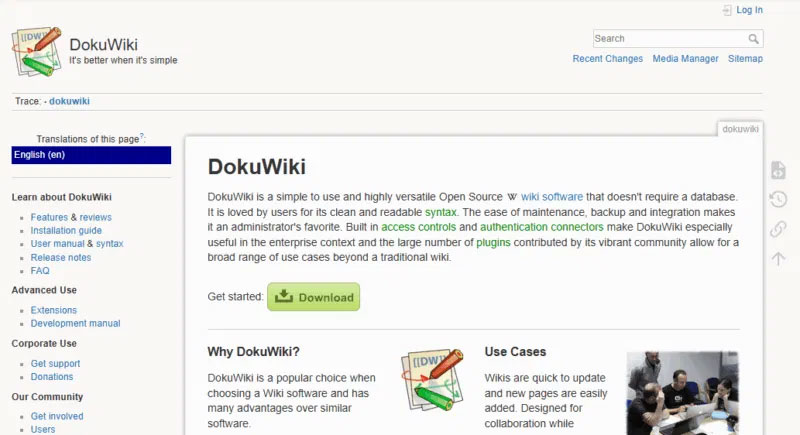
DokuWiki includes a built-in version control system to track changes, compare edits, and prevent conflicts. Access can be managed at both the page and item level, with support for LDAP and Active Directory, making it suitable for larger organizations.
DokuWiki also supports thousands of plugins for customization, although some are outdated and may not work with the latest versions. Its interface can feel outdated and lacks real-time collaboration features, as only one user can edit a page at a time. Features like tagging and privacy controls are available, but are limited compared to other modern platforms.
Wiki.js allows multiple users to collaborate at the same time
Wiki.js is a modern, open-source wiki platform that provides a user-friendly interface for both desktop and mobile devices. It supports real-time editing using Markdown, allowing multiple users to collaborate at the same time, similar to Google Docs.
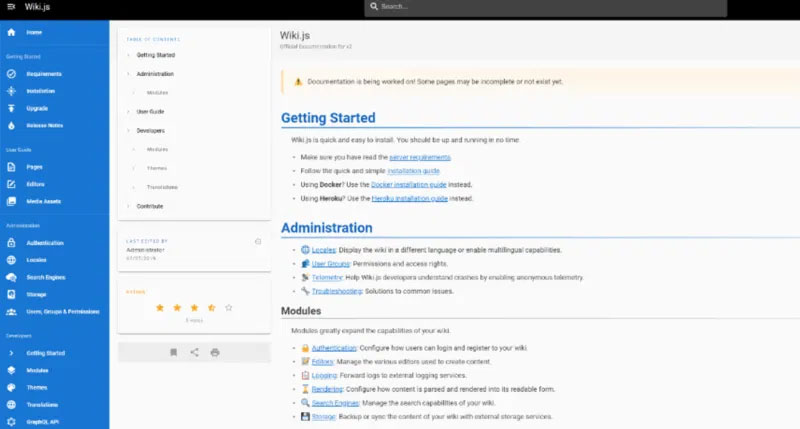
It integrates with many authentication providers like Google, GitHub, LDAP, and Discord. Git integration allows for automatic backups, version tracking, and easy content recovery. Wiki.js also comes with built-in tools for searching, media management, and image previewing, reducing the need for external plugins.
However, Wiki.js requires a SQL database and Node.js, which can make setup more complex and resource-intensive. It may not be ideal for basic hosting environments, and some users find its navigation less intuitive.
Note : Docmost is the best self-hosted Notion alternative you are looking for.
Compare security capabilities
DokuWiki provides built-in authentication and LDAP/Active Directory support via plugins. Access control is managed via ACLs, making it effective for multi-user setups. Maintaining security includes regular PHP/plugin updates, using HTTPS, and setting appropriate file permissions.
Wiki.js supports advanced security options, including 2FA, OAuth, SAML, and integration with Google and GitHub. Its RBAC system allows for granular control over user roles and permissions. Security best practices include keeping Node.js and databases up to date, using environment variables for security, and enabling Git-based version control for backups and restores.
Consider Cost When Choosing a Self-Hosted Wiki
DokuWiki is ideal for low-cost setups. Wiki.js runs without a database and works well on shared hosting or lightweight VPS.
Wiki.js requires more resources, including Node.js and a SQL database. VPS or cloud hosting is recommended, but there may be additional costs if using Docker or a managed cloud database.
Which Wiki is right for you?
Here is a detailed comparison between DokuWiki and Wiki.js, highlighting their core features, strengths, and ideal use cases:
| Features | DokuWiki | Wiki.js |
|---|---|---|
| Stack Technology | Based on PHP, stores data as plaintext, no database required | Based on Node.js, requires SQL database (e.g. PostgreSQL, MySQL). |
| Easy to set up | Easy to install on any server that supports PHP. | Requires Node.js and a database, but Docker and instructions simplify setup. |
| Editing experience | It uses its own wiki markup syntax. Visual editor can be used via plugins. | Supports Markdown, WYSIWYG, live preview and HTML |
| Authentication | Includes basic user manager and LDAP or Active Directory support via plugin. | Built-in support for Google, GitHub, LDAP, SAML, OAuth, and 2FA. |
| Access Control (ACL) | It allows page/section permissions using ACLs. | It provides granular access control with roles, groups, and permissions for tight control. |
| Search function | It has a built-in full text search engine. | Wiki.js includes full-text search with external integrations like Elasticsearch, Algolia |
| Plugin / Extension | It offers over 1,000 plugins that let you add features like SEO tools, sitemaps, and export options. | It has a module system with built-in tools; fewer plugins than DokuWiki. |
| User Interface | straightforward to use; has many themes but can look outdated. | Modern, responsive user interface with dark/light mode and mobile support. |
| Backup & Portability | Easy file-based backup by copying folders. | Supports Git sync, database backups, and external storage (e.g. S3, Dropbox). |
| Efficiency | Lightweight and runs well on low resource servers. | Requires more resources; better suited to dedicated or cloud servers. |
| Best use cases | Suitable for personal, school and small group wikis. | Ideal for modern teams that need real-time editing and integration. |
Both of these self-hosted platforms have their strengths. DokuWiki is a great choice if you want a simple, database-free solution that is easy to set up and maintain. The lightweight nature of DokuWiki makes it ideal for personal wikis, internal documentation, or small teams working in resource-constrained environments.
Wiki.js, on the other hand, is better suited for modern teams that need real-time collaboration, third-party integrations, and granular access control. While it requires more setup and resources, it offers a beautiful interface and powerful features for growing or enterprise-level projects.
FAQ
What should you know about dokuWiki is ideal for small teams and personal projects?
DokuWiki is a lightweight, open-source wiki software built in PHP. It stores content as plain text files, making it easy to set up on any basic server without a database. Its low server requirements and simple installation process make it ideal for small teams and personal projects.
What should you know about wiki.js allows multiple users to collaborate at the same time?
Wiki.js is a modern, open-source wiki platform that provides a user-friendly interface for both desktop and mobile devices. It supports real-time editing using Markdown, allowing multiple users to collaborate at the same time, similar to Google Docs.
What should you know about compare security capabilities?
DokuWiki provides built-in authentication and LDAP/Active Directory support via plugins. Access control is managed via ACLs, making it effective for multi-user setups. Maintaining security includes regular PHP/plugin updates, using HTTPS, and setting appropriate file permissions.
What should you know about consider Cost When Choosing a Self-Hosted Wiki?
DokuWiki is ideal for low-cost setups. Wiki.js runs without a database and works well on shared hosting or lightweight VPS.
Related Articles
 7 Keys for Selecting and Managing Company Wiki12 minutes read
 Awesome Self-Hosted Options Replace Dropbox: Self Hosted Services7 minutes read
 Hosted App Model, a Great Feature of Windows 10 20044 minutes read
 Instructions for Installing and Using N8n on Windows 119 minutes read
 AI Can Now Help Write the Biographical Pages on Wikipedia6 minutes read
 How to Create a Personal Wiki Using Microsoft Onenote10 minutes read
Reader Comments 0
Sign in with email or Google to join the discussion.