Table of Contents
6 Webcam Security Tips Everyone Should Know brings together practical options worth considering. Below, you'll find clear explanations, useful context, and tips for deciding which choices best match your needs.
Key Takeaways
- Learn how to use a webcam cover to protect privacy.
- Explore disconnect or disable webcam when not in use.
- Understand block suspicious apps and websites from accessing your webcam.
1. Use a Webcam Cover to Protect Privacy
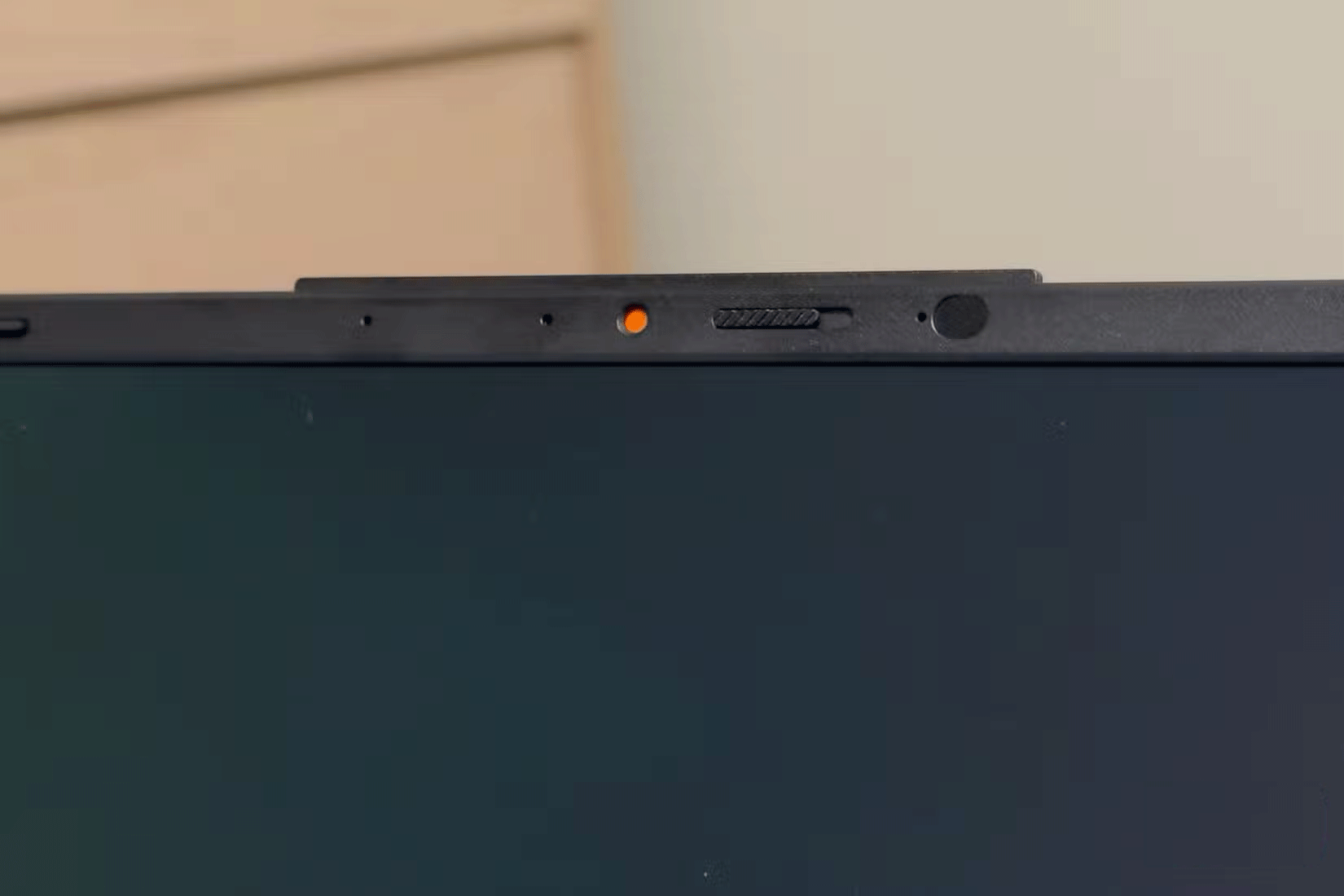
In 2016, The Guardian reported that Meta CEO Mark Zuckerberg, as well as former FBI director James Comey, covered their laptop webcams. On tape, Comey said,
I put a piece of tape on my camera because I saw someone smarter than me put tape on their camera.
This simple yet effective method will block unauthorized surveillance, even if someone gains access to your device. Therefore, to protect your privacy, you should always cover your camera when not in use.
You can use opaque tape if your device doesn't have a built-in cover. However, a sliding cover is a better alternative, as it allows you to easily open the camera when needed.
2. Disconnect or Disable Webcam When Not in Use
You should get into the habit of unplugging your external webcam when you're not using it or disabling your built-in webcam if you're uncomfortable covering your webcam. This ensures that even if your device is compromised, hackers won't be able to access your webcam and spy on you. Plug it back in or turn it on when you're ready to use it.
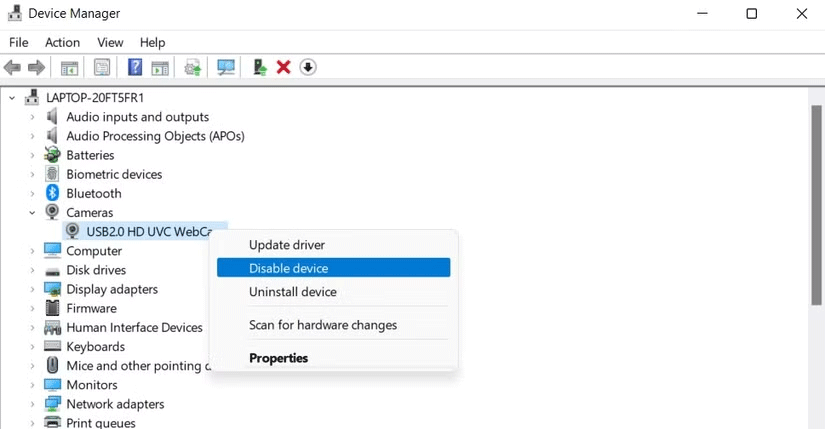
Unplug it from your computer if you're using an external webcam. You can disable the built-in webcam through Windows Device Manager or System Preferences on macOS.
3. Block Suspicious Apps and Websites from Accessing Your Webcam
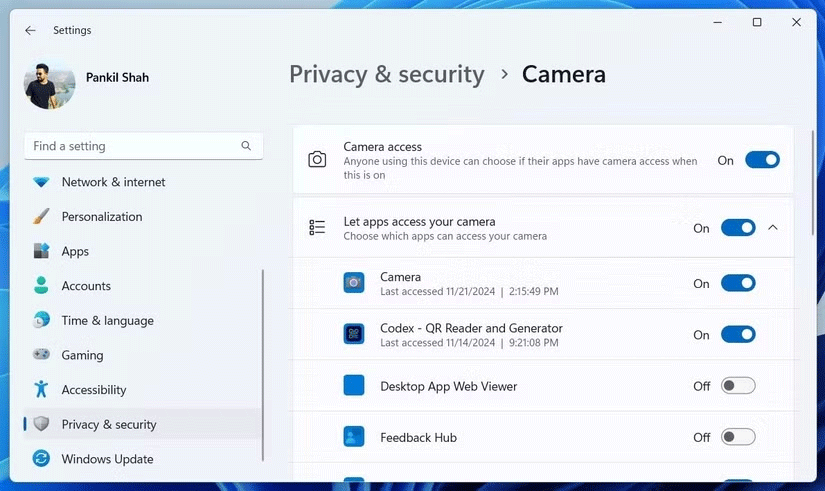
Your webcam can be compromised by apps, malware, or websites that secretly access it. Once these apps have access, they can activate your webcam at any time to spy on you. Therefore, you should regularly review your device's permission settings and revoke camera access for suspicious apps.
You can revoke camera access for suspicious apps in your operating system's app permissions settings and deny access to websites in your browser settings.
4. Pay Attention to What's Displayed in the Background
Your background during video calls can reveal personal, sensitive data, or private information if left unchecked. This can reveal your private life, damaging your reputation with colleagues, friends, or clients. Therefore, you should do a quick check before joining a meeting.
Make sure no sensitive content is visible. Use software features to blur or replace the background, and consider using a virtual background to hide what's behind you.
5. Update Webcam Driver to Stay Safe
Hackers can also exploit vulnerabilities and bugs in outdated webcam drivers to infiltrate your device and access your camera. You'll need to manually check for new drivers on the manufacturer's website, especially if you're using an external webcam, and install them while most operating systems automatically update drivers when installing a new operating system update.
By updating your drivers, you ensure that you're using the latest security patches from your operating system or manufacturer, which helps protect both your webcam and your privacy.
6. Watch for Signs of Webcam Hacking
The longer a webcam breach goes on, the more your privacy is at risk. That's why you need to be able to recognize the signs of a webcam hack when hackers secretly activate it to spy on you. One key sign is if your webcam light suddenly turns on, even when you're not using any camera apps.
Or if you find unusual photos or videos on your device, this could be a sign of a hack if your webcam appears to be in use when you try to access it. You can review your webcam's activity log to detect any unauthorized access and verify that your webcam has been compromised if you're ever in doubt.
Here are some steps you can take to enhance your webcam privacy and protect your personal life. Start following the tips above to prevent any accidental privacy breaches you'll regret later if you haven't already prioritized webcam security.
Final Thoughts
The most reliable way to handle webcam security tips everyone should know is to follow the process in order, verify each important setting, and test the result before moving on. Use the guidance above as a practical reference, then adjust the details for your device, software version, or specific goal.
FAQ
What should I know first about Webcam Security Tips Everyone Should Know?
Webcams are incredibly useful, but if not properly protected, they can also be a gateway to privacy breaches.
How do I get the best results with Webcam Security Tips Everyone Should Know?
Use current software or equipment, follow the steps in order, review the recommended settings, and test one change at a time so you can identify what improves the result.
What should I do if Webcam Security Tips Everyone Should Know doesn't work as expected?
Check compatibility, permissions, connectivity, and version-specific settings. Restart the relevant device or app, then repeat the process carefully before trying a more advanced fix.
Related Articles
 How to Secure Webcam on Windows to Avoid Exposure5 minutes read
 The Security of the Webcam Is Extremely Simple5 minutes read
 Fixed a Problem with Invalid Webcam Windows 1011 minutes read
 The Best Webcam Models 201812 minutes read
 How to Check If Your Webcam Is Hacked7 minutes read
 Unexpected Uses of Laptop Webcams7 minutes read
Reader Comments 0
Sign in with email or Google to join the discussion.