Table of Contents
This updated guide compares ways scammers use TikTok to infect users' devices with malware and highlights the details that matter most. There aren't many social media platforms as engaging as TikTok, but its popularity also makes it a target for scammers. If you enjoy scrolling through TikTok, beware of scams that could infect your device with malware.
6. Fake " Unfilter " or " Reveal " Tools
Scammers often advertise tools that help people remove filters or blurred/blacked-out parts from videos. To make things more convincing, scammers may show a blurred image in their video, pretend to run it through a special tool, and then crop it to what appears to be an unfiltered version, creating the illusion that the special tool removed the blur or unfiltered elements.
In reality, these videos are completely fabricated. If you download the tool they advertise, you run the risk of installing malware on your device. So if you see a TikTok video promoting similar tools, it is best to avoid clicking any links in the description. There are some legitimate ways to unblur images, but there's no magic way to reveal sensitive elements in a photo. Anyone claiming to have a tool that does this is likely trying to scam you.
5. 'Secret' or 'Pro' TikTok App for Access to Exclusive Features
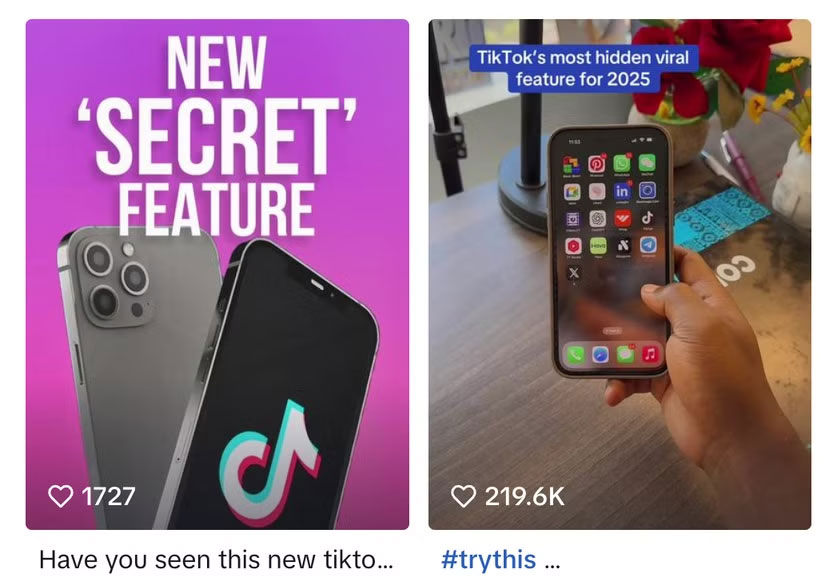
TikTok has a few companion apps, like TikTok Studio (for creators) and TikTok Lite (a data-friendly version of the regular app). But these aren't widely known. There's also a TikTok Business account, but it is just a separate account type that you can switch to within the app ( Profile > Menu > Account and select Switch to Business Account ). If you're not familiar with TikTok, it is easy to assume there might be a secret version of the app or a Pro account that offers exclusive features.
Scammers take advantage of this by promoting fake TikTok apps. They often claim that these apps offer exclusive perks, like increased follower counts or access to hidden editing tools. naturally, the downside is that if you happen to see one of these shady videos promoting such an app and you accidentally download it, you could end up infecting your device with malware.
4. Fake Gifts
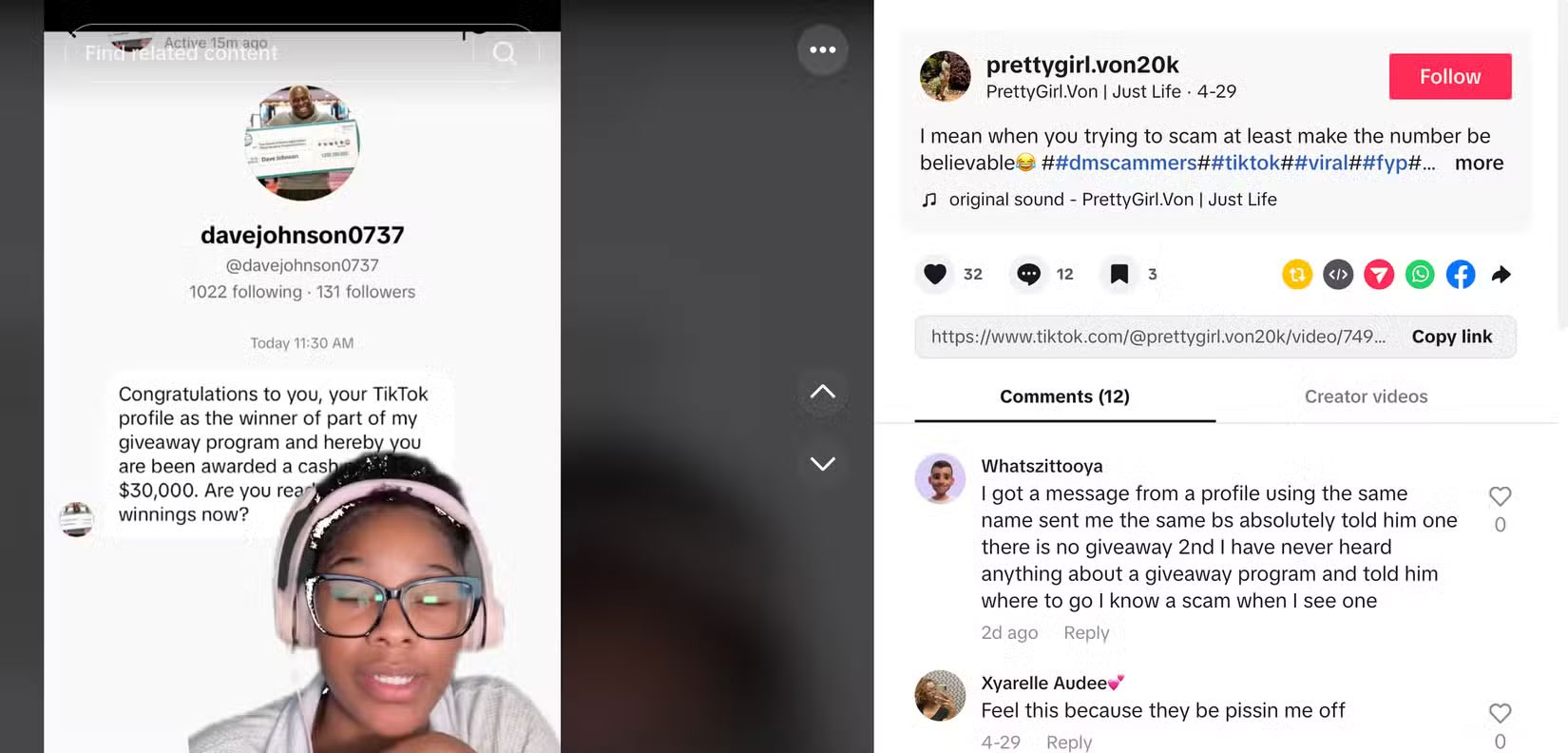
Scammers are hosting fake giveaways on a variety of social media platforms, including TikTok. These giveaways often promise the winner an expensive prize, such as the latest iPhone, gift cards, or even just money, making them more appealing to enter.
Typically, TikTok giveaway videos ask you to submit your entry by navigating to a URL mentioned in the description or bio. Once there, you may be prompted to share sensitive information that could be used for identity theft, or you may be asked to download an app to complete your entry, which could result in malware being installed on your device. it is not that legitimate influencers and companies do not host giveaways for their fans, but these giveaways are often posted by verified accounts. If a giveaway seems shady, it is best not to proceed.
3. QR Code Scam
Another sneaky tactic scammers use on TikTok is posting videos with QR codes. Viewers are asked to scan the QR code to access sensitive content, hidden features, or enter giveaways.
But these QR codes are often fake and only exist to redirect you to malicious websites that download malware to your device. Since these types of scams are really common these days, ensure to learn how to spot fake QR codes.
2. Messages from Fake Celebrity/influencer Accounts
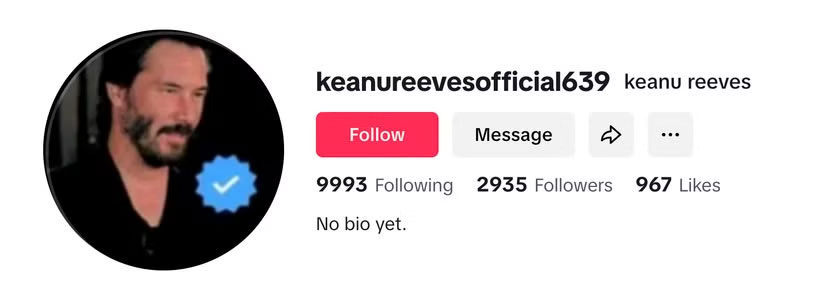
Scammers often create fake accounts for celebrities and influencers to trick people into thinking they're interacting with the celebrity. These accounts look pretty similar to real accounts and may even have the same photos (stolen, naturally). Once the account has enough followers, the scammer starts sending people direct messages. These messages may include links to scam sites or prompts to download malware, but it is hard to tell because you wouldn't expect a celebrity to scam you.
If you receive a direct message from a celebrity on TikTok or any other social media platform, do not select anything or continue interacting unless you're sure it is a legitimate message, which you can determine by checking for a blue checkmark next to the account name. Still, scammers can use photos with a blue checkmark to make an account appear authentic. So, check to see if a blue checkmark appears next to the account name in the profile header before interacting with an account.
1. Fake Copyright Infringement Notices
If you're a creator or even just a casual TikTok user who occasionally makes your own videos, receiving a copyright notice can be a concern. Scammers try to take advantage of this by sending fake copyright notices that appear to come from TikTok.
These notifications may include a link to view the full message or verify your account details. Still, with these fake notifications, it is not recommended to select the included link. If you receive a similar notification, do not act hastily. Check the official TikTok app and your account for any notifications, as well as your email. If you are unsure, use TikTok's support center to report the issue.
Social media is rife with scam ads and videos. While some are easy to spot, others are cleverly disguised and may even look like they come from a legitimate influencer or TikTok itself. Staying vigilant and avoiding suspicious links can help protect you and keep your device safe from malware.
FAQ
How were the ways scammers use tiktok to infect users' devices with malware options evaluated?
The comparison focuses on practical features, ease of use, limitations, compatibility, and the type of user each option is most likely to help.
Which option is best for beginners?
Beginners should prioritize a clear interface, useful documentation, reliable support, and the core features needed for their first project.
Should I choose a free or paid option?
Start with a free option when it covers your needs. A paid plan may be worthwhile when you need advanced tools, commercial rights, collaboration, or professional support.
Related Articles
 Macs: 5 Ways Malware Can Easily Infect a Mac9 minutes read
 The Us Navy Prohibits All Troops from Using Tiktok on Dispensed3 minutes read
 What Is Zefoy TikTok? How to Use It3 minutes read
 The 4 Most Common Ways to Spread Malware Today9 minutes read
 How Dangerously Addictive Is Tiktok's AI?5 minutes read
 Tiktok Launches Its Own Font with Anti-Copy Feature3 minutes read
Reader Comments 0
Sign in with email or Google to join the discussion.