Table of Contents
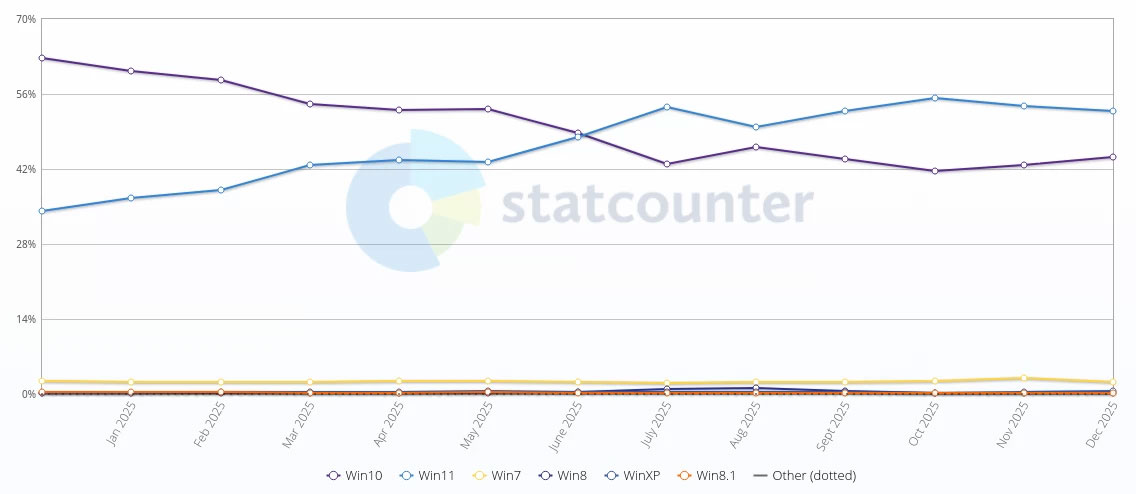
Windows 11 accounted for 53.7% of worldwide desktop Windows web usage in Statcounter’s November 2025 chart, while Windows 10 accounted for 42.7%. Windows 7 represented 2.93%. Windows 11 led the measured sample, but Windows 10 still made up a substantial share after its general support ended.
What the November figures measure
The November 2025 Statcounter chart compares Windows versions within desktop Windows traffic. It is a historical snapshot, not a count of all computers in use or a statement about today’s market share.
Statcounter derives its statistics from page views on websites using its tracking service. A computer that browses frequently can contribute more activity than one used mainly offline. Regional coverage, browsing patterns, and changes in the measured sample can affect the percentages. A monthly share change alone does not establish how many people upgraded, abandoned Windows, or bought a new PC.
Why Steam and overall desktop figures can differ
Steam’s hardware and software survey describes participating Steam users, a different audience from Statcounter’s web traffic sample. Gaming PCs and general-purpose computers need not have the same Windows version mix. Compare each source with its own earlier results using the same reporting period.
There is also a separate denominator for Windows’ share of all desktop operating systems. A Windows 11 percentage among Windows traffic cannot be compared directly with a Windows percentage among Windows, macOS, Linux, and other desktop systems. Neither measure proves that a particular alternative received all of Windows’ lost share.
What Windows 10 users should check
General support for Windows 10 ended on October 14, 2025. PCs continue to work, but standard support status and the ability to receive security updates are separate questions: eligible devices may receive Extended Security Updates (ESU), and some specialized editions have different lifecycle dates.
- Check upgrade eligibility: use PC Health Check to assess the complete Windows 11 requirements.
- Check temporary update coverage: review Microsoft’s current consumer ESU requirements, regional enrollment options, and coverage end date. ESU does not add new Windows features or replace a migration plan.
- Plan around your work: confirm that essential applications, peripherals, and files will work on the replacement system before changing operating systems. Make a backup first.
If you need to identify the hardware before deciding, follow the guide to finding your PC specifications. Market share is useful context, but compatibility and available security updates are more useful guides to what to do with an individual computer.
Related Articles
 Chrome OS's market share accounts for only 0.023% of the global market
 Video statistics market share of all versions of Windows from 2003 to present: Success mixed with regret
 IOS market share decreased slightly in November
 Windows Phone is just a puzzle piece of the big picture
 Windows 7's market share for the first time reached more than 50%
 Microsoft: Windows 10's market share unexpectedly dropped, Edge kept growing
Reader Comments 0
Sign in with email or Google to join the discussion.