Table of Contents
Explore 5 interesting ubuntu terminal tips that many people don't know.
Linux programmers have long viewed personal computers as something to be fun , so they occasionally 'embed' little jokes into their software. While this article focuses on Ubuntu and illustrates with Ubuntu images, most of these examples work on almost any Ubuntu-based distribution, and some even run on other Linux distributions with the necessary packages installed.
When you type ls incorrectly and… a train appears
If you use the Terminal frequently, you're probably very familiar with the command ls to view the contents of the current directory. But this is also a command that's very easy to type incorrectly – and there's even a program designed specifically to 'catch' that mistake.
Just type:
sl
(If the command has been set), you will see a steam train running across the Terminal window . The wordplay here is 'SL', which stands for sl – the same as the common typing error ls.
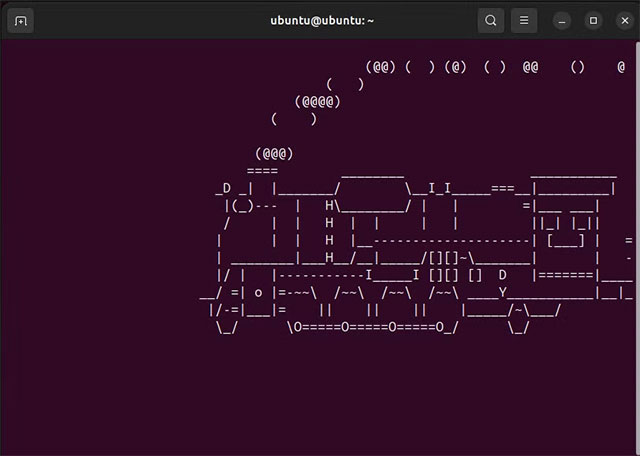
What's even more interesting is that each option (flag) produces a different type of ship. When you add -F, the ship will… fly above the window. With -l , the ship will be smaller. If you run:
sl -a
You even see 'passengers' on the ship shouting for help. It's a bit dark, but it's like typing the wrong command sometimes leading to… a really bad day.
The cow 'hiding' in APT
If you've ever installed software on Ubuntu, you're certainly familiar with APT , the default package manager. Few people know that APT also has a classic prank.
Just run:
apt moo
The terminal will display a cow drawn with ASCII characters , asking you about your 'cow moo' sound.
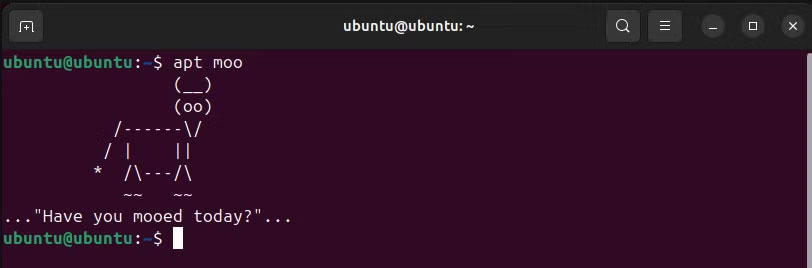
APT even teased this prank in their help section. If you view the help using `@Apt.org` --help, you'll see a description stating that APT has… 'cow powers'.
Aptitude version of the cow
If you're familiar with APT, you may have also heard of Aptitude – an alternative package management interface, notable for its TUI interface that runs directly in the Terminal. This tool isn't always pre-installed, but it can be added using:
sudo apt install aptitude
Aptitude continues the tradition of 'cow powers,' but in a more sophisticated way. When typing:
aptitude moo

You will be… rejected. To see the full Easter egg, you need to be more persistent by requesting more 'detailed' output with the -v parameter. Keep adding the 'v' repeatedly:
aptitude -v moo
aptitude -vv moo
.
aptitude -vvvvvvv moo
It wasn't until the seventh attempt that Aptitude finally released the full content. This prank is so nonchalantly crafted that it's best to experience it firsthand.
Sudo… insults you when you type the wrong password
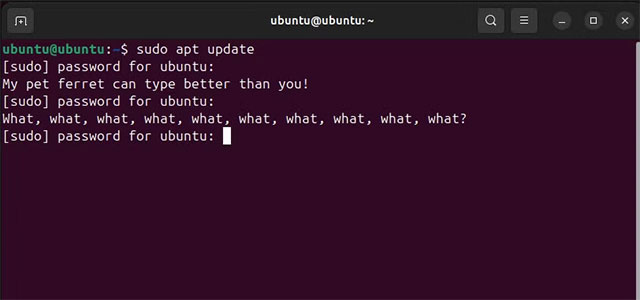
Typing the wrong password is not uncommon, especially when using sudo to run commands with administrator privileges. Few people know that sudo has a built-in 'trolling' mode for users , but it's disabled by default.
To enable it, you need to edit the sudoers file using the command:
sudo visudo
After entering the correct password, the /etc/sudoers.tmp file will open in the nano editor. Simply scroll down to the area of lines starting with Defaults and add a new line:
Defaults insults
(Note: You must use the Tab key to align the spaces correctly.)
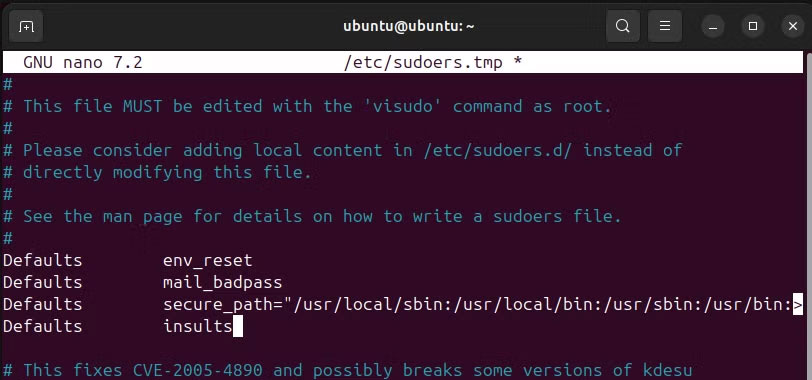
Save the file using Ctrl+O , exit nano with Ctrl+X , close Terminal, and then reopen it. From now on, every time you type the wrong sudo password, Terminal will randomly display a sarcastic message. If you feel offended, simply delete the line above.
Scanning the internet like… 'leet speak'
If you want to scan your network, see connected devices, or check open ports, nmap is a very familiar tool. It can be installed using:
sudo apt install nmap
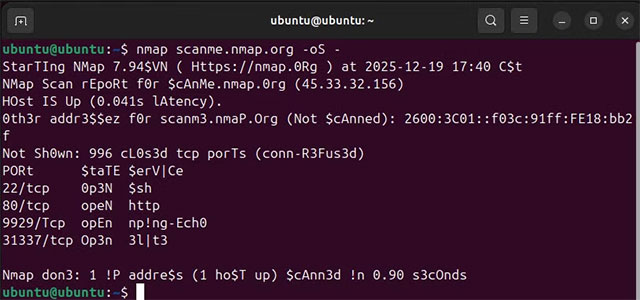
Hidden within nmap's array of options is a very peculiar output style known as 'kiddie script' , or more commonly known as leet speak – writing things like '1337 5p34k' or 'n00b'.
To activate it, add the option -oSto the end of the command, along with the output location. If you want to print directly to the Terminal, simply use a hyphen -:
nmap scanme.nmap.org -oS -
The command above will scan nmap's own test page, and all the results will be displayed in a hilariously funny 'leet' style.
Final Thoughts
Understanding 5 interesting ubuntu terminal tips that many people don't know makes it easier to evaluate the information and apply the most relevant recommendations. Focus on the key points above and verify details that may change over time.
FAQ
What is 5 interesting ubuntu terminal tips that many people don't know?
Explore 5 interesting ubuntu terminal tips that many people don't know.
What key points does this article cover?
The article focuses on When you type ls incorrectly and… a train appears, The cow 'hiding' in APT, Aptitude version of the cow, with practical explanations and examples.
How can you use this information in practice?
Use the explanations to compare options, verify important details, and make a more informed decision. Apply the recommendations that best match your goals and situation.
Related Articles
 How to Install Hyper Terminal in Ubuntu 20.045 minutes read
 How to Customize Terminal in Ubuntu8 minutes read
 6 Interesting Terminal Commands on Mac5 minutes read
 Click: How to Open a Terminal Window in Ubuntu3 minutes read
 Fix Ubuntu Unable to Open Terminal Error: What to Know8 minutes read
 3 Ways to Listen to the Radio via Ubuntu Terminal6 minutes read
Reader Comments 0
Sign in with email or Google to join the discussion.