Article on the subject of "decimal"
-

How to round numbers in Excel using the ROUND, ROUNDUP, ROUNDDOWN Function
how to round numbers in excel using the round, roundup, rounddown function
-
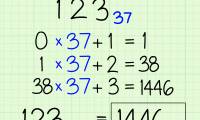
How to Convert from Binary to Decimal
the binary system is the internal language of electronic computers. if you are a serious computer programmer, you should understand how to convert from binary to decimal. this wikihow will show you how to do this. === using positional...
-
How to Prevent Excel from Removing Leading & Trailing Zeros
excel automatically removes leading zeros, as well as trailing zeros after a decimal point. if this disrupts your ability to store data such as postal codes, you can import the data as text so it appears exactly as entered. if you need to...
-
How to Round in Excel
this wikihow teaches you how to round the value of a cell using the round formula, and how to use cell formatting to display cell values as rounded numbers. enter the data into your spreadsheet.
-
Switch from base 16 to base 10
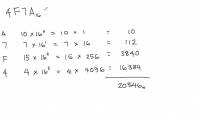
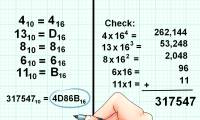
hex (hexadecimal) is the base system 16 and the decimal system is the base number 10. sometimes, we need to know the equivalent value in the decimal of a hexadecimal number.
-
How to Convert from Binary to Decimal
the binary system is the internal language of electronic computers. if you are a serious computer programmer, you should understand how to convert from binary to decimal. this wikihow will show you how to do this. === using positional...
-
Instructions for rounding decimal numbers after commas in Excel
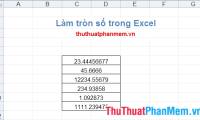
the round function in excel helps you round down decimal numbers into natural numbers without commas. so, how do you want to round decimal places after commas?
-
How to Convert from Decimal to Hexadecimal
hexadecimal is a base sixteen numeral system. this means it has 16 symbols that can represent a single digit, adding a, b, c, d, e, and f on top of the usual ten numerals. converting from decimal to hexadecimal is more difficult than the...
-
TIME function - Function returns decimal numbers for a specific time value in Excel
time function: the function returns the decimal number for a time value. the decimal number that the function returns is from 0 to 0.99988426, which corresponds to the time from 0:00:00 (12:00:00 am) to 23:59:59 (11:59:59 pm). syntax: time (hour, minute, second)
-
ROUND, ROUNDDOWN, ROUNDUP functions - Functions for rounding decimal numbers in Excel
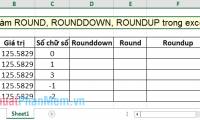
you want to round a decimal up or down depending on the problem. the following article shows in detail how to use round, rounddown, roundup functions - decimal rounding functions in excel.
-
How to get numbers after commas in Excel
how to get numbers after commas in excel. a rational number consists of two parts, an integer and a decimal. the whole part is the part before the comma, the part after the comma is called a decimal. excel does not have specialized tools or functions to get numbers after commas. however, you can use
-
The FIXED function in Excel rounds a number to a specified number of decimal places.
the fixed function in excel allows you to round numbers to a predetermined number of decimal places. to use the fixed function correctly and get the right results, please refer to the instructions in the following article.
-
How to Convert Latitude and Longitude Units from Degrees to Decimal Forms
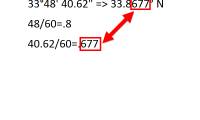
have you found yourself trying to locate your location on a map on google earth, but found the location points to be in decimal form? so you can find your location(found from a paper map) on a digital map, you'll need to convert it. this...
-
How to Prevent Excel from Removing Leading & Trailing Zeros
excel automatically removes leading zeros, as well as trailing zeros after a decimal point. if this disrupts your ability to store data such as postal codes, you can import the data as text so it appears exactly as entered. if you need to...
-
TIMEVALUE function - The function returns the decimal number of time expressed as a text string in Excel
timevalue function: the function returns the decimal number of time indicated by a text string. the decimal number that the function returns is from 0 to 0.99988426, which corresponds to the time from 0:00:00 (12:00:00 am) to 23:59:59 (11:59:59 pm). syntax: timevalue (time_text)
-
Switch from base 16 to base 10
hex (hexadecimal) is the base system 16 and the decimal system is the base number 10. sometimes, we need to know the equivalent value in the decimal of a hexadecimal number.
-
3 ways to convert time to decimal numbers in Excel and how to convert it back
in this article, we will show you 3 ways to convert time to decimal numbers in excel and how to convert it back. please follow the following article to know how to do it in detail
-
How to change the dot to a comma in Win 10
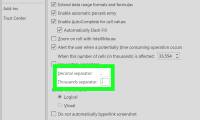
how to change the dot to a comma in win 10. according to european regulations, large numbers will use commas to prevent the division of rows of units such as 1,000; 2,000 or 15,000. and the dot will be used to separate decimal points like 0.1 or 0.025…
-
How to use math functions in C#
the math class contains many different mathematical functions. they include functions related to decimal rounding, trigonometry, powers, and square roots. below is a list of some popular functions you can use.
-
How to Round in Excel
this wikihow teaches you how to round the value of a cell using the round formula, and how to use cell formatting to display cell values as rounded numbers. enter the data into your spreadsheet.
-
How to Change the Number Format on a Mac
this wikihow will teach you how to change the formats of measurement units, decimal and grouping separators, as well as regional keyboard numbers, dates, and times (by language) on your mac. click on the apple menu. it's the black,...
-
How to Change a Comma to Dot in Excel
this wikihow article teaches you how to change a comma to a dot in excel. manually replacing commas with dots in excel can be a time-consuming task. you might run into this situation due to european countries using commas as a decimal...
-
Transfer from base 10 to base 16
the decimal system is the standard and most commonly used system in everyday life. this counting system uses number 10 as the base.
-
What is the TRUNC function in Excel? How to use the function?
for basic excel functions, the trunc function is a simple function that removes decimal places. just apply the trunc function correctly, and you'll get a quick and accurate result without needing many steps.
-
Round a number in Excel
the following article shows you how to round decimal places after commas in excel.
 Home
Home Tech info
 Technology
 Science
 Life
Life Application
 Electric
 Program
 Mobile
 System