Table of Contents
Samsung Auto Launched: New Rival to Android Auto and Apple CarPlay is easier to approach with a clear overview and reliable steps. This guide organizes the essential information, highlights practical details, and explains what to check along the way.
Key Takeaways
- Follow the recommended steps in order to avoid common mistakes with samsung auto launched: new rival to Android auto and Apple CarPlay.
- Review compatibility, settings, or requirements before making changes.
- Use the troubleshooting notes to confirm the final result.
Samsung Auto allows car connectivity via Baidu CarLife+ or ICCOA CarLink – two connectivity standards currently only available on cars sold in China. The application is compatible with many car manufacturers such as Audi, BMW… but only on the China-specific version (as of now). During the testing process, many people noticed that the user interface (UI) of Samsung Auto is very similar to Android Auto and CarPlay. The display screen includes navigation apps, music controls, and some widgets. Similar to CarPlay, Samsung Auto also displays four apps arranged vertically on the side of the screen.
Not many details have been revealed yet, but basically, Samsung Auto will support a quick navigation feature, acting as a bridge between the car and the smartphone. Users can start navigation on the Samsung phone and transfer it to the car screen, or vice versa. This is similar to the feature of Google Maps, where you can send navigation links from the phone to the car screen.
The leaks also mention two exclusive Samsung Auto features: location-based navigation and address recognition for quick navigation. According to Samsung, location-based navigation automatically extracts addresses from messages users receive and updates them to the current route on the Samsung Auto map. This feature is useful because drivers don't have to stop the car to manually enter a new address if their route changes.
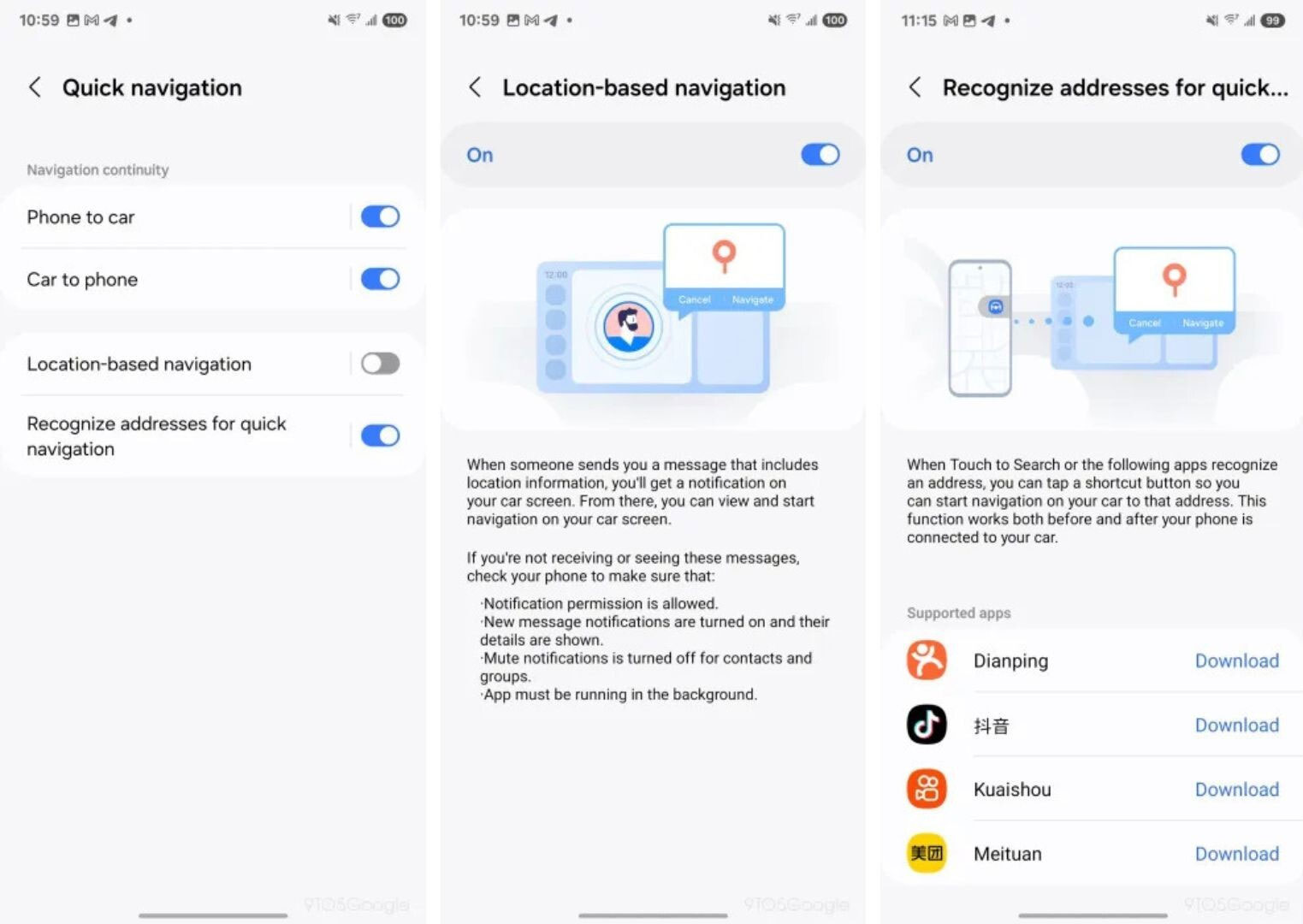
The 'address recognition for quick navigation' feature is only compatible with certain Chinese apps and works when the user is in the car. A shortcut button will appear on the phone screen when supported apps detect an address. The user taps this button to send the address to the car screen and start navigation.
As mentioned, Samsung Auto is currently only available in China. The main reason is that the app relies on the Baidu and ICCOA connectivity standards. Implementing both of these standards requires significant firmware changes from automakers and Samsung, so the likelihood of Samsung Auto going global—at least in the near future—is slim.
Final Thoughts
The most reliable way to handle samsung auto launched: new rival to Android auto and Apple CarPlay is to follow the process in order, verify each important setting, and test the result before moving on. Use the guidance above as a practical reference, then adjust the details for your device, software version, or specific goal.
FAQ
What should I know first about Samsung Auto Launched: New Rival to Android Auto and Apple CarPlay?
Google's Android Auto and Apple's CarPlay are the two leading smartphone integration platforms in cars today, allowing users to display and use phone features right on the car's central entertainment screen, extremely convenient.
How do I get the best results with Samsung Auto Launched: New Rival to Android Auto and Apple CarPlay?
Use current software or equipment, follow the steps in order, review the recommended settings, and test one change at a time so you can identify what improves the result.
What should I do if Samsung Auto Launched: New Rival to Android Auto and Apple CarPlay doesn't work as expected?
Check compatibility, permissions, connectivity, and version-specific settings. Restart the relevant device or app, then repeat the process carefully before trying a more advanced fix.
Related Articles
 Apple CarPlay 2 Project Continues to Be Delayed, Is There Anything4 minutes read
 6 Tricks to Make Apple Carplay Better: Practical Guide7 minutes read
 How to Fix Apple Carplay Not Working Error6 minutes read
 5 Useful Android Auto Features You Should Know7 minutes read
 Here Are All the New Features Coming to Apple CarPlay on iOS 18: Explained7 minutes read
 How to Enable 'Do Not Disturb While Driving' Mode in Apple3 minutes read
Reader Comments 0
Sign in with email or Google to join the discussion.