Table of Contents
Discover why is the samsung internet experience on Windows surprising so many people and explore the main causes.
Built on Chromium
Chrome extension support and familiar interface
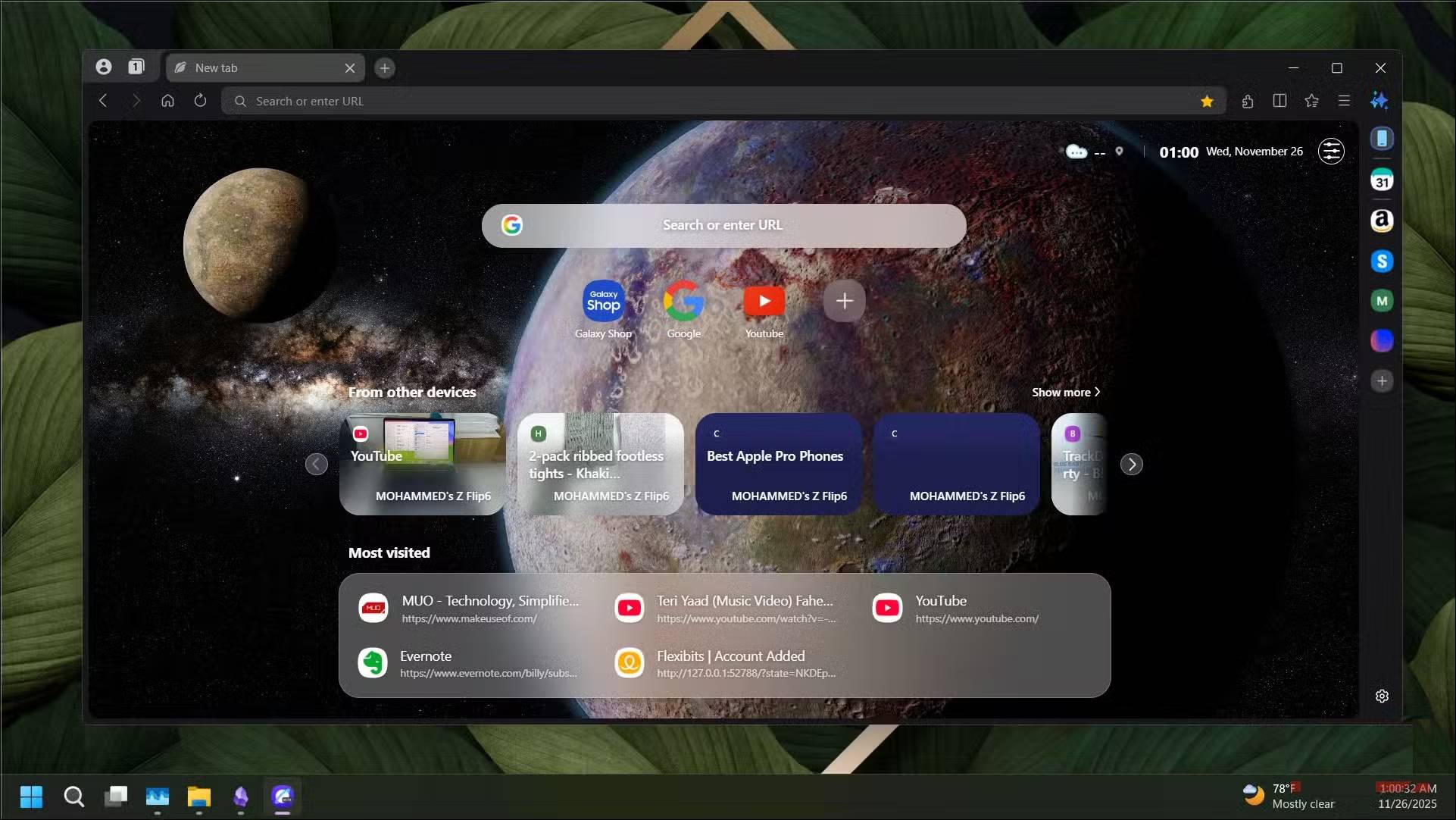
Like the Android version it's based on, Samsung Internet for Windows is powered by the Chromium engine. This means you can install almost any extension from the Chrome Web Store. Whether you need uBlock Origin, Bitwarden, or any other productivity tool you trust, chances are it will work without any problems.
Samsung Internet has a minimalist interface right out of the box. If you sign in with your Samsung account, tabs from your Samsung phone will sync and appear under From other devices , though you can turn this feature off. You can also change your wallpaper, add widgets, and create shortcuts to frequently visited sites.
The home screen provides useful links and information at a glance, and there's no news feed. People are tired of browsers constantly cramming headlines every time they open a new tab, so Samsung's cleaner approach feels refreshing.
The browser also carries over one of the tab management features from the mobile version. Clicking the stack icon in the upper left corner shows your tabs as a card preview, making it easier to find what you need when you have too many tabs open. You can also close all open tabs with a single click without closing the browser window. To navigate the crowded tab bar, the arrow buttons on either side let you scroll through tabs when the window is in split-screen mode or when the tabs are full screen.
Multitasking and AI integration
Split screen, side panel and AI
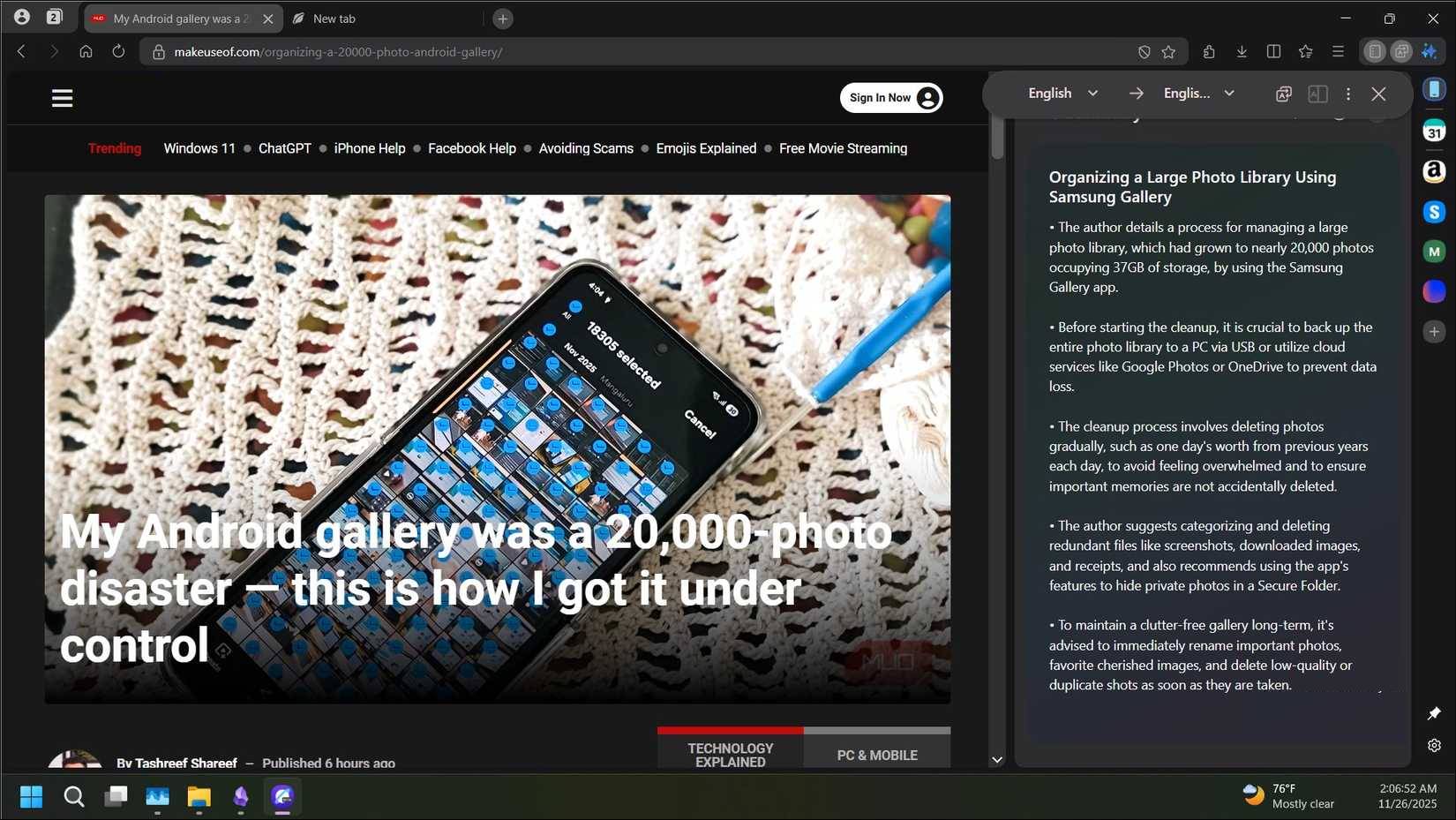
It's hard to find a mainstream browser without AI features these days, and Samsung Internet is no exception. The browser comes with a web assistant that can summarize web pages. There's also a translation feature, although you'll need to download language packs first. Once downloaded, it works just as well as translation features on other browsers.
Split screen lets you open two tabs side by side for multitasking. I've used this feature in other browsers, including Edge, and I'm glad Samsung included it here. It's one of those must-have features when considering a browser, and I find it useful when comparing products or referencing documents while writing. Having both pages visible without having to switch windows is really helpful.
The sidebar is another multitasking tool. It gives you quick access to your favorite websites and apps without leaving your current tab. It comes with shortcuts to popular services by default, but you can replace them with your own. Yes, the sidebar isn't exclusive to Samsung Internet, but it works better than Edge's version and doesn't block content on the page.
Built-in ad blocker and impressive performance
No need to install third-party ad blocker apps

Samsung Internet has a built-in ad blocker that takes care of annoying pop-up ads. It even shows you how many ads it has blocked. While Google is actively fighting ad blockers, this feature works well on most websites.
What's most impressive is its performance. Pages load quickly, thanks in part to the powerful ad blocking, but also to better overall optimization. Checking Task Manager after a day of use, you'll see that memory usage is lower than both Comet and Edge with the same tabs open. This is a pleasant surprise, especially if you're used to resource-hungry browsers. If you're looking for a solid alternative to Google Chrome that doesn't hog RAM, Samsung Internet is worth considering.
Internet browser built to complement Samsung's ecosystem
Samsung Internet isn't just another Chromium browser. It's there to fill a gap in Samsung's ecosystem. The company wants more people to use its browser, but that's hard when no one wants to use two different browsers on their phone and PC. Plus, building it on Chromium removes the biggest barrier to competing with Chrome.
For Samsung phone users who want a seamless browsing experience across multiple devices, this is exactly what's been missing. The browser is fast, clean, and doesn't feel overwhelming. Sure, there are some missing features, and the YouTube ad-blocking issue is annoying. But for a beta version, Samsung Internet for Windows is surprisingly polished. If Samsung continues to improve it, it could become a secondary browser for many people on both their phones and PCs.
Final Thoughts
Understanding why is the samsung internet experience on windows surprising so many people makes it easier to evaluate the information and apply the most relevant recommendations. Focus on the key points above and verify details that may change over time.
FAQ
What is why is the samsung internet experience on windows surprising so many people?
Discover why is the samsung internet experience on Windows surprising so many people and explore the main causes.
What key points does this article cover?
The article focuses on Built on Chromium, Chrome extension support and familiar interface, Multitasking and AI integration, with practical explanations and examples.
How can you use this information in practice?
Use the explanations to compare options, verify important details, and make a more informed decision. Apply the recommendations that best match your goals and situation.
Related Articles
 Already Have Samsung Internet 9. 0 with Many Upgrade Points2 minutes read
 8 Little-Known Features in Samsung Internet That You Should Use9 minutes read
 Why You Shouldn't Ditch Samsung Internet for Google Chrome?8 minutes read
 Why Should You Replace Samsung's Internet Browser with Google6 minutes read
 Samsung Updates Web Browser: Improves Speed, Protects Users from Malicious Code3 minutes read
 Why Should You Ditch Chrome for Samsung Internet on Android?7 minutes read
Reader Comments 0
Sign in with email or Google to join the discussion.