Table of Contents
A repair case involving an NVIDIA RTX PRO 6000 Blackwell workstation graphics card shows how transport damage to a small connector board can disable an expensive GPU. Repair shop NorthridgeFix documented a snapped PCIe board and said it could not obtain the replacement part needed for the repair.
The original account described the card as a roughly $10,000 loss. That price was part of the reported case, not a fixed current price for every RTX PRO 6000 configuration. The story also has a follow-up: later coverage reported that NVIDIA offered the owner a replacement card.
What broke
According to the repair account, the computer was transported with the graphics card still installed. The PCIe interface board—the part that connects the card to the motherboard—broke. This is distinct from a failure of the GPU chip itself or a graphics driver problem.
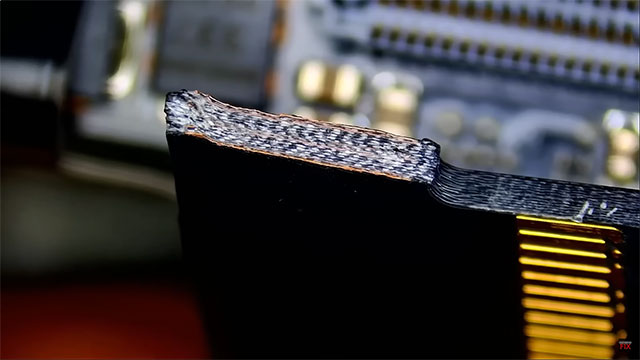
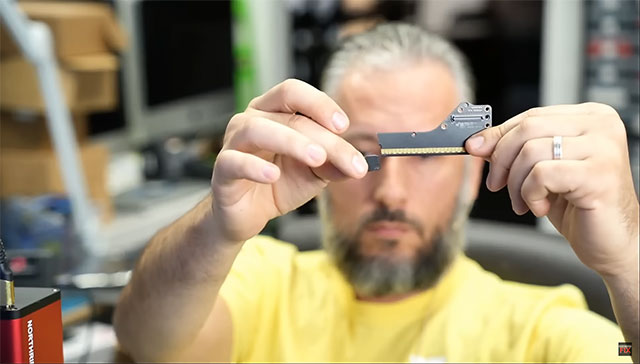
NorthridgeFix's original repair video documents the damaged unit. This is one reported incident; it does not establish how frequently the model fails or prove that ordinary operation causes the same damage.
Why a modular board can still be difficult to repair
The affected design uses a separate PCIe interface board connected to the main assembly. That may make replacing a damaged module possible in principle, but a repair still needs a compatible part, suitable tools and verification that the rest of the card works.
In this case, the shop reported that it could not source the required board through NVIDIA. It is more accurate to describe that parts-access problem than to claim that a broken connector is always impossible to repair. Nor should the apparent condition of the main board be taken as proof that every other component is undamaged.
The reported replacement changes the outcome
A later NorthridgeFix update was followed by coverage reporting that NVIDIA offered a replacement. The initial account should therefore not be presented as the owner's final outcome.
A replacement in an individual case is not a promise that all accidental damage is covered. Owners should consult the seller or workstation supplier and NVIDIA's workstation graphics-card warranty information for the applicable terms and service process.
What workstation owners can do
- Plan for transport: follow the workstation maker's shipping instructions. A heavy card may need removal and separate protective packaging, or a shipping support designed for that system. An ordinary anti-sag stand should not be assumed to protect against transport shocks.
- Document damage: photograph the card, slot and packaging before attempting repairs, then contact the supplier or manufacturer.
- Avoid repeated testing: do not keep powering a card with visibly broken connectors. Have the damage assessed first.
- Verify service options: ask about authorized repair, replacement and parts compatibility before buying an undocumented third-party board.
TipsMake's guides to installing PC components and checking case and graphics-card fit provide background. For this workstation card, the manufacturer's installation and shipping instructions should take priority.
Related Articles
 What is the difference between PCIe 3.0, PCIe 4.0 and PCIe 5.0?
 5 best cheap PCIe 4.0 motherboards
 List of the best graphics cards according to the price segment
 PCIe 5.0 SSDs will dominate the market for another 5 years, PCIe 6.0 will only be popular from 2030
 Why is the PCI Express port on the motherboard different in size? What does x16, x8, x4 and x1 mean?
 What is PCIe 4.0? Should I upgrade?
Reader Comments 0
Sign in with email or Google to join the discussion.