Table of Contents
Model Context Protocol (MCP) gives compatible AI apps a standard way to connect to tools and data sources. On Windows 11, Microsoft’s On-device Agent Registry helps apps discover MCP connectors from local apps and remote services. A connector defines what an app can request, such as searching an approved folder or using a service’s tools.
How an MCP request works
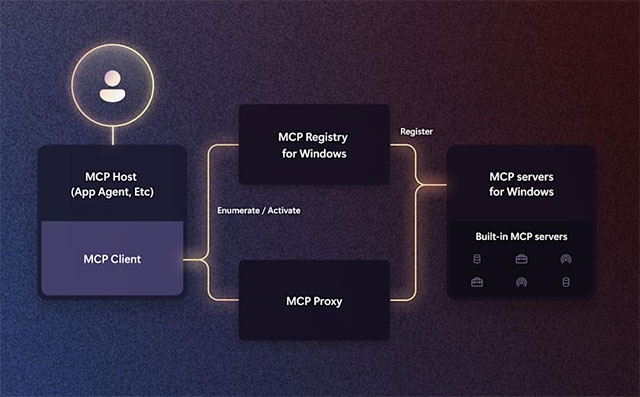
An AI app hosts the MCP client, which sends requests to an MCP server. The server advertises tools or resources the client can use. For example, an assistant can ask a file connector to find a document, then use the returned information to help answer a question. The connector and its configured access determine what the app can do.
What Windows adds to MCP
Microsoft documents isolation for MCP servers by default and access limited to approved resources. Users and administrators can manage which MCP servers individual agents can use through Windows Settings or management tools such as Microsoft Intune, where supported. Microsoft’s documentation lists a File Explorer connector with file access and modification tools.
Before enabling a connector, check which app can call it, which files or services it can reach, and whether it can make changes. If you only need to search or summarize documents, prefer read-only access where the connector offers it.
Microsoft announced its Windows MCP work at Build 2025. See the current Microsoft Learn overview of MCP on Windows for supported connectors and management controls.
Related Articles
 Why AI Gives Poor Answers Without the Right Context
 The role and advantages of Model Context Protocol (MCP) in modern AI models.
 How to connect a local AI model to Obsidian with MCP
 Microsoft is committed to improving the context menu experience on Windows 11
 Windows Phone is just a puzzle piece of the big picture
 History of Microsoft Windows operating system throughout the ages
Reader Comments 0
Sign in with email or Google to join the discussion.