Table of Contents
Learn what is microsd express? a memory card as small as a fingernail but as powerful as means.
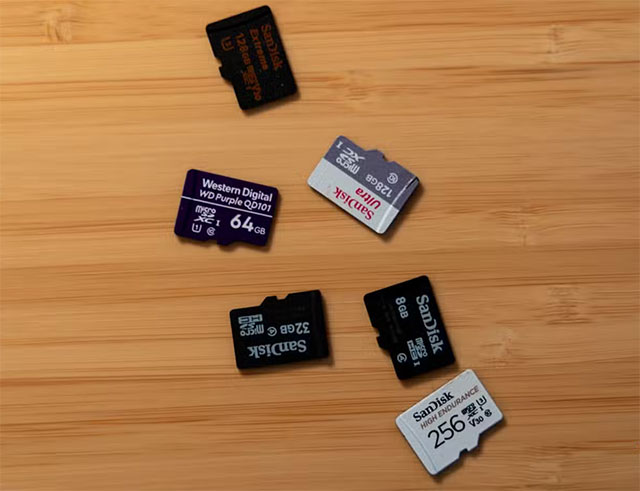
When microSD cards first launched in 2005, they were truly groundbreaking. At that time, SSDs were not yet common among the average user, the average hard drive capacity was only about 80GB, and the data transfer speeds of desktop hard drives were typically only 40–60MB/s. Early microSD cards mostly met the Class 2 standard, with continuous write speeds of only about 2MB/s.
Subsequently, Class 4, Class 6, and then Class 10 standards appeared, each indicating the minimum write speed that the card could achieve. At that time, these numbers were perfectly adequate for practical needs such as expanding phone memory, taking photos, recording average-quality videos, or listening to MP3 music. These tasks did not require extremely high read and write speeds, and microSD cards at that time were not designed to compete in terms of performance.
However, as the demand for 4K video recording, transferring large files, and faster data processing became increasingly common, microSD cards began to show their limitations. The UHS standard, along with the U1, U3, and V-class levels, was introduced to somewhat improve the situation. U1 maintained the same 10MB/s speed as Class 10, while U3 increased write speeds to 30MB/s. With V-class, especially the V90, write speeds approached 90MB/s, a significant improvement over previous standards.
However, even with speeds close to 100MB/s, microSD cards are still unlikely to become a truly portable storage solution in the true sense. In reality, microSD cards are primarily used to expand device memory, not to carry data like USB flash drives. Meanwhile, modern USB drives can achieve very high speeds, even close to 1GB/s, far exceeding the capabilities of traditional microSD cards.
Things really changed with microSD Express – the next generation of microSD cards. Notably, this standard retains the familiar physical size but adds more contact pins to unlock higher bandwidth when used with compatible readers. More importantly, microSD Express is built on PCIe and NVMe platforms, similar to high-speed SSDs in computers.
Thanks to this, microSD Express can achieve continuous write speeds of up to approximately 600MB/s and read speeds close to 1,000MB/s. If plugged into an older microSD slot, the card will still function normally but at a lower speed, ensuring backward compatibility.
What makes microSD Express so appealing is not just its speed, but also its incredibly compact size. A microSD card is only slightly larger than a fingernail, yet it can reach capacities of 256GB, 512GB, or even 1TB. In theory, with just a small pocket-sized case, users can carry tens of terabytes of data with them. microSD Express could be the ideal solution for a mobile media library, even storing an entire Plex movie collection on these tiny cards.
Furthermore, transferring data between devices has become much simpler. Just copy the data from your laptop to the microSD card, then plug it into your desktop computer – no need for bulky USB drives. With microSD Express, the idea of using ultra-small memory cards as a truly portable storage medium can become a reality.
If the microSD Express standard becomes widely adopted by hardware and device manufacturers, it has the potential to completely replace USB flash drives in many use cases. The goal isn't to eliminate USB entirely, but rather to provide users with a more compact, flexible, and modern alternative.
Final Thoughts
Understanding what is microsd express? a memory card as small as a fingernail but as powerful as an nvme ssd makes it easier to evaluate the information and apply the most relevant recommendations. Focus on the key points above and verify details that may change over time.
FAQ
What is what is microsd express? a memory card as small as a fingernail but as powerful as an nvme ssd?
Learn what is microsd express? a memory card as small as a fingernail but as powerful as means.
What key points does this article cover?
The article explains the core concept, important considerations, and practical details readers should understand.
How can you use this information in practice?
Use the explanations to compare options, verify important details, and make a more informed decision. Apply the recommendations that best match your goals and situation.
Related Articles
 What Is Microsd Express Memory Card?7 minutes read
 Samsung Introduces New 256GB SD Express microSD Memory Card, Supporting 800MB/s6 minutes read
 Top Best MicroSD Cards for 2020 Devices9 minutes read
 Whoever Plays the Game Is Ready to Buy HyperX MicroSD Card4 minutes read
 The World's Fastest 1.5 TB microSD Card: Complete Overview5 minutes read
 Mistakes or Mistakes When Buying MicroSD Cards10 minutes read
Reader Comments 0
Sign in with email or Google to join the discussion.