Table of Contents
Wayground is now used in over 150 countries worldwide. This is thanks to a very intuitive system, a beautiful, minimalistic interface, and making learning more fun.
Wayground (formerly Quizizz) was once a quiz creation tool like many others, but it has now gone beyond that. The platform was built with both teachers and students in mind, who can benefit from all of its features, and as such, Wayground is a great tool to use in education.
Wayground is now used in over 150 countries worldwide. This is thanks to a very intuitive system, a beautiful, minimalistic interface, and making learning more fun.
What is Wayground?
Wayground is primarily an online testing and teaching tool that functions like a game show. That means it's a Q&A platform that works on browsers and Google Chrome, as well as iPhone and Android devices, with dedicated apps for both.
From a student perspective, this makes learning more fun with game-based interactions and the ability to take tests on their own devices. For teachers, there are plenty of pre-built tests to choose from, as well as the option to edit and create their own tests from scratch. Plus, with the focus on AI, personalization is easier than ever.
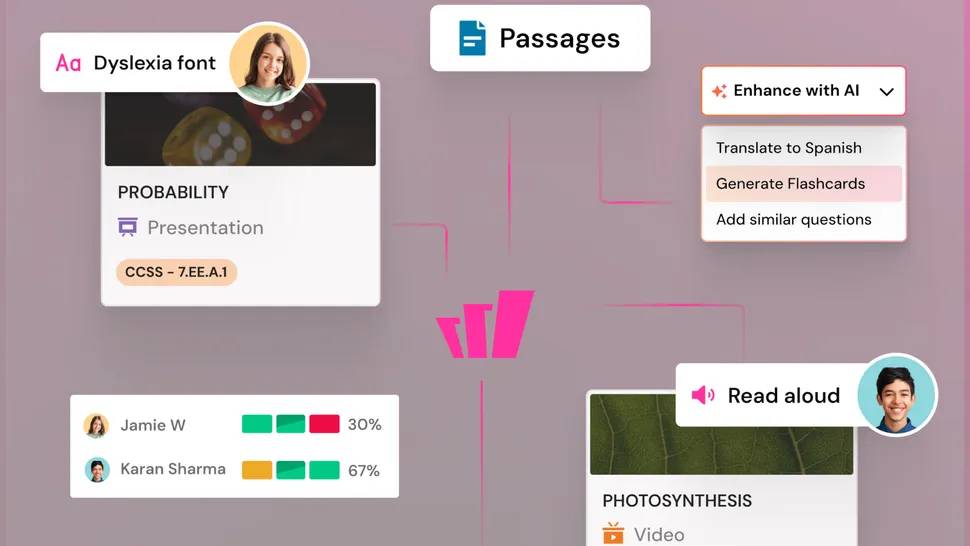
Since students only need an access code, there is no need to register an account, making access extremely simple for everyone. Additionally, student privacy and personal information will be protected.
For teachers, the platform offers a large database of quiz options and AI tools, so it's an easy-to-use tool that doesn't take much time or effort. However, because they can be edited, Wayground can also provide a more in-depth and personalized service for students and classrooms.
What's new in Wayground?
Since the rebrand, several updates have been made, including aligning the curriculum to map resources to standards.
- Lesson packs are a useful addition, ideal for lesson planning.
- Artificial intelligence helps process a single file to create multiple interactive formats.
- Language support is now extended across all media.
- VoyageMath is also a new tool that offers middle school curriculums for personalized instruction.
How does Wayground work?
For teachers, signing up to start using Wayground requires basic information and can be done with a school email address as well as a Google or Microsoft account. What makes this tool particularly useful is that it offers some great integrations with platforms like Edmodo, Google Classroom, and Remind.
Once an account is created, teachers can access a database of test options, report options, and search and organize teaching resources to make finding the ideal option quick and easy. You may find that a pre-built tool serves your purpose well. Or you may want to edit and make a few changes to perfect the final version.
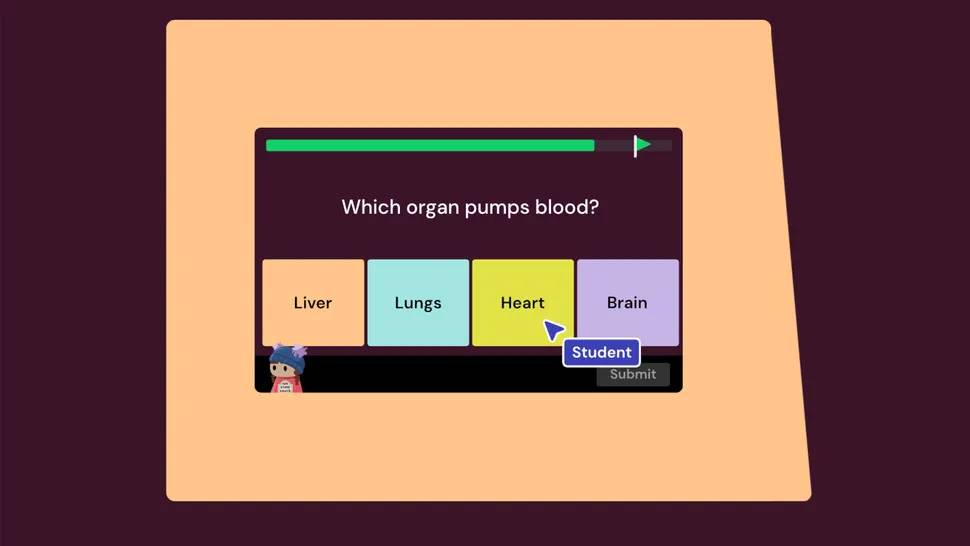
Creating a new resource is also an option, with single and multiple choice options. Teachers can manually enter questions and answers if that's easiest, but there are also rich media options. Add images to questions or as answer options, and customize student feedback.
For example, you could incorporate a popular meme that students see based on their answers. While there are many options, teachers can also implement their own if they want.
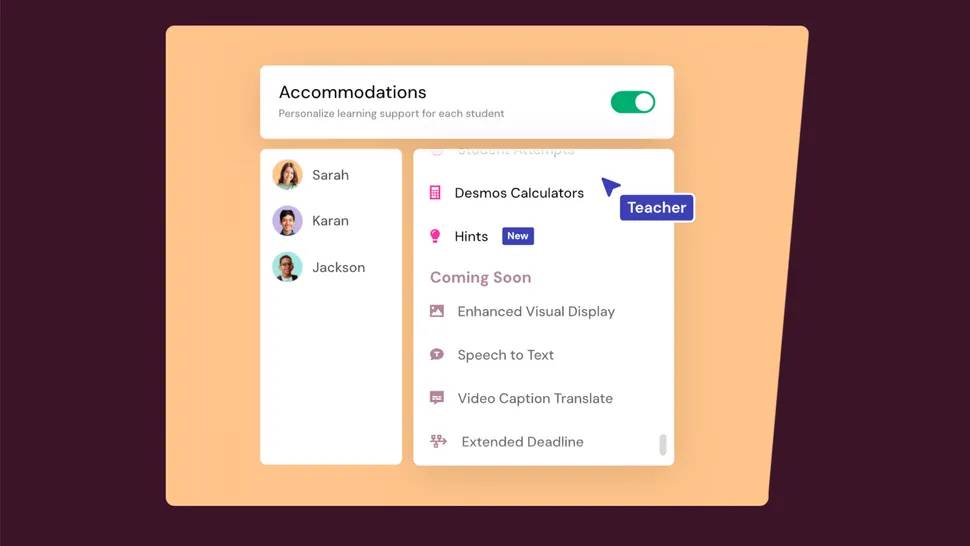
What's important is that you can customize with AI, so there are over 25 modifications that can meet each student's individual needs.
Wayground's Best Features
The ability to test individually or as a class is a useful option. This allows teachers to assign individual tests tailored to each student, or work in groups, receiving feedback on how the class is handling a single subject within the group. The advantage of working in a class is that everyone can see the performance of their classmates. Similarly, working alone can be ideal for those who prefer to be alone, or for assigning homework.
Wayground offers a leaderboard, but teachers can turn it off if the competition isn't a good fit for their students. Likewise, the Q&A timer can be motivating for some students but unnecessarily stressful for others—so being able to turn it on and off is a plus.
The meme and music response options can also be customized. Turning these on can make the quiz very fun and lively, or you can turn them off for a more effective learning experience.
An option to allow students to see their results after taking the test is a useful way to ensure they learn from their mistakes. They can also retake the test as a way to gamify it, seeing how many they get right the second time.
Teachers can email parents through the app with detailed reports on student performance. These results are also useful for teachers to see how students are struggling to decide what to do next.
Wayground's Best Tips and Tricks
Take time to search
Spending time searching the database is important because spending more time here can help you get a test closer to completion, rather than spending more time creating the test yourself. Plus, the more you search, the better you get at using the platform. AI can help here as a starting point for further research.
Early assessment
Start a class, or even a semester, by using a test to assess students' understanding of a task or subject. This can help guide how you teach the subject both at the classroom level and between teachers and students.
Using parents
Email results to parents and make sure students know this, perhaps monthly, so they can have someone else monitor their efforts.
FAQ
What should you know about wayground?
In practical terms, wayground is now used in over 150 countries worldwide. This is thanks to a very intuitive system, a beautiful, minimalistic interface, and making learning more fun.
Why does wayground matter?
The article highlights that the platform was built with both teachers and students in mind, who can benefit from all of its features, and as such, Wayground is a great tool to use in education.
What is the main takeaway?
The main takeaway is that wayground is primarily an online testing and teaching tool that functions like a game show.
Related Articles
 Wayground User Guide for Teachers7 minutes read
 How to Use Wayground AI (Quizizz) to Create Quizzes8 minutes read
 How to Use Wayground AI to Create Quizzes7 minutes read
 How to Make an Educational Video: Step-by-Step Guide12 minutes read
 How to Use Scratch20 minutes read
 Top 10 Best Children's Educational Games on the Phone8 minutes read
Reader Comments 0
Sign in with email or Google to join the discussion.