Article on the subject of "macos error"
-
11 tips to fix any common errors on Mac
macos is a reliable operating system but it also cannot avoid fundamental errors and needs to be fixed. the following article summarizes the 11 fastest ways to fix common errors such as slow system, application crashes or non-responding, ...
-
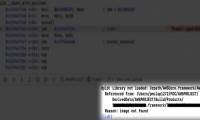
How to fix 'Dyld: Library not Loaded' error on macOS
recently, apple received a lot of reports regarding the 'dyld: library not loaded' error on macos. in the article below, tipsmake will work with you to find out the cause and solution of this problem.
-
How to fix automatic restart error on MacBook Pro running macOS Catalina?
an issue that appeared on apple's updated macos catalina 10.15.4 operating system was that it caused the user's 16-inch macbook pro to occasionally restart unexpectedly. tipsmake helps you fix this error in the way below.
-
What is NVRAM? Should I reset NVRAM on Mac?
if you mute the sound on the mac, then reboot, then you will not hear the mac boot sound again. so how does mac play that boot sound? the reason is because the volume settings are stored on nvram, but the mac firmware has access even before the macos operating system starts to boot.
-
Apple released macOS unlocking patch, with apology
yesterday, apple just released a bug fix update on macos, allowing root account creation and login without a password.
-
How to fix corrupted macOS installer errors
creating a bootable macos installer on usb provides a convenient way to install a new copy of macos on multiple macs, while also allowing you to perform a 'clean' installation quickly and easily.
-
How to fix error Error code -43 deletes the file on macOS
when a user deletes any file in the finder file manager on macos, an error will usually occur error code -43 cannot delete the file on the system.
-
How to fix signature errors when upgrading macOS
the new macos operating system gives users a fascinating experience. however, during the installation process, we may encounter signature errors on macos.
-
11 tips to fix any common errors on Mac
macos is a reliable operating system but it also cannot avoid fundamental errors and needs to be fixed. the following article summarizes the 11 fastest ways to fix common errors such as slow system, application crashes or non-responding, ...
-
Fix the Mac crashed during macOS update
in the process of updating and upgrading macos operating system, quite a few users have encountered a crash. recently, many users reflect on this error. if you are a mac user and you are experiencing this error, you can apply some solutions in the following article of network administrator to fix
-
How to fix the 'Error Code 8076' error on macOS
some macos users always encounter the 'error - 8076' problem when they want to rename, copy, move or delete files or folders. each case will have a different cause but most of it has a common consequence, that is, users cannot complete their work.
-
How to fix 'Dyld: Library not Loaded' error on macOS
recently, apple received a lot of reports regarding the 'dyld: library not loaded' error on macos. in the article below, tipsmake will work with you to find out the cause and solution of this problem.
-
Updating to macOS 10.13.1 brings the root error back
if you've just updated to macos high sierra 10.13.1, unfortunately, the security update for mac unlocking bugs is ineffective.
-
Fixing Dropbox errors cannot sync or conflict with iCloud on macOS Sierra
if you've just upgraded to macos sierra and you're using dropbox, chances are you'll get an asynchronous error on files on dropbox. so how to fix this error, please refer to the following article of network administrator.
-
How to fix common errors when upgrading to macOS Sierra
during the latest macos sierra version on mac, you will encounter some common errors such as not being able to open the device for use, the download file is corrupted, unable to use the application, ...
-
Apple released macOS unlocking patch, with apology
yesterday, apple just released a bug fix update on macos, allowing root account creation and login without a password.
-
How to fix automatic restart error on MacBook Pro running macOS Catalina?
an issue that appeared on apple's updated macos catalina 10.15.4 operating system was that it caused the user's 16-inch macbook pro to occasionally restart unexpectedly. tipsmake helps you fix this error in the way below.
-
Error on macOS allows creating root account without password
recently, an error in the latest version of macos high sierra allows users to create a root account without a password by repeatedly clicking on the button in the options panel.
-
5 steps to fix a crashed and inactive Mac error
the status of mac hangs is very rare, but does not mean it does not happen. like other computers, when running in a cycle, sometimes the software may hang. and when this happens you can find the application or the entire macos system (or mac os x) unresponsive.
-
How to change the shortcut to use Siri on macOS Sierra
to be able to use siri on macos sierra, we can access the siri icon on the screen, use quick shortcuts to call siri, .. and you can completely set yourself to change the shortcut use siri on macos sierra.
-
How to restart the Touch Bar on macOS
restarting the touch bar will fix some errors such as the touch bar is not working, errors when performing application tasks.
-
Do you know 3 window management features on macOS Sierra?
when upgrading macs to macos sierra, there are many features and tips that you don't know about. for example, when performing tricks with multiple windows of the application on macos sierra.
-
Apple Mail error can cause data loss in macOS Catalina
michael tsai wrote a blog post, warning macos users about the possibility of data loss in mail when upgrading to macos catalina 10.15.0 (build 19a583).
-
How does macOS High Sierra unlock? How to stop?
there seems to be a vulnerability in macos high sierra 10.13.1, even from the login menu when starting the computer for the first time. let's see how the macos high sierra unlocked and how to stop it.
-
Why is macOS becoming an increasingly attractive target for cybercriminals?
reports indicate that malware targeting macos is rapidly increasing, while apple is cutting bug bounties for security vulnerabilities. why is this trend dangerous, and what can mac users do to protect themselves?