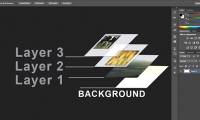
How to apply smart filters to multiple layers in Photoshop
layers like simple transparent sheets can be combined and shaped together. you can use a smart filter on multiple layers to make the effects more interesting.3 tips to manage layers in Photoshop
think of the layers as stacked transparent plastic sheets. but arranging unreasonable layers can turn them into a mess.

Latest articles
-
How Google AI Studio's Screen Share Feature Revolutionizes Landing Page Optimization? -
8 Little ChatGPT Automations That Make Every Day More Enjoyable -
How to create Infographics with AI simply -
Why Google AI Studio's Generative Media is a game-changer for marketers by 2025? -
10 Ways to Maximize Your Experience with Google AI Studio and Gemini -
How to create AI videos shot with drones on Google Flow -
How to connect a local AI model to Obsidian using MCP -
Google launches Gemini 3 Pro Image: next-generation imaging model with higher accuracy
System
Mac OS X
Hardware
Game
information
Technology
Science
Life
Application
Web Email
Website - Blog
Web browser
Support Download - Upload
Software conversion
Social Network
Simulator software
Online payment
Office information
Music Software
Map and Positioning
Installation - Uninstall
Graphic design
Free - Discount
Email reader
Edit video
Edit photo
Compress and Decompress
Chat, Text, Call
Archive - Share
Electric
Program
Mobile