Table of Contents
Most Windows computers today use x86 processors from Intel or AMD. However, there are also models equipped with ARM chips, each with its own advantages and disadvantages. Distinguishing between these two types is quite important, because it directly affects performance as well as software compatibility.
First of all, it's important to note that ARM computers are not necessarily synonymous with Copilot+ PCs. The first batch of Copilot+ PCs did indeed use Snapdragon ARM chips, but Intel and AMD have since released multiple Copilot+ models that run on x86 platforms. That is, there are Copilot+ PCs that run on ARM, but there are also Copilot+ PCs that run on x86, and vice versa.
To determine whether a PC is ARM-based, you can rely on the product's specifications and labels. If the word 'Snapdragon' appears in the name or specifications – such as the 'Snapdragon X Elite' on the Lenovo Yoga Slim 7x – then it's almost certainly a Windows 11 on ARM machine. MediaTek is also planning to enter the PC market in the future, so if you see a chip with this brand, it's likely ARM. Some machines even have a 'Snapdragon' sticker on the body or box, making it easier for users to identify.
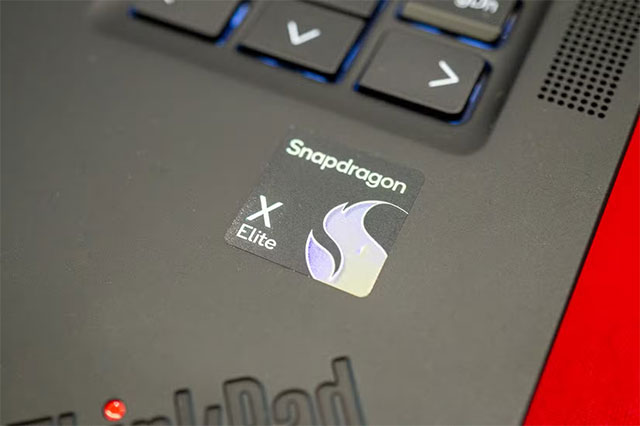
Also, product configuration listings will sometimes state 'Windows 11 on ARM' or 'Windows 11 Home 64 ARM'. However, not all manufacturers disclose this detail, so it's best to double-check.
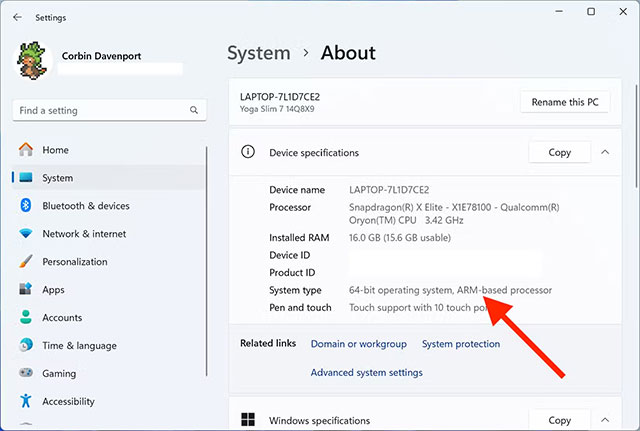
If you're using the device and want to be sure, you can open the Settings app on Windows, go to System > About . Here, the 'System type' section will tell you what chip the device uses: if it says 'ARM-based processor', it means the device runs ARM, and 'x64-based processor' means the device uses x86.
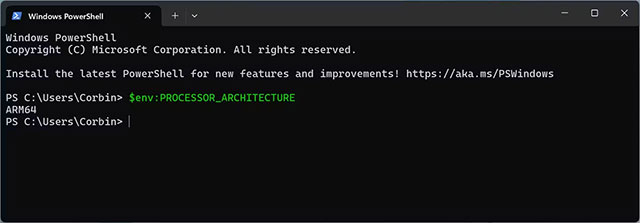
Another way is to use Terminal or PowerShell. Just type the command:
$env:PROCESSOR_ARCHITECTURE
The result will return 'ARM64' if the machine is running a 64-bit ARM, 'ARM' if it is a 32-bit ARM, or 'x64/x86' in the case of an Intel/AMD chip. The gwmi win32_Processor command can also provide more details about the CPU model and processing speed.
So why does ARM matter? Windows 11 on ARM looks and feels exactly like regular Windows, but software written for ARM is still rare. To get around that, Microsoft has to use an x86 emulation layer, which sometimes makes apps slow or unreliable. The good news is that more and more software is now available as ARM-native, from popular web browsers to Zoom, Slack, Photoshop, Office, and Google Drive. But some games, especially those with anti-cheat technology, still can't run.
If you prioritize maximum compatibility with software and games, an x86 PC is still the safer bet for now. But if you can live with some limitations, Windows on ARM offers a fresh, power-efficient experience that's only getting more useful as the software ecosystem expands.
Final Thoughts
Following the steps in order and checking version-specific settings should make it easier to Identify Windows Computers Running ARM Chips. If an option looks different, verify the device, app, or operating-system version before changing additional settings.
FAQ
What is the best way to Identify Windows Computers Running ARM Chips?
Start with the requirements described in the article and follow the steps in order. Most Windows computers today use x86 processors from Intel or AMD. However, there are also models equipped with ARM chips, each with its own advantages and disadvantages.
What should you know about the key details?
First of all, it's important to note that ARM computers are not necessarily synonymous with Copilot+ PCs.
What should you do if the instructions do not match your screen?
Check the device, software version, account permissions, and regional settings. Interfaces can change after updates, so use the closest matching option and consult the official support documentation when necessary.
Related Articles
 4 Ways to Identify Computers Running Windows 64 Bit6 minutes read
 AMD Computer Crashes: Complete Guide3 minutes read
 Intel Does Not Discount Chips for Windows Computers4 minutes read
 Microsoft Announced That Windows 11 Does Not Support Apple3 minutes read
 Microsoft Again Urges Users to Leave Windows 10 and Switch to Pcs Running Arm4 minutes read
 Microsoft and Qualcomm Introduced Windows 10 Running ARM Chips All Day Without Running Out6 minutes read
Reader Comments 0
Sign in with email or Google to join the discussion.