Table of Contents
The iPhone 17 Pro’s A19 Pro and revised cooling system are designed to improve sustained performance. Launch-period gaming figures attributed to Geekerwan suggest substantial gains in selected tests, but the headline “69% faster than the previous generation” needs qualification: the largest percentage in the reported results compares A19 Pro with A17 Pro, two generations earlier.
Read the reported FPS comparison correctly
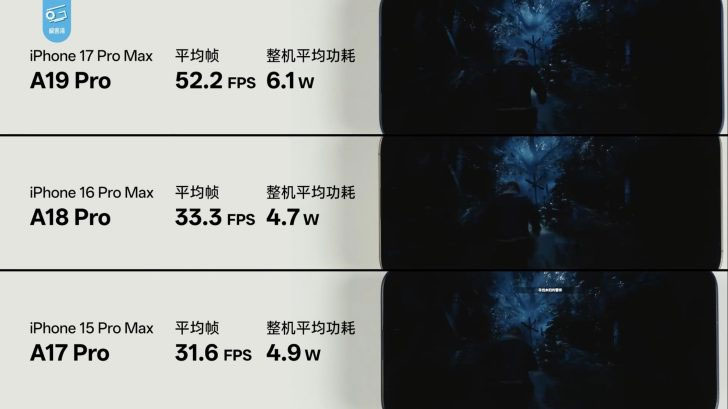
The original report attributes the following average frame rates to Geekerwan’s iPhone 17-series analysis. These are historical reported test figures, not measurements performed for this article. The original summary does not document enough settings to reproduce or independently validate them here.
| Game | A19 Pro FPS | A18 Pro FPS | A17 Pro FPS | A19 gain over A18 | A19 gain over A17 |
|---|---|---|---|---|---|
| Resident Evil 4 | 52.2 | 33.3 | 31.6 | About 57% | About 65% |
| Death Stranding | 47.1 | 29.3 | 27.8 | About 61% | About 69% |
| Assassin’s Creed Mirage | 29.7 | 20.4 | 18.4 | About 46% | About 61% |
The percentages above are arithmetic calculated from the quoted FPS values: (new FPS − old FPS) ÷ old FPS × 100. They do not establish a gain in every game or prove that the benchmark conditions were equivalent.
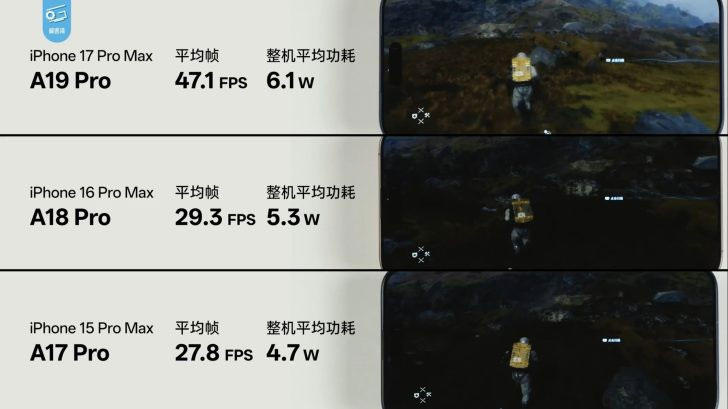

A percentage gain and a percentage reduction use different denominators. For example, 47.1 FPS is about 69% higher than 27.8 FPS; it does not follow that 27.8 FPS is 69% lower than 47.1 FPS.
What Apple says about cooling
Apple’s iPhone 17 Pro announcement describes an aluminum unibody and an Apple-designed vapor chamber. It claims up to 40% better sustained performance than the previous generation when paired with A19 Pro.
That manufacturer claim is separate from the game-specific figures above. Different workloads, settings, time intervals, and comparison devices can produce different percentages without measuring the same thing.
Higher FPS does not settle efficiency or heat
More frames per second can improve responsiveness, but they do not automatically mean lower energy consumption or a cool surface. A cooling system moves and spreads heat; it does not eliminate heat production or make throttling impossible.
To compare efficiency, power consumption must be measured consistently under comparable workloads. To compare battery life, you also need to consider runtime, display brightness, network use, and battery capacity. A reported FPS number alone answers neither question.
What to check before upgrading for gaming
- Compare the same game version, graphics preset, resolution, and frame-rate target.
- Look for a sustained run, not only the first minute after a cool start.
- Check frame-time consistency and visible stutter alongside average FPS.
- Distinguish the Pro and Pro Max test devices and their conditions.
- Check current game compatibility and storage requirements for the titles you actually play.
The useful takeaway is that the new thermal design targets longer demanding workloads. The reported launch figures are evidence to examine, not a promise that every A19 Pro game runs 69% faster or never overheats.
If a game triggers a temperature warning, stop and follow iPhone overheating guidance rather than trying to override thermal protections.
Related Articles
 OnePlus 10 Pro review: Extremely impressive performance, 'cutting off' 'cheap' iPhone models
 Benchmark benchmark of iPhone 12: 'kill the flesh' performance of any Android phone
 The performance point of the Apple A12 chip on the iPhone Xs, the Xs Max outperformed the Snapdragon 845
 Top 4 Asus laptops running AMD CPUs have the most impressive performance in the first half of 2020
 Samsung or iPhone, which phone has faster 5G speed?
 How to improve gaming performance on Mac
Reader Comments 0
Sign in with email or Google to join the discussion.