Table of Contents
New learners of Python often make mistakes such as IndentationError, SyntaxError, IndexError, ValueError and AttributeError.
You can find many different types of errors in Python. Whether you are new or experienced, you have probably encountered at least one annoying error. Some errors are easy to spot, while others make you scratch your head. Here are the 5 most common errors in Python and how to fix them.
1. IndentationError – Indentation error
If you are new to Python, or coming from C/C++ or Java, this is probably the most common mistake you will make. Python uses Indentation To define blocks of code, instead of punctuation marks {}Like other languages.
For example:
For i in range(5): print(i) 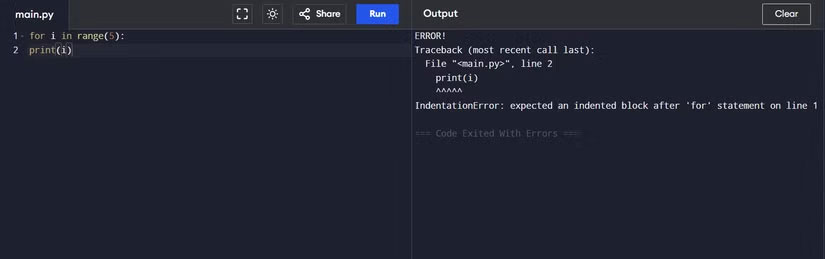
Running this section will give An IndentationError Because Print(i)It is not properly indented. How to fix:
For i in range(5): print(i) Note:
Don't mix Tabs And Spaces , as it's hard to spot errors with the naked eye. Also, when copying code from different editors, remember to double-check the indentation.
2. SyntaxError – Syntax error
Every language has its own set of syntax rules. If you write them wrong, Python won't understand what you want to do.
Some common syntax errors:
-
Forgot the
:Mark afterIf,For,Def. -
Mistyped keyword: write
EsleInstead ofElse. -
Use reserved keywords as variable names.
-
Confuse
=(assign) with==(compare). -
Omitted parentheses or quotes.
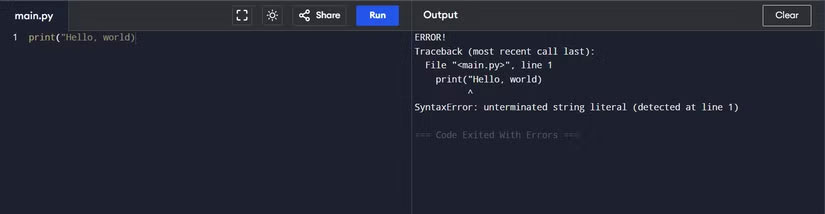
The good news is that Python usually tells you which line is causing the error and what kind of error it is, making it easier to fix. If you use an IDE like PyCharm or VS Code, they will also suggest fixes very quickly.
3. IndexError – Index out of range error
Python indexes from 0 . If the list has NElements, a valid index is 0 → N-1.
Numbers = [1, 2, 3] print(numbers[3]) # IndexError 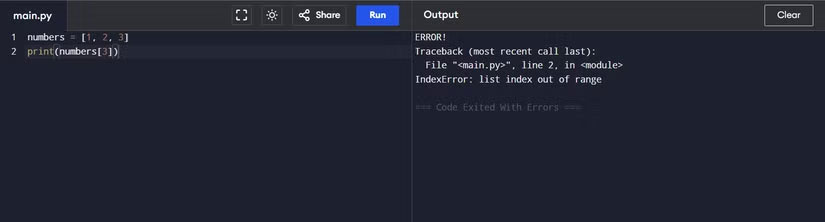
How to avoid: always check the list length before accessing:
If index < len(numbers): print(numbers[index]) Also, don't iterate and edit the list in the loop at the same time, because it's easy to get an IndexError.
4. ValueError – Invalid value
This error occurs when The data type is correct , but The value is invalid .
For example:
Int("ten") # ValueError The function Int()Receives a string as correct, but "ten"Not a number so it fails.
Or:
Import math math.sqrt(-5) # ValueError 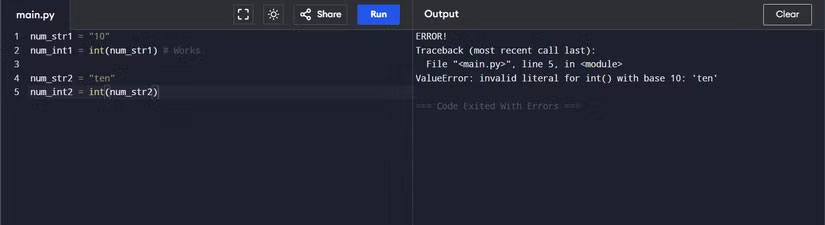
The function Sqrt()Only accepts positive numbers.
How to handle: used Try-exceptTo avoid crash:
Try: num = int(input("Enter a number: ")) except ValueError as e: print("Invalid value:", e) 5. AttributeError – Wrong attribute call
Raised when calling a Method or property that does not exist On the object.
For example:
Text = "hello" text.push() # AttributeError String has no function Push().
Or:
User = None print(user.name) # AttributeError 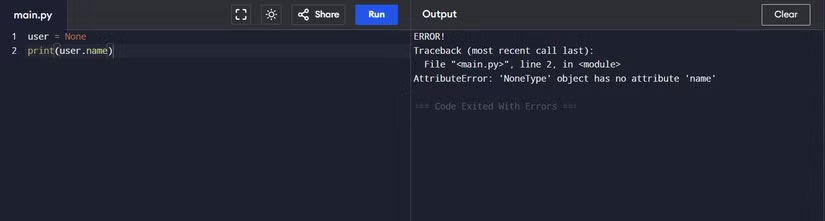
How to handle:
-
Use
Type()OrIsinstance()To check the object type. -
Used
Dir(obj)To see what properties an object has.
Conclude
Python is a friendly and easy-to-learn language, but there are still many errors that confuse beginners. Understanding The 5 common errors Above helps you debug faster, write cleaner and more 'Pythonic' code.
FAQ
What should you know about common python errors?
In practical terms, new learners of Python often make mistakes such as IndentationError, SyntaxError, IndexError, ValueError and AttributeError.
Why does common python errors matter?
The article highlights that indentationError – Indentation error If you are new to Python, or coming from C/C++ or Java, this is probably the most common mistake you will make.
What is the main takeaway?
The main takeaway is that some common syntax errors: Forgot the : Mark after If , For , Def .
Related Articles
 Bookmark 5 Best Python Programming Learning Websites8 minutes read
 How to Open Source Python Projects for Beginners7 minutes read
 If, If. .. Else, If. .. Elif. .. Else Commands in Python9 minutes read
 How to Install Python7 minutes read
 Draw Different Shapes with a Turtle in Python: Step-by-Step Guide10 minutes read
 More Than 100 Python Exercises Have Solutions (Sample Code)20 minutes read
Reader Comments 0
Sign in with email or Google to join the discussion.