Table of Contents
Explore top 10 best automl frameworks for python and users who don't need to code.
AutoML tools support many tasks such as feature engineering, model selection, hyperparameter tuning, and automating the entire pipeline. This allows development teams to focus on higher-value work.
In this article, we will explore the leading AutoML frameworks currently available, clearly categorized into three user groups:
- Open Source Framework
- No-code and Low-code platforms
- Enterprise-grade AutoML solution
Each framework will be introduced in detail, highlighting its main features and including sample code, so you can start using it right away.
What are AutoML Frameworks?
AutoML (Automated Machine Learning) is a term referring to tools and systems capable of automating the entire process of developing machine learning models, from raw data to a trained and deployable model.
AutoML frameworks help handle many technical and repetitive tasks, enabling both experts and less technical users to work more efficiently. Specifically, they often automate the following steps:
- Data preprocessing and validation: Cleaning, normalizing, and formatting raw data.
- Feature creation and selection: Automatically create or select meaningful input variables.
- Algorithm selection: Experiment with different models to find the most suitable one.
- Hyperparameter optimization: Automatically adjusts model parameters to improve performance.
- Model evaluation and ranking: Comparing trained models based on key metrics.
- Support for deployment and monitoring (on the enterprise platform): Helps bring the model to life on a large scale.
By automating these tasks, AutoML minimizes manual effort, increases consistency and reproducibility, and helps both technical and non-technical teams build high-quality machine learning models more quickly.
Comparison Table of AutoML Frameworks
| Framework | Category | Code Level | Interface | Main use case |
|---|---|---|---|---|
| TPOT | Open source | High | Python API | Exploring and optimizing pipelines for tabular data. |
| AutoGluon | Open source | Short | Python API | Production-ready model, high accuracy, diverse data |
| FAML | Open source | Short | Python API | Refine the model for cost and resource efficiency. |
| AutoKeras | Open source | Medium | Python API | Deep learning automation and neural network architecture research. |
| PyCaret | Low-Code | Very low | Python API, optional GUI | Rapid testing and analytical workflows |
| MLJAR Studio | No-Code | Are not | Web UI, Python optional | Testing and comparing business-friendly models. |
| H2O AutoML | Combine | Short | Web UI (H2O Flow), Python, R | AutoML extended for big data and enterprise deployments. |
| DataRobot | Businesses | Not to Low | Web UI, Python API | Enterprise-level ML with governance, interpretation, and MLOps |
| SageMaker Autopilot | Businesses | Not to Low | AWS Console, Python SDK | AWS native AutoML, integrated with production pipelines. |
| Google Cloud AutoML | Businesses | Are not | Vertex AI Console, optional SDK | AutoML for computer vision, NLP, tabular data on GCP |
The best open-source AutoML frameworks
Open-source frameworks provide flexible, transparent, and developer-friendly tools, enabling learners to automate model building while retaining full control over data, pipelines, and deployment processes.
1. TPOT
TPOT is an open-source Python AutoML framework that uses genetic programming algorithms to automatically discover and optimize complete machine learning pipelines. It is particularly effective for tabular data, enabling rapid experimentation and the creation of robust baselines.
Main features:
- Optimization using genetic algorithms: Exploring the vast search space of pipelines and improving them over generations.
- Automated pipeline construction: Combining preprocessing, feature selection, modeling, and hyperparameters.
- Compatible with Scikit-Learn: Leverage the components of scikit-learn, making it easy to understand, extend, and deploy.
- Custom search space: Users can control the algorithms and transformations allowed to be explored.
- Python code output: The best pipelines can be exported as clean Python code for use in production.
Sample code:
jump
import tpot X, y = load_my_data() est = tpot.TPOTClassifier() est.fit(X, y)2. AutoGluon
Developed by AWS AI, AutoGluon is an open-source Python AutoML framework focused on high accuracy, minimal coding requirements, and support for tabular, text, and image data.
Main features:
- Multimodal support: Work with tabular data, text, and images within the same library.
- Automatic Stacking and Ensemble: Combine multiple models using stack ensembling techniques to increase accuracy.
- Hyperparameter optimization: Automatically optimizes the hyperparameters of the model.
- Easy to use: High-level APIs allow training powerful models with just a few lines of code.
- Powerful preprocessing: Automatically processes data and identifies various types of features.
Sample code:
jump
from autogluon.tabular import TabularDataset, TabularPredictor label = "signature" train_data = TabularDataset("train.csv") predictor = TabularPredictor(label=label).fit(train_data) test_data = TabularDataset("test.csv") predictions = predictor.predict(test_data.drop(columns=[label]))3. FLAML
Developed by Microsoft Research, FLAML (Fast Lightweight AutoML) is an open-source Python AutoML library designed to automatically and efficiently find high-quality machine learning models while minimizing computational costs.
Main features:
- Budget-Aware Optimization: Prioritize cheaper configurations first, then explore more complex ones later.
- Fast hyperparameter optimization: Focus on speed and computational efficiency.
- Supports a variety of tasks: Classification, regression, time series forecasting, etc.
- Scikit-Learn-style interface: Easily integrates with familiar fit and predict functions.
- Custom search space: Balancing precision and resources.
Sample code:
jump
from flaml import AutoML from sklearn.datasets import load_iris X_train, y_train = load_iris(return_X_y=True) automl = AutoML() automl_settings = { "time_budget": 1, "metric": "accuracy", "task": "classification", "log_file_name": "iris.log", } automl.fit(X_train=X_train, y_train=y_train, **automl_settings) print(automl.predict_proba(X_train))4. AutoKeras
AutoKeras is an open-source AutoML library built on the Keras platform, specializing in the automated discovery and training of high-quality neural networks for various tasks.
Main features:
- Neural Architecture Search (NAS): Determines the optimal neural network structure for a specific task.
- Multimodal support: Structured data, images, and text.
- Easy to use: High-level APIs
StructuredDataClassifiersimplify training. - Flexible: Allows customization of search constraints for advanced cases.
- Keras and TensorFlow integration: Works seamlessly with the TensorFlow ecosystem.
Sample code:
jump
import keras import pandas as pd import autokeras as ak TRAIN_DATA_URL = "https://storage.googleapis.com/tf-datasets/titanic/train.csv" TEST_DATA_URL = "https://storage.googleapis.com/tf-datasets/titanic/eval.csv" train_file_path = keras.utils.get_file("train.csv", TRAIN_DATA_URL) test_file_path = keras.utils.get_file("eval.csv", TEST_DATA_URL) train_df = pd.read_csv(train_file_path) test_df = pd.read_csv(test_file_path) y_train = train_df["survived"].values x_train = train_df.drop("survived", axis=1).values clf = ak.StructuredDataClassifier(overwrite=True, max_trials=3) clf.fit(x_train, y_train, epochs=10) print(clf.evaluate(x_test, y_test))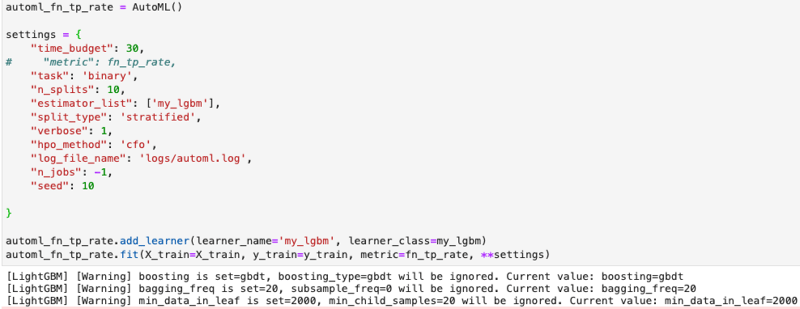
No-Code and Low-Code AutoML Platform
These platforms simplify model development by abstracting complex processes, enabling both engineering teams and enterprise users to test and deploy quickly.
5. PyCaret
PyCaret is a low-code, open-source machine learning library in Python that automates end-to-end workflows for tasks such as classification, regression, clustering, anomaly detection, and time series forecasting.
Main features:
- Low-Code Automation: Significantly reduces the amount of code needed for standard machine learning steps.
- Supports multiple ML tasks: Built-in integration for classification, regression, clustering, NLP, etc.
- Integrated preprocessing: Automatically handles missing values, encodes classification features, and normalizes data.
- Model comparison and selection: This function
compare_modelstrains and evaluates multiple models, providing performance rankings. - Scalability and integration: Wraps around popular libraries and can be integrated into BI tools.
Sample code:
jump
from pycaret.datasets import get_data from pycaret.regression import * data = get_data("insurance") s = setup(data, target="charges", session_id=123) best_model = compare_models()
6. MLJAR Studio
MLJAR Studio is a no-code and low-code AutoML environment that allows you to train and compare machine learning models through an intuitive graphical interface, while also offering workflow options in Python.
Main features:
- AutoML No-code Process: Load data, select features and target variables, start training, and view results without writing any code.
- Transparent model and detailed reporting: Generate reports explaining the model's construction and performance.
- Automated training and tuning: Preprocessing, model training, and hyperparameter optimization.
- Clear model comparison: Train multiple models and help you compare them.
- Option to use code via mljar-supervised: Provides Python packages for more control.
Sample code: (optional):
jump
import pandas as pd from supervised.automl import AutoML df = pd.read_csv("https://raw.githubusercontent.com/pplonski/datasets-for-start/master/adult/data.csv", skipinitialspace=True) X = df[df.columns[:-1]] y = df["income"] automl = AutoML(results_path="mljar_results") automl.fit(X, y) predictions = automl.predict(X)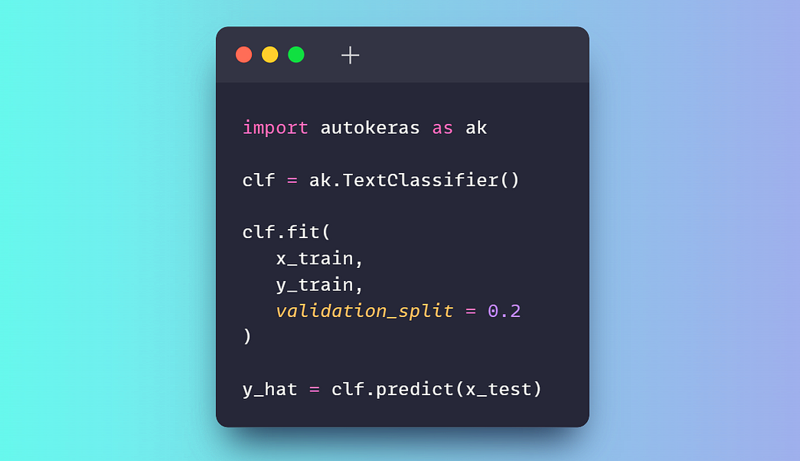
7. H2O AutoML
H2O AutoML is an open-source AutoML feature within the H2O platform, providing scalable machine learning automation capabilities with support for Python, R, and a no-code graphical interface called H2O Flow.
Main features:
- Automated model training and refinement: Automatically run multiple algorithms, fine-tune hyperparameters, and generate rankings of the best models.
- The no-code web interface: H2O Flow allows users to interact with H2O via a browser, perform ML tasks, and explore the results.
- Multiple interface support: Python, R, and Web UI, providing flexibility for both low-code and no-code workflows.
- Automated preprocessing: Handles missing values, automatically codes categorical variables, and performs automatic scaling.
- Model interpretation tool: Provides detailed information about the model's behavior and performance.
Sample code: (Python):
jump
import h2o from h2o.automl import H2OAutoML h2o.init() train = h2o.import_file( "https://s3.amazonaws.com/h2o-public-test-data/smalldata/higgs/higgs_train_10k.csv" ) test = h2o.import_file( "https://s3.amazonaws.com/h2o-public-test-data/smalldata/higgs/higgs_test_5k.csv" ) x = train.columns y = "response" x.remove(y) train[y] = train[y].asfactor() test[y] = test[y].asfactor() aml = H2OAutoML(max_models=20, seed=1) aml.train(x=x, y=y, training_frame=train) aml.leaderboardEnterprise-Grade AutoML Solutions
These solutions provide scalable, secure, and managed machine learning platforms designed for large-scale production deployment, compliance, and usage.
8. DataRobot
DataRobot is an enterprise-grade, no-code and low-code AutoML platform that enables enterprise users, analysts, and data teams to build, deploy, and manage machine learning models without requiring extensive programming knowledge.
Main features:
- No-code model development: Upload data, configure tasks, train the model, and generate predictions via a graphical interface.
- Automated Machine Learning: Automatically discovers algorithms, generates features, fine-tunes hyperparameters, and ranks models.
- Integrated interpretive capabilities: Tools for interpreting global and local models.
- MLOps End-to-End: Supports deployment, monitoring, drift detection, and retraining processes.
- Enterprise Governance and Security: Role-based access control, approval processes, audit logs.
Sample code: (Python API - optional):
jump
import datarobot as dr dr.Client(config_path="./drconfig.yaml") dataset = dr.Dataset.create_from_file("auto-mpg.csv") project = dr.Project.create_from_dataset( dataset.id, project_name="Auto MPG Project" ) from datarobot import AUTOPILOT_MODE project.analyze_and_model( target="mpg", mode=AUTOPILOT_MODE.QUICK ) project.wait_for_autopilot()9. Amazon SageMaker Autopilot
Amazon SageMaker Autopilot is a fully managed AutoML solution from AWS that allows users to automate end-to-end machine learning workflows with little to no code, particularly through a web interface in SageMaker Canvas or SageMaker Studio.
Main features:
- Web-based no-code workflow: Most tasks, from data loading and test setup to training, evaluation, and deployment, can be performed through a web interface.
- Automated data analysis and preprocessing: Identify problem types, clean, and create features.
- Model selection and optimization: Explore various algorithms and fine-tune hyperparameters.
- Explanatory ability: Provide detailed information about the features that influence the prediction.
- Production deployment: Deploy the selected model directly from the interface.
Sample code: (Python SDK - optional):
jump
from sagemaker import AutoML, AutoMLInput automl = AutoML( role=execution_role, target_attribute_name=target_attribute_name, sagemaker_session=pipeline_session, total_job_runtime_in_seconds=3600, mode="ENSEMBLING", ) automl.fit( inputs=[ AutoMLInput( inputs=s3_train_val, target_attribute_name=target_attribute_name, channel_type="training", ) ] )10. Google Cloud AutoML
Google Cloud AutoML is part of Vertex AI, Google Cloud's unified machine learning platform, enabling users to build, train, evaluate, and deploy high-quality models on a fully managed infrastructure.
Main features:
- No-code Web Interface: Upload data, configure AutoML tasks, train models, review metrics, and deploy entirely via the Vertex AI Console.
- Supports various data types: Tabular data, image classification and detection, text classification and extraction, video analysis.
- Automated End-to-End Training: Preprocessing, feature generation, model architecture selection, and hyperparameter fine-tuning.
- Managed infrastructure: All training and deployment processes run on Google's infrastructure.
- Deployment ready for production: Deploy the model as endpoints for online or batch prediction.
Sample code: (Python SDK - optional):
jump
from google.cloud import aiplatform aiplatform.init( project="YOUR_PROJECT_ID", location="us-central1", staging_bucket="gs://YOUR_BUCKET", ) dataset = aiplatform.ImageDataset.create( display_name="flowers", gcs_source=["gs://cloud-samples-data/ai-platform/flowers/flowers.csv"], import_schema_uri=aiplatform.schema.dataset.ioformat.image.single_label_classification, ) training_job = aiplatform.AutoMLImageTrainingJob( display_name="flowers_automl", prediction_type="classification", ) model = training_job.run( dataset=dataset, model_display_name="flowers_model", budget_milli_node_hours=8000, )Conclude
AutoML frameworks have matured into production-grade tools, supporting development teams throughout the entire machine learning lifecycle. In real-world contexts, they are not limited to testing or prototyping.
From a data professional's perspective, AutoML is a powerful way to establish a robust and objective baseline model at very little cost. Simply by providing the data, these frameworks handle characterization, model selection, hyperparameter refinement, and evaluation. This allows practitioners to focus on understanding the problem, validating assumptions, and improving results, rather than spending excessive time researching and testing models from scratch.
AutoML doesn't replace expertise. Instead, it speeds up workflows by providing a reliable starting point from which to gradually improve.
FAQ About AutoML
1. Can AutoML replace data scientists?
No. AutoML is a powerful tool that automates repetitive tasks, allowing data scientists to focus on more complex issues such as business depth, sophisticated feature generation techniques, and model interpretation.
2. Should I choose an open-source AutoML framework or an enterprise platform?
The choice depends on your needs. If you need flexibility, control, and technical resources, choose open source. If you prioritize deployment speed, scalability, security, and integrated MLOps features, an enterprise platform is the right choice.
3. Does AutoML work well with unstructured data such as images and text?
Many modern frameworks such as AutoGluon, AutoKeras, and Google Cloud AutoML are designed to support a wide variety of data types, including images, text, and video.
4. Where can I learn about AutoML?
You can start by practicing with the open-source libraries introduced in this article. Alternatively, platforms like DataCamp offer numerous courses on MLOps and specific AutoML tools.
Final Thoughts
Understanding top 10 best automl frameworks for python and users who don't need to code makes it easier to evaluate the information and apply the most relevant recommendations. Focus on the key points above and verify details that may change over time.
Related Articles
 More Than 100 Python Exercises Have Solutions (Sample Code)20 minutes read
 AutoML - Google's AI Can Outperform Its Creators4 minutes read
 Python Online Editor: Explained3 minutes read
 5 Choose the Best Python IDE for You7 minutes read
 5 Python Decorators to Help Write Cleaner and More Manageable AI Code8 minutes read
 Package in Python5 minutes read
Reader Comments 0
Sign in with email or Google to join the discussion.