Guide to play 3G with SIM Vietnamobile SIM on iPhone
Are you having trouble playing 3G with Holy SIM on iPhone? Calmly solve the problem by reading and following the instructions to know how to play 3G on iOS devices when using SIM card.
A few days ago, Vietnamobile launched Saint SIM with special offers for those who want to use 3G to drop station with only 20,000 VND / month. Now owning the SIM SIM users can freely connect online anytime, anywhere. Even sharing 3G for relatives and friends around.
However, many practical experiences have you complaining that they want to distribute 3G to Holy SIM on iPhone to share the network for others to use, the result is not as expected, the machine constantly reports an error. If you fall into the same situation, calmly solve the problem by reading and following the instructions to know how to play 3G on iOS devices when using SIM card.
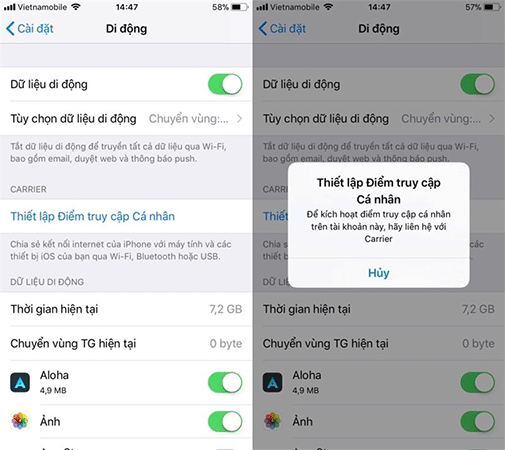 Most of you will get an error like this.
How to play 3G with SIM Vietnamobile SIM on iPhone
To play 3G on iPhone when using Vietnamobile's SIM card, you only need to follow 3 steps as below:
Step 1: First of all, from the iPhone home screen, go to Settings > Mobile > Mobile data options > Mobile data network .

Step 2: Here, you scroll down to the bottom to see the Personal access point , click to select APN . Then enter the keyword "internet" in the picture.

Step 3: Go back outside and now you can proceed to play 3G by clicking on Personal access point.

Step 4: Now that you have been able to share 3G on iPhone when using SIM Vietnamobile Saints
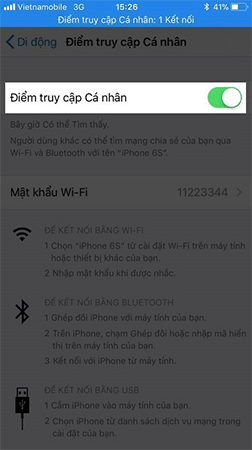
Thus, the 3G playback with Holy SIM on iPhone has been successful. Hopefully, the above steps have helped you to overcome the previous 3G error. In addition, readers should also note that we should not be too abusive or often share 3G because it will quickly drain the battery, waste data and heat your iPhone.
Wish you success with this little trick.
See more:
- Vietnamobile launched Saint SIM - unlimited Data capacity with only 20,000 VND
- Answer common questions about SIM card of Vietnamobile
- Instructions to play WiFi with iPhone / iPad
Discover more
3g error play 3g on iPhone
Share by
Micah SotoYou should read it
- How to check Vietnamobile's SIM SIM card is covered
- The policy of using Vietnamobile's new SIM card after being 'whistled' by the Telecommunications Department
- Fix iPhone without personal access point to play 3G
- How to transfer the Holy SIM package to Super Holy SIM
- How to stream games from Windows computer to iPhone
- The Quiet Details That Make a Sports Betting Platform Feel Reliable
- Instructions on creating toy set images with ChatGPT AI
- How are AI agents changing the journalism industry?
- 10 paid apps are free for iOS in a short time
- 10 apps that cost $ 26 are being free for iOS in a short time
- How to set up IMAP / POP, CalDAV or CardDAV accounts on iPhone or iPad