Table of Contents
An AI world generator can turn a written scene description or reference image into an environment that you can look around or move through. In OpenArt, the basic workflow is to choose the world-generation tool, describe a coherent space, generate a preview, and then build the explorable result.
Before starting, understand what the tool exports. A navigable panoramic or spatial scene is not necessarily a conventional 3D model with editable geometry, materials, collision meshes, and game-engine files. Check the current export formats if you need to continue the work in Blender, Unity, Unreal Engine, or a CAD application.
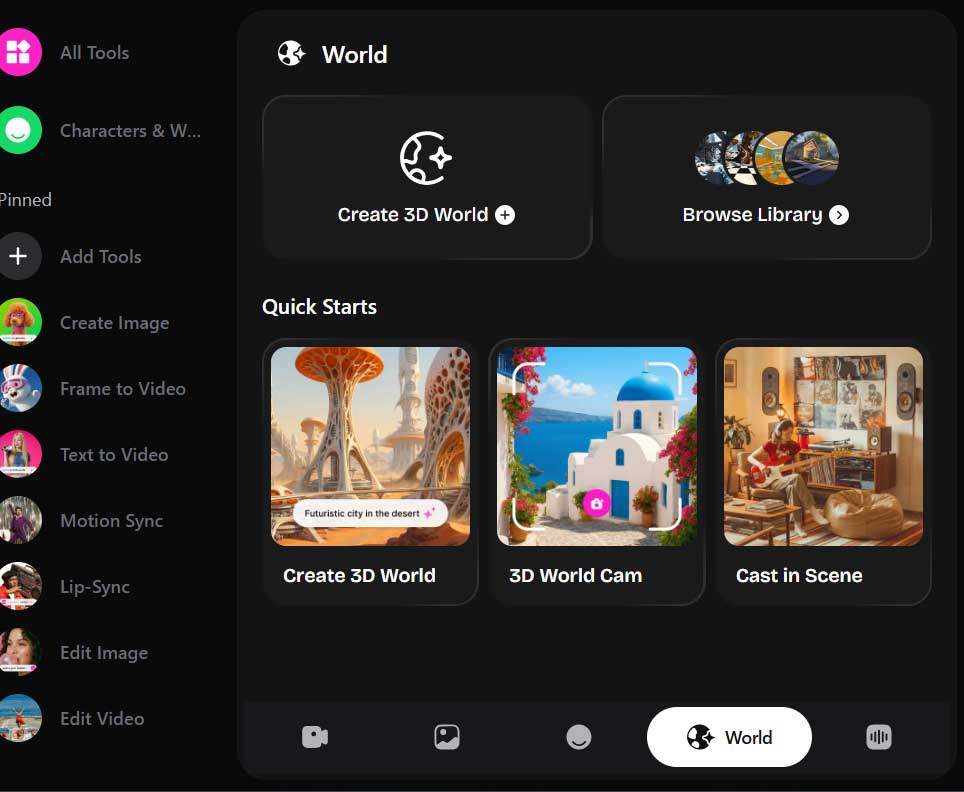
1. Open the world-generation tool
Sign in to OpenArt and look for Create 3D World or the equivalent world-generation option in the creation interface. Features can move or be limited by account, plan, and rollout; if the option is absent, consult the current product navigation or support information.
2. Describe one coherent environment
A short idea such as “cyberpunk city at night” establishes a theme but leaves most design decisions to the model. A more useful prompt defines the layout, viewpoint, lighting, scale cues, and areas the viewer should be able to explore.
A walkable cyberpunk market alley at night, viewed from standing eye level.
Layout: one main lane leading to a small plaza, two narrow side passages, shop fronts on both sides.
Landmarks: a red noodle stall near the entrance and a blue clock tower in the plaza.
Lighting: wet pavement reflecting restrained magenta and cyan signs, soft fog, no flashing lights.
Navigation: clear ground plane, open path, no blocked doorway at the center.
Style: detailed cinematic realism with consistent building scale.
Avoid: readable brand logos, duplicated signs, floating objects, warped architecture, people close to the camera.
Good prompts use spatial relationships: “behind,” “to the left,” “at the end of the path,” and “visible from the entrance.” These are more actionable than stacking adjectives such as “epic,” “stunning,” or “ultra-detailed.”
3. Use a reference image when composition matters
If the interface accepts an image, upload one you own or are permitted to use. A reference can anchor the palette, architecture, and viewpoint, but it does not guarantee accurate geometry. Images with a clear horizon, visible floor, and understandable depth generally provide better spatial cues than tight close-ups or collages.
Do not upload confidential floor plans or copyrighted concept art without authorization. If the world will be published commercially, review OpenArt's current license and the rights attached to your plan on its pricing page.
4. Generate the preview before building the world
Inspect the initial 360-degree or scene preview before spending more credits or generation time. Check:
- whether the entrance, ground, horizon, and major landmark agree with the prompt;
- whether objects keep a plausible size as the view rotates;
- whether walls, doors, and paths connect instead of melting into one another;
- whether important areas are visible and navigable;
- whether unwanted text, logos, or duplicated objects appear.
If the layout is wrong, revise the spatial instructions rather than adding more style words. Keep the seed or reference settings when available so you can compare one change at a time.
5. Build and test the interactive result
Continue to the world-generation step and wait for processing to finish. Move slowly through the environment and test every direction. Pay attention to geometry near the camera, transitions between areas, collision behavior if present, and sudden changes in texture or scale.
A visually convincing starting view can hide severe problems behind the viewer or around a corner. Test on the target device as well: a scene that works with mouse and keyboard may feel uncomfortable with touch controls or a headset.
What these AI worlds are useful for
- Concept exploration: compare atmosphere, layout, and color directions before manual modeling.
- Storyboarding: find camera positions and blocking ideas for a scene.
- Education: create an illustrative environment for a guided lesson, with factual labels added separately.
- Previsualization: communicate a rough space to a game, film, or event team.
- Interactive prototypes: test whether a navigable idea is engaging before investing in production assets.
For asset-focused workflows rather than whole environments, see 5 AI tools that turn 2D images into 3D.
Where the generated result may fall short
Prompt-generated worlds can have inconsistent scale, unstable surfaces, blocked paths, low-detail areas, or visual rather than geometric depth. They may not include clean topology, UV maps, physically meaningful dimensions, or the optimization required for a game or VR application.
Architecture and interior-design concepts also need professional validation. A generated scene does not establish structural feasibility, accessibility, fire safety, code compliance, or accurate dimensions. Treat it as visualization, not a construction model.
A better iteration method
- Generate a low-cost draft with one path and one landmark.
- Test the full viewing area and note the largest spatial problem.
- Change only the layout instruction needed to address that problem.
- Lock a successful composition before increasing detail.
- Add secondary props and atmosphere last.
- Export or capture the result only after checking the required format and usage rights.
AI can make spatial ideation faster, but it does not remove the need for 3D judgment. A precise layout prompt, a clear reference, and systematic testing produce a more useful world than a one-line request followed by repeated random generations.
Related Articles
 How to Create a ChatGPT Prompt That Works in All Cases: Step-by-Step Guide11 minutes read
 What Is a Prompt? How to Create Effective AI Prompts: Clear Explanation12 minutes read
 99+ Prompt AI Creates Detailed Videos of All Genres54 minutes read
 Prompt Templates: Explained8 minutes read
 How to Automatically Retrieve Any Image Prompt4 minutes read
 Debugging Prompt: Explained11 minutes read
Reader Comments 0
Sign in with email or Google to join the discussion.